
How to Download Microsoft Authenticator App on iPhone?
Published August 17, 2026
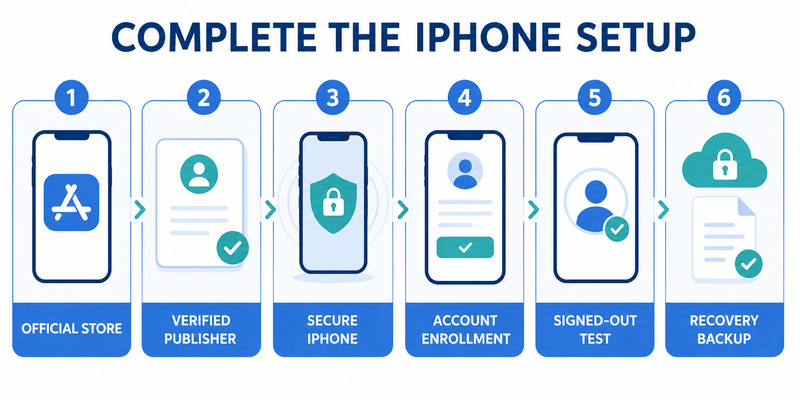
Learning how to download microsoft authenticator app on iphone begins with the Apple App Store, but a secure setup does not end when the icon appears. You must verify the Microsoft publisher, protect the iPhone, enroll each account through its real security page, complete server verification, and prepare recovery before relying on the app.
Microsoft Authenticator can receive approval notifications, perform number matching, generate standard time-based codes, and support account-specific passwordless or passkey features. Available functions depend on the account provider, organization policy, region, and current iOS and app versions.
This guide covers the official download, first launch, personal and managed enrollment, third-party TOTP, notifications, App Lock, iCloud backup, phone migration, and safe troubleshooting. It also explains the checkpoints that prove an account is actually protected.
1. Confirm iPhone Requirements Before Downloading
Prepare iOS and local security
Before following how to download microsoft authenticator app on iphone, install available iOS security updates and confirm that the device can use the current App Store version. Microsoft states that Authenticator versions more than one year old are unsupported, so an outdated iPhone that cannot run a maintained release is a poor home for new credentials.
Set a strong device passcode and configure Face ID or Touch ID if appropriate. Authenticator’s App Lock can use these local controls, but biometrics remain backed by the device passcode. Review the Apple Account, trusted phone numbers, and recovery contacts because iCloud-related recovery is only as secure as the Apple identity behind it.
Enable automatic date and time. Standard TOTP codes change according to a shared clock, and manual time drift can make correct-looking values fail. Confirm adequate storage, a stable network for download and push notifications, and a second screen for enrollment.
Preserve current account access
Do not remove an old authenticator or reset security methods before installing the new app. Sign in to important account-security pages, confirm another working factor, and generate provider recovery codes where available. Store those codes outside the iPhone.
For employer or school access, read the official onboarding instructions. The organization may require a managed iPhone, Company Portal, a particular iOS version, or an authentication method permitted by policy. The how to download microsoft authenticator app on iphone process should begin with these requirements, not with trial-and-error enrollment.
Create a secret-free checklist containing the account provider, account type, current factor, planned factor, fallback, and acceptance test. Never write down a password, QR image, manual TOTP seed, current code, recovery code, or approval number.
Download Authenticator App
Secure your accounts with fast, reliable two-factor authentication. Download now and protect your login in seconds.
2. Find and Verify the Official App Store Listing
Start from Microsoft or the App Store
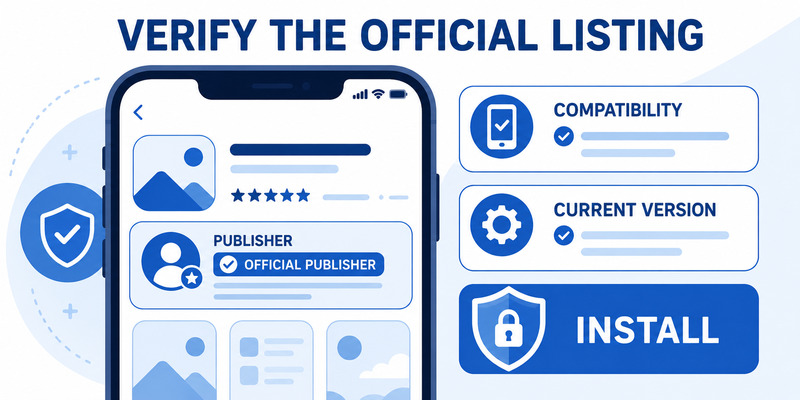
Microsoft’s official download guidance sends iPhone users to the Apple App Store. Open the support page and follow its iOS link, or open the App Store directly and search for Microsoft Authenticator. The microsoft authenticator download guide provides the broader mobile route.
Verify that the app name is Microsoft Authenticator and the developer or publisher is Microsoft Corporation. Review the listing, privacy information, compatibility, update date, and version. A similar name, copied icon, high rating, or sponsored search placement is not equivalent to publisher verification.
Avoid unofficial installation routes
An iPhone normally does not need a website package, desktop installer, configuration profile, certificate, or “activation tool” to install Authenticator from the App Store. Do not disable iOS security controls or enter Apple Account credentials on an unrelated download page.
| Download signal | Meaning | Safe response |
|---|---|---|
| Microsoft support link to App Store | Supported starting route | Verify the final listing and install |
| Microsoft Corporation publisher | Expected identity | Compare spelling carefully |
| Website offers IPA or profile | Not the normal App Store route | Stop and return to official guidance |
| Page asks for an MFA code | Download should not need an account code | Do not provide it |
| App claims “premium unlock” | Inconsistent with official distribution | Leave the page |
The key lesson in how to download microsoft authenticator app on iphone is that the delivery channel is part of security. Bookmark the official support page so a future reinstall does not begin with an advertisement or a lookalike domain.
If the App Store says the app is unavailable, check region, Screen Time restrictions, device management, App Store status, network, and iOS compatibility. Do not replace a policy or compatibility problem with an unknown package.
Save the verified listing so a future how to download microsoft authenticator app on iphone check starts from the same trusted publisher and channel.
🗺️ Browse How-To Guides: Microsoft Authenticator Download Mac: Safe Best Options
3. Install and Complete the First Launch
Install from the verified listing
Tap Get on the verified App Store listing and complete Apple’s normal confirmation. Allow the download to finish, then open the app from the listing or Home Screen. Re-check the listing if anything about the name, icon, publisher, or prompts differs from what was expected.
During first launch, read the privacy and diagnostic choices. Camera permission is needed when scanning an enrollment QR code. Notification permission supports push approval and number-matching requests. Standard TOTP can generate codes offline after setup, but some Microsoft and managed-account flows require connectivity.
Learning how to download microsoft authenticator app on iphone does not mean accepting every permission automatically. Authenticator should not require an unknown configuration profile, remote-control session, or payment to activate. If a helper asks to see the screen during enrollment, end the session before any QR code appears.
Configure local protection before enrollment
Review Settings inside Authenticator and enable App Lock if it suits the user’s accessibility and security needs. This can require Face ID, Touch ID, or the device passcode when the app opens or an approval is made. Also review lock-screen notification previews so account details are not displayed more broadly than intended.
Confirm that automatic time remains enabled, the network is stable, and the second device is ready to open the provider’s official security page. Installing an empty app does not change any account. Registration must be initiated and accepted by each provider.
Record the installed version and date without adding sensitive data. That simple evidence confirms that how to download microsoft authenticator app on iphone reached the expected, supportable application before credentials were introduced.
Keep that record with the trusted listing so the next how to download microsoft authenticator app on iphone review can confirm the same publisher and update path.
📘 Find the Right Guide: Microsoft Authenticator APK Download for Android: Safe Installation Guide
4. Add a Personal Microsoft Account
Begin from Microsoft account security
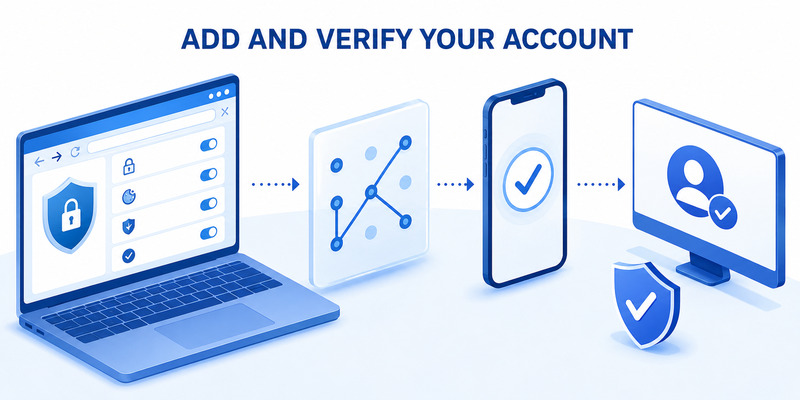
On a computer or another trusted device, open the personal Microsoft account Security page and sign in. Choose to manage sign-in or verification methods, add Microsoft Authenticator, and continue until a fresh enrollment flow appears. In the iPhone app, tap plus and choose Personal account.
Scan the QR code directly from the trusted screen. Do not screenshot, email, print, save, or upload it. The image can contain a live enrollment secret. If a manual option is necessary, use only the key generated by Microsoft and protect it with the same care.
The microsoft authenticator setup guide explains the end-to-end process. The download part of how to download microsoft authenticator app on iphone is complete only when the account provider verifies the newly installed app.
Complete verification and test
Approve the test notification, enter a current code, or complete number matching as Microsoft requests. Return to the browser and finish every confirmation. An account tile in Authenticator is not evidence that the server accepted the method.
Sign out of a low-risk session and perform a fresh login in a private browser window. Test a separate recovery method. Review recent activity, existing devices, passkeys, recovery email, phone methods, and recovery codes. Remove an old phone only after the new iPhone and independent fallback work.
Personal two-step verification, passwordless phone sign-in, passkeys, and TOTP are related but distinct. Adding Authenticator does not automatically enable every feature or remove the password. Read the exact label in Microsoft account security before changing another method.
Document the successful login and fallback test without secrets. That evidence turns how to download microsoft authenticator app on iphone into a verified security change rather than a completed App Store transaction.
🗺️ Browse How-To Guides: Microsoft Authenticator: Complete Setup, Login, Backup & Troubleshooting Guide
5. Register a Work or School Account
Use the organization’s Security info flow
Open the organization’s official Security info page, often through mysignins.microsoft.com/security-info, and sign in to the correct tenant. Choose Add sign-in method and Microsoft Authenticator. On the iPhone, tap plus, choose Work or school account, and scan the fresh QR displayed by the enrollment page.
Complete the server test, including number matching when shown. Never approve a request merely because onboarding is underway; match the account and number to the action you just initiated. Repeated or unexpected prompts can mean that someone already knows the password.
For a managed rollout, how to download microsoft authenticator app on iphone may include Company Portal, device registration, a managed App Store assignment, or a Temporary Access Pass. Follow the organization’s written sequence because installing from the public listing cannot bypass tenant policy.
Distinguish app errors from policy decisions
Conditional Access, authentication methods policy, authentication strength, device compliance, registration campaigns, location, and risk controls can affect enrollment. Reinstalling Authenticator rarely fixes a method that an administrator has blocked.
If registration fails, provide the help desk with the username, tenant, time, iPhone model, iOS version, Authenticator version, network, exact error, and failing step. Do not send a password, live code, QR image, manual key, recovery code, or approval number.
After enrollment, test a normal work app and a resource that applies the expected policy. Confirm the approved fallback and lost-phone process. A reliable how to download microsoft authenticator app on iphone result includes a supportable credential, not merely permission to launch the app.
Keep the organization’s official download and recovery links with the device record. They make a future replacement consistent with tenant controls and reduce the chance of following a phishing message during an urgent reset.
📘 Find the Right Guide: Download Microsoft Authenticator for Laptop: Safe Setup Guide
6. Add Third-Party Verification Codes
Start with the service provider
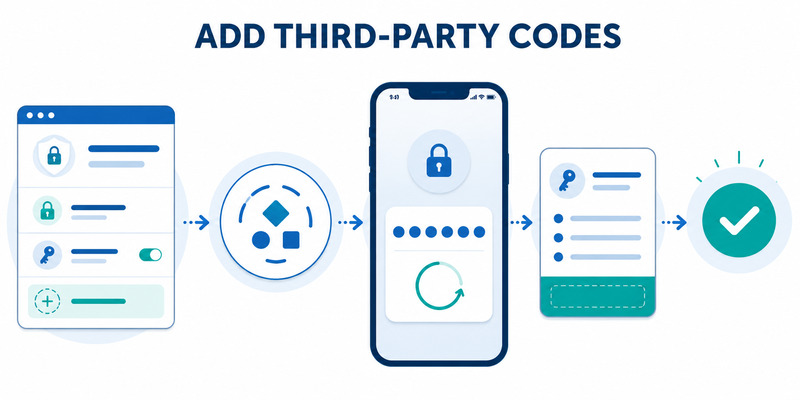
Microsoft Authenticator can generate standard TOTP codes for many non-Microsoft services. Sign in to the provider’s official security settings, enable two-factor authentication, and choose an authenticator app. The provider—not Microsoft—creates the QR code and controls recovery.
In Authenticator, tap plus, choose Other account, and scan the fresh provider code. Enter the current six- or eight-digit value back on the provider page. If the timer is almost finished, wait for the next value. Save the provider’s new recovery codes before closing setup.
The procedure for how to download microsoft authenticator app on iphone is common across accounts, but the enrollment secret is unique. A sample QR in an article, video, or support chat cannot activate a real account. Never reuse or archive enrollment images.
Keep multiple entries understandable
When several accounts share an issuer, use safe labels that distinguish personal, work, client, and test identities without exposing confidential data. Selecting the wrong tile is a common cause of a rejected but otherwise valid code.
Test a signed-out login and independent fallback for each provider. Microsoft support cannot remove two-factor authentication from another company’s account. The provider’s recovery codes, security key, trusted session, or identity-recovery process must remain available.
If a code fails, confirm automatic time, wait for a fresh value, check the selected account, and verify that setup finished on the provider page. Avoid creating several incomplete entries. Remove a duplicate only after identifying which credential the server accepted.
For high-value accounts, consider a phishing-resistant passkey or hardware security key where supported. The value of how to download microsoft authenticator app on iphone is strongest when TOTP is part of a tested, recoverable security plan rather than the only remaining route.
7. Configure Notifications, App Lock, and Backup
Tune notifications and local access
In iOS Settings, allow Authenticator notifications and choose lock-screen preview behavior appropriate for the account. Check Focus modes and notification summaries if approval prompts appear late. Open the app directly when a request is expected; avoid generating many concurrent sign-ins that become hard to match.
App Lock can require Face ID, Touch ID, or the iPhone passcode. Verify that iOS local authentication works after a restart or biometric change. Remove unknown biometric appearances and never disclose the device passcode to someone claiming to troubleshoot Authenticator.
These settings finish the daily-use portion of how to download microsoft authenticator app on iphone. The goal is to make legitimate approvals visible while keeping the credential store protected from casual access.
Prepare iCloud recovery correctly
Review Authenticator backup and the required iCloud-related settings. Protect the Apple Account with strong recovery controls. Backup behavior can change, so confirm the current in-app status rather than assuming that a general iPhone backup includes every Authenticator credential.
| Credential type | What may return | What still needs testing |
|---|---|---|
| Third-party TOTP | Supported account data may restore | Generate and verify a fresh code |
| Personal Microsoft account | Account information may return | Passwordless or device-bound status |
| Work or school account | Account name may reappear | Organization re-registration |
| App preferences | Some settings may return | App Lock and notifications |
Backup is not a substitute for recovery codes and another strong factor. Some work, school, passwordless, passkey, or device-bound registrations require enrollment again. Keep independent recovery outside both the iPhone and the Apple Account where the provider permits it.
Review the microsoft authenticator backup guide, then record a successful backup check. A complete how to download microsoft authenticator app on iphone plan anticipates loss before the phone disappears.
Test that recovery plan while access is healthy; this is the most important follow-up to how to download microsoft authenticator app on iphone.
📘 Find the Right Guide: Microsoft Authenticator Download PC: Safe Options Guide
8. Move to a New iPhone or Repair Installation Problems
Migrate while the old phone still works
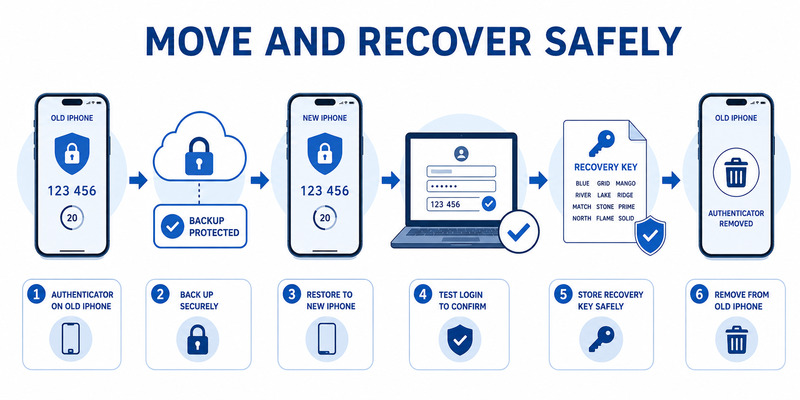
Update iOS and Authenticator on the old iPhone, confirm backup status, test recovery codes, and keep the device active. Install the official app on the new iPhone and use the supported recovery flow before adding unrelated accounts. Restored names do not prove that every credential is active.
Test each account in a signed-out browser. Re-register personal passwordless, work, school, passkey, or device-bound credentials when requested. Keep the old phone until the replacement and fallback succeed, then remove the retired registration from provider security pages and erase the old device through Apple’s supported process.
Changing from iPhone to Android is not the same as restoring to another iPhone. Plan provider-by-provider enrollment and preserve the original device. The next how to download microsoft authenticator app on iphone event should be based on the migration checklist, not on memory.
Troubleshoot without deleting credentials first
If download fails, check App Store status, network, Apple Account sign-in, storage, Screen Time, region, management policy, and iOS compatibility. If the app launches but push fails, check connectivity, notifications, Focus, background behavior, app version, and tenant policy.
If App Lock does not open, unlock iOS with the legitimate device passcode, retry Face ID or Touch ID, restart, and review permissions. Do not delete Authenticator until backup and independent recovery are confirmed; deletion can turn a local access problem into multiple account lockouts.
For crashes, record the exact version, time, network, and error without secrets. Use Microsoft support for app behavior and the account provider or organization help desk for credential resets. The microsoft authenticator recovery guide covers lost access.
After repair, repeat the signed-out login and fallback test. Those checks prove that how to download microsoft authenticator app on iphone still protects access after an update, restore, or reinstall.
📘 Find the Right Guide: Microsoft Authenticator Reset: Safe Step-by-Step Guide for Beginner
9. Frequently Asked Questions
Is Microsoft Authenticator free on iPhone?
The official app is free to install from the Apple App Store. Organization services around a work or school identity may depend on separate licensing and administrator policy.
Who should be listed as the publisher?
Verify Microsoft Corporation on the App Store listing. Do not rely on the icon, name, screenshots, ranking, or an advertisement alone.
Do I need a computer to set it up?
A second screen is the easiest way to display a fresh enrollment QR while the iPhone scans it. If none is available, use only the provider’s official same-device or manual setup process and protect the secret.
Can I use Authenticator without notifications?
Standard TOTP can work offline after enrollment, but push approvals and some Microsoft features need network and notification support. Organization policy determines which methods are accepted.
Can I install it on two iPhones?
Some providers allow multiple registered authenticators, but backup does not automatically create two active copies of every credential. Add and test each phone through the provider’s official security page.
Does iCloud restore every account?
No. Some information may restore, while work, school, passwordless, passkey, and device-bound registrations can require new enrollment. Test each provider separately.
Should I delete the app if Face ID fails?
Not before confirming backup and independent recovery. Restore iPhone authentication, restart, update, and review settings first. Reinstallation can remove local credentials.
How do I know enrollment worked?
Finish server verification, sign out, complete a fresh login, test another factor, and confirm the method in account-security settings. An app tile alone is not sufficient.
These answers summarize how to download microsoft authenticator app on iphone while keeping installation, account enrollment, and recovery as separate checkpoints.
When any answer conflicts with current organization policy, pause how to download microsoft authenticator app on iphone and follow the authorized administrator’s instructions.
10. Final Thoughts
The secure answer to how to download microsoft authenticator app on iphone is to use Microsoft’s official guidance or the Apple App Store, verify Microsoft Corporation as the publisher, install a maintained version, and protect the iPhone before adding accounts.
Start every enrollment from the account provider’s trusted security page. Scan only the fresh QR intended for that account, complete the server test, perform a signed-out login, and preserve an independent recovery method. Deny every approval you did not initiate.
Personal Microsoft accounts, work or school identities, and third-party TOTP entries do not recover in exactly the same way. Confirm backup status, keep recovery codes outside the phone, and retain the old iPhone until the replacement works. Never assume restored account names mean restored credentials.
Visit Authenticator App for download, setup, backup, migration, recovery, and troubleshooting guidance. A complete how to download microsoft authenticator app on iphone workflow proves both normal sign-in and fallback access instead of ending at installation.
Revisit the App Store listing, app version, notification privacy, App Lock, iCloud protection, registered devices, and recovery methods after major iOS updates, phone replacement, Apple Account recovery changes, or organization-policy updates.
Keep a secret-free setup record and test high-value recovery periodically. That small routine makes the next how to download microsoft authenticator app on iphone decision faster, safer, and easier to verify.
Download Authenticator App
Secure your accounts with fast, reliable two-factor authentication. Download now and protect your login in seconds.
