
Microsoft Authenticator Download PC: Safe Options Guide
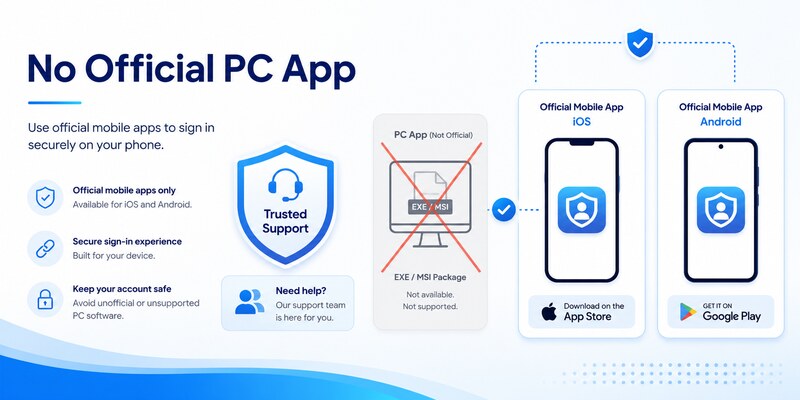
The official answer to microsoft authenticator download pc is straightforward: Microsoft Authenticator is a mobile app for iOS and Android, and Microsoft’s current support guidance says it is not available for PC or Mac. A website offering an Authenticator EXE, MSI, desktop extension, or preconfigured emulator should not be treated as an official Microsoft download.
You can still use a Windows PC with Authenticator. The PC displays the sign-in or enrollment page, while the trusted phone stores the credential and approves the request. You can also choose Windows Hello, a passkey, or a FIDO2 security key when the provider and organization support them.
This guide explains the correct two-device workflow, personal and managed account setup, safe PC alternatives, fake-download warning signs, and recovery when the phone is unavailable.
1. Understand the Official PC Availability
Separate a PC setup page from a PC app
People searching microsoft authenticator download pc often see Microsoft security pages on a computer and assume a Windows application must exist. The browser page manages the account and displays an enrollment QR code or approval step. The Authenticator app itself remains on a supported iOS or Android device.
| What you see on the PC | What it actually does | Where the credential lives |
|---|---|---|
| Microsoft account Security page | Adds or removes sign-in methods | Phone, security key, or platform credential |
| Work or school Security info | Registers an organization-approved method | Phone or other approved authenticator |
| QR code in a browser | Transfers an enrollment secret to a phone | Authenticator on the phone |
| Number-matching prompt | Links a PC sign-in to a phone approval | Registered mobile Authenticator |
| Windows Hello setup | Creates a PC-bound sign-in credential | Protected hardware on that PC |
Follow Microsoft’s current download guidance
Microsoft directs users to Apple App Store and Google Play Store and states that Authenticator is not available for PC or Mac. It also says versions more than one year old are unsupported. Use the current mobile store version and keep the device updated.
An authentic microsoft authenticator pc download should not be an EXE because no official desktop edition is offered. The correct path is to install the mobile app, open the account’s official security page on the PC, and pair them during enrollment.
Users in China or on managed devices should follow Microsoft’s regional instructions or their organization’s application catalog. Regional availability does not make a random desktop package safe.
This official distinction settles microsoft authenticator download pc before any untrusted file is opened.
🗺️ Browse How-To Guides: Microsoft Authenticator App Not Showing Code: How to Fix It
Download Authenticator App
Secure your accounts with fast, reliable two-factor authentication. Download now and protect your login in seconds.
2. Why Authenticator Is Designed for Phones
Preserve factor separation
One security benefit of the two-device workflow is separation. A password or session may be entered on the PC, while a distinct phone holds the authenticator credential and receives the approval request. If malware controls the PC, it should not automatically gain the phone’s protected secret.
The request microsoft authenticator download pc can undermine that separation when users install an unofficial emulator or clone on the same machine used for passwords. A single compromise could then expose the password, authentication secret, browser session, and approval interface together.
Use mobile security controls
Modern phones provide application sandboxing, screen lock, encryption, secure hardware, controlled app-store distribution, biometric access, remote lock or erase, and notification isolation. Authenticator can use these controls while keeping TOTP secrets local and registering push or passwordless credentials to a specific device.
This does not make phones invulnerable. Users must update the OS and app, reject unexpected prompts, use App Lock, protect cloud recovery, and remove lost-device registrations. However, the supported model is easier to verify than an unknown Windows package promising microsoft authenticator download for pc.
Windows has its own strong authentication technologies. Windows Hello and platform passkeys can protect PC sign-in, while FIDO2 security keys provide a portable phishing-resistant factor. These are alternatives designed for desktop use rather than unofficial copies of the mobile app.
Understanding the architecture helps users choose the correct tool: Authenticator on the phone, account settings in the PC browser, and Windows-native or hardware-backed credentials where appropriate.
The architecture—not a missing installer—is the key to microsoft authenticator download pc.
3. Use Microsoft Authenticator with a Windows PC
Install the official mobile app first
On Android, obtain Authenticator from Google Play or an approved managed store. On iPhone or iPad, use Apple App Store or the organization’s approved catalog. Verify the Microsoft publisher and update status. The microsoft authenticator download guide covers the official mobile routes.
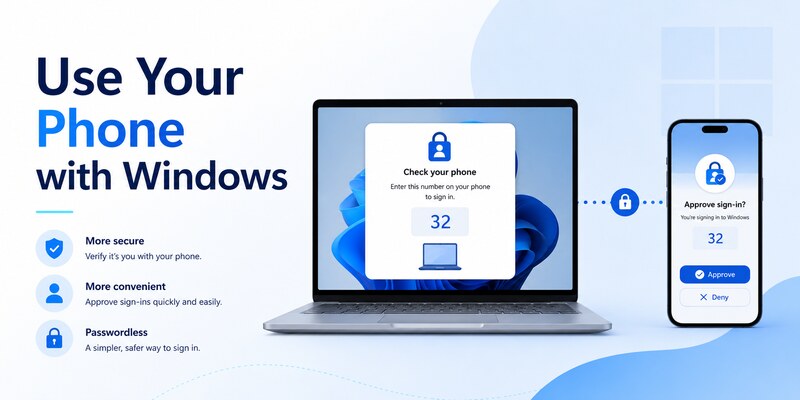
This is the safe answer to microsoft authenticator download pc: the phone runs Authenticator, and the PC supplies the browser-based sign-in or setup screen. Avoid sideloaded APK files, mobile emulators, browser extensions, and sites advertising a desktop port.
Complete the two-device sign-in flow
On the Windows PC, open the provider’s official sign-in page and enter the username. Choose the Authenticator approval option if it is already registered. The PC may display a number; open the notification on the phone, unlock Authenticator, confirm the number, and approve only if you initiated the sign-in.
If the phone does not receive a prompt, do not approve later notifications blindly. Check network access, notifications, background restrictions, time, account registration, and the provider’s current security-method list. Use another verified sign-in method if available.
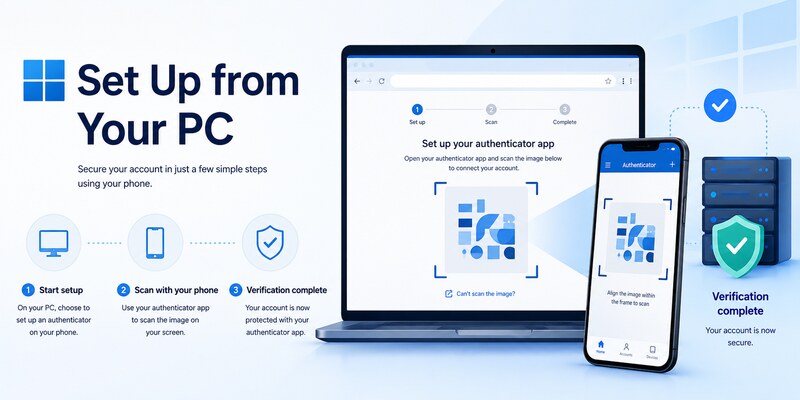
For enrollment, the PC displays a fresh QR code. Scan it directly with the phone and complete server verification before closing the browser. Do not save or email the QR image; it can contain the credential secret.
Once configured, a user does not need download microsoft authenticator app on pc. The supported interaction deliberately spans the Windows browser and the registered mobile device.
That two-device workflow is the safe implementation of microsoft authenticator download pc.
4. Set Up a Personal Account from Your PC
Add Authenticator through account security
Sign in to the personal Microsoft account’s official security page on the PC. Confirm an independent recovery method, then choose to add Microsoft Authenticator. On the phone, open the official app, choose the appropriate personal account option, and scan the fresh code shown by the PC.
For microsoft authenticator download pc, remember that the browser is only coordinating enrollment. The local secret or device registration belongs to the phone. Complete the first test approval or code verification while the setup page remains open.
Test and secure the new method
Open a private browser window, sign in with the new method, and test a separate fallback. Generate fresh recovery codes where supported and store them securely offline. Review recent activity, registered devices, recovery contacts, and current security methods.
Passwordless phone sign-in can require another device-specific step after ordinary Authenticator verification is registered. Likewise, adding a passkey or Windows Hello credential is a separate process. Do not assume one successful push configured every sign-in mode.
If replacing a phone, keep the old one until the replacement and fallback have passed. Then remove the old server-side method, revoke obsolete sessions, and erase the retired device. Do not delete the old local tile first if it is still the only working factor.
The microsoft authenticator setup workflow provides a detailed enrollment baseline. It eliminates the need for any questionable download microsoft authenticator for pc offer.
Testing the browser and phone together completes microsoft authenticator download pc for a personal account.
🗺️ Browse How-To Guides: Microsoft Authenticator Recovery: Regain Access Safely
5. Set Up a Work or School Account from Your PC
Follow the organization’s Security info process
Open the organization’s official Security info page on the Windows PC and sign in to the correct tenant. Install Authenticator on the phone through Apple App Store, Google Play, Company Portal, Managed Google Play, or another approved catalog. Then add a work or school account and scan the fresh enrollment QR.
The phrase download microsoft authenticator app for pc can appear in workplace instructions even when they mean “use the PC to reach the download link.” Confirm with the help desk if the wording is ambiguous. The application still runs on the supported mobile device.
Satisfy policy and managed-device requirements
Microsoft Entra Conditional Access, authentication methods policy, authentication strength, risk controls, and device compliance can determine whether enrollment succeeds. A managed profile may control camera, notifications, network access, and app handoff. Use the correct work-profile copy of Authenticator.
If setup is blocked, give the help desk the username, tenant, device model, OS, app version, time, network, exact error, and failing step. Never send a password, QR image, manual key, live code, recovery code, or approval number.
An administrator may reset an incomplete method, require MFA re-registration, issue a Temporary Access Pass, or approve a different strong factor. Installing a desktop clone does not bypass organization policy and can violate security requirements.
After enrollment, test a normal Microsoft 365 app and a resource that triggers the relevant policy. A complete microsoft authenticator download pc solution leaves the phone registered, the Windows workflow tested, and the old device removed through the approved process.
Keep the organization’s instructions as the authoritative microsoft authenticator download pc route for future replacements.
6. Choose Safe PC Sign-In Alternatives
Use Windows-native credentials
Windows Hello can use a PIN, biometric, or security hardware bound to the PC. A passkey can provide phishing-resistant sign-in when the account and browser support it. These methods may offer the PC convenience users seek from microsoft authenticator download pc without pretending that the mobile app has a desktop edition.
A Windows Hello PIN is local to the device and is not simply the online account password. Protect the PC with current updates, encryption, secure boot where supported, a standard user account for routine work, and strong device recovery.
Consider a FIDO2 security key
A hardware security key provides a portable phishing-resistant factor and keeps its private credential protected on the key. Register at least two keys for critical accounts when supported, keep the spare secure, and test both before relying on them.
| PC-friendly option | Strength | Main limitation |
|---|---|---|
| Windows Hello | Fast, device-bound, hardware-backed where available | Tied to configured PC and recovery design |
| Platform passkey | Phishing-resistant and convenient | Ecosystem and account support vary |
| FIDO2 security key | Portable, phishing-resistant, strong separation | Physical key must be carried and backed up |
| Mobile Authenticator | Broad MFA and TOTP compatibility | Requires a supported phone |
| Recovery code | Useful emergency access | Must be stored securely and usually single-use |
Avoid moving all factors onto the same PC merely for convenience. A security key or separate phone keeps factor separation while supporting desktop sign-in.
The right alternative depends on provider support and organization policy. Confirm that it satisfies required authentication strength before replacing Authenticator or abandoning the search for microsoft authenticator download pc.
These PC-native choices answer microsoft authenticator download pc without copying mobile secrets onto Windows.
7. Avoid Fake Desktop Downloads and Emulators
Recognize high-risk download claims
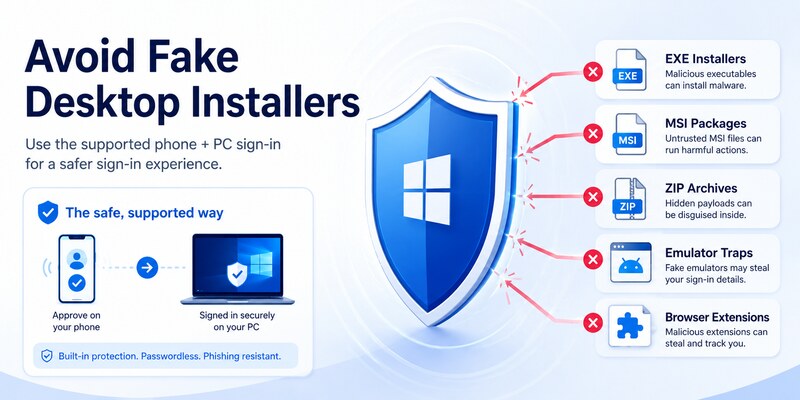
Warning signs include an Authenticator EXE, MSI, DMG, ZIP, browser extension, cracked “pro” version, preloaded virtual machine, or request to disable antivirus. Microsoft’s official guidance says the app is not available for PC or Mac, so these files do not become trustworthy because they use familiar icons.
Sites targeting microsoft authenticator download pc may imitate Microsoft pages, purchase search ads, or display fake reviews. Verify the domain, publisher, store channel, and documentation independently. Never approve a sign-in or enter a live code merely to “activate” a download.
Understand emulator risks
An Android emulator may run mobile applications technically, but it is not Microsoft’s supported Authenticator distribution model. Emulator storage, snapshots, shared clipboard, host malware, backup images, root-like controls, and unclear hardware protection can weaken credential isolation. Organization policy may explicitly block emulated or noncompliant devices.
The safest response to download microsoft authenticator app on pc is not to engineer around the supported model. Use a real supported phone, a hardware security key, Windows Hello, passkey, or administrator-approved alternative.
If an unofficial package was installed, stop using it and do not enter additional secrets. Remove it using standard system tools, run trusted security scans, change exposed passwords from a known-clean device, revoke sessions, rotate affected TOTP credentials, and review recovery methods. Notify organizational security for any work account.
Treat any shared QR code, manual seed, or recovery code as compromised. Local deletion alone does not revoke a server-side method; replace it at the original provider.
Avoiding these traps is an essential part of microsoft authenticator download pc safety.
🧭 Explore Guides: Microsoft Authenticator Unable to Add the Account: Easy Fix it
8. Recover When Your Phone Is Unavailable
Use an independent recovery method
If the phone is lost, broken, or offline, microsoft authenticator download pc is not a recovery shortcut. Use a registered security key, passkey, recovery code, alternate authenticator, trusted session, approved email or phone method, or provider identity-recovery process.
For a work or school account, contact the published help desk. An authorized administrator may reset authentication methods, revoke the missing device, require re-registration, or issue a Temporary Access Pass when policy permits. Consumer support cannot override another organization’s tenant controls.
Rebuild securely on a replacement phone
Install Authenticator from the official mobile store, restore a compatible backup if available, and resolve every Action required entry. Work, school, and passwordless credentials often need provider-side re-registration even when their names reappear.
Register and test the replacement phone, verify an independent fallback, remove the lost phone’s server methods, revoke sessions, review recent activity, and change passwords when compromise is plausible. Use remote lock or erase where supported.
The microsoft authenticator recovery guide covers full lost-access workflows. Do not pay an unofficial “recovery” service or send anyone passwords, QR images, manual keys, live codes, or recovery codes.
Once access returns, add a PC-friendly backup such as a security key or passkey where supported. That recovery design removes the urgency behind future searches for microsoft authenticator download pc while preserving strong authentication.
Recovery planning makes microsoft authenticator download pc a routine setup question instead of a lockout emergency.
9. Frequently Asked Questions
Can I download Microsoft Authenticator on Windows 10 or 11?
Microsoft’s official guidance says Authenticator is not available for PC or Mac. Install the official mobile app on iOS or Android and use it with the Windows browser’s sign-in or enrollment page.
Is there an official Microsoft Authenticator EXE or MSI?
No official desktop installer is provided. Treat sites offering an EXE, MSI, ZIP, DMG, or browser extension as untrusted unless Microsoft’s current official documentation explicitly changes.
Can I use an Android emulator for Authenticator?
It is not the supported security model and may weaken isolation, backup protection, and device compliance. Use a supported phone, Windows Hello, passkey, or hardware security key instead.
How do I scan a QR code shown on my PC?
Open Authenticator on the phone, choose the correct account type, and scan the fresh QR displayed by the provider’s official security page. Finish the server verification before closing the browser.
Can Windows Hello replace Authenticator?
For some accounts and policies, Windows Hello or a passkey can be an approved strong method. It does not universally replace mobile TOTP or push. Confirm provider and organization requirements.
What if I cannot use a smartphone?
Ask the provider or organization about FIDO2 security keys, passkeys, hardware tokens, or another approved method. Do not use an unofficial desktop clone as a workaround.
Can I approve a PC sign-in from my phone?
Yes. When Authenticator is registered, a PC sign-in can send a notification to the phone and may show a number to match. Approve only requests you initiated.
What should I do if I installed a fake version?
Stop using it, remove it, scan the PC, change exposed passwords from a clean device, revoke sessions, rotate affected credentials, review security methods, and notify organization security when applicable.
These answers resolve the common intent behind microsoft authenticator download pc without directing users toward unsafe or unsupported software.
🧭 Explore Guides: How to Disable Microsoft Authenticator: Safe Step-by-Step Guide
10. Final Thoughts
There is no official microsoft authenticator download pc application in Microsoft’s current support model. Authenticator runs on supported iOS and Android devices, while the Windows PC provides the browser-based setup or sign-in page. That separation helps keep authentication secrets away from the same environment that handles the password and session.
Use Microsoft’s official mobile download page, Apple App Store, Google Play, or an organization-managed catalog. Reject EXE, MSI, desktop-extension, and emulator shortcuts. If a site asks for passwords, QR images, manual keys, recovery codes, or live verification codes, stop immediately.
For a convenient PC experience, consider Windows Hello, passkeys, or a FIDO2 security key where supported. Keep an independent recovery method and test it before the phone becomes unavailable. Managed users should confirm authentication strength and device policy with their help desk.
Visit Authenticator App for setup, recovery, device-change, and troubleshooting guidance. A safe response to microsoft authenticator download pc preserves the supported mobile app, uses the PC only for account management and sign-in, and avoids fake desktop packages entirely.
Review the configuration after major device or policy changes. A signed-out test, fallback check, and server-method audit prove that the design works when it matters.
That verification closes microsoft authenticator download pc safely.
Download Authenticator App
Secure your accounts with fast, reliable two-factor authentication. Download now and protect your login in seconds.
