
How to Disable Microsoft Authenticator: Safe Step-by-Step Guide
People searching for how to disable microsoft authenticator may want to stop approval notifications, replace the app with a security key, turn off passwordless phone sign-in, remove an old device, or completely disable multifactor authentication. Those outcomes are not equivalent. Removing an account tile from the phone does not necessarily remove its server-side security method, and deleting the app does not cancel existing registrations.
The safest approach is to identify the exact feature, add and test a replacement factor, change the account’s security settings through its official website, and only then remove obsolete local data. For a work or school account, an administrator may control the available methods and may need to complete the change.
This guide explains each path, the risks involved, and the checks that prove the old device can no longer approve sign-ins.
1. Decide What You Actually Want to Disable
Match the goal to the correct control
Before following any instructions for how to disable microsoft authenticator, write down the account, username, device, current method, and desired result. Authenticator can hold time-based one-time passwords, receive Microsoft push approvals, support number matching, and enable passwordless phone sign-in. Each function is registered differently.
| Your goal | Correct action | Action that is not enough |
|---|---|---|
| Stop using Authenticator for one Microsoft account | Add another method, then delete Authenticator in Security settings | Delete the app tile |
| Stop passwordless phone sign-in | Disable the phone sign-in credential | Turn off notifications |
| Move to a new phone | Register and test the new device, then remove the old one | Uninstall from the old phone first |
| Remove a third-party TOTP account | Replace or disable 2FA at that provider | Change the Microsoft account settings |
| Stop work or school MFA prompts | Follow organization policy or contact IT | Repeatedly deny prompts |
| Respond to a lost phone | Revoke the method, sessions, and device | Wait for the phone to return |
Understand local removal versus server revocation
The Authenticator tile on a phone is local data. The provider’s security page stores the server-side registration that determines what can approve a login. Removing only the tile can leave a stale method attached to the account; removing only the provider method can leave an unusable tile on the phone.
Uninstalling Authenticator is broader still: it may erase credentials for many unrelated providers without informing any of them. That is why how to disable microsoft authenticator should be treated as an account-security change, not an app-cleanup task.
Use the provider’s official URL, not a link in an unexpected email or approval notification. If prompts appeared that you did not initiate, deny them and investigate recent account activity before making routine changes. An unsolicited prompt can indicate password compromise rather than a preference problem.
A written plan for how to disable microsoft authenticator keeps the local app action, provider change, and final security test in the correct order.
Download Authenticator App
Secure your accounts with fast, reliable two-factor authentication. Download now and protect your login in seconds.
2. Prepare a Safe Replacement Before Making Changes

Add an independent sign-in method
Account owners should not begin how to disable microsoft authenticator while the app is their only working factor. Add a supported replacement such as a passkey, FIDO2 security key, another authenticator, recovery code, or an organization-approved method. SMS and email may be available, but they generally offer less resistance to phishing and account takeover than a hardware-backed method.
Test the replacement in a private browser or a separate browser profile. A method displayed in settings is not necessarily usable: the phone number may be old, a security key may belong to another account, or a passkey may be available only on the device that created it. Keep the current Authenticator registration until the test succeeds.
Preserve recovery and active access
Generate fresh recovery codes where the provider supports them and store them offline in a secure location. Confirm that the recovery email, phone number, account password, and password-manager access are current. Keep at least one trusted session signed in until the change has been verified from a signed-out browser.
If a phone migration is the reason for how to disable microsoft authenticator, consider following the microsoft authenticator change phone sequence instead. Registering the replacement first avoids turning a planned migration into recovery work. A compatible microsoft authenticator backup can help with same-platform recovery, although work, school, and passwordless entries may still require re-registration.
Record only non-secret details: provider, username, old device, replacement method, test result, and removal time. Never copy live codes, QR images, recovery codes, or manual TOTP seeds into a checklist, ticket, email, or chat.
This preparation makes how to disable microsoft authenticator reversible until the replacement has genuinely passed its tests.
🧭 Explore Guides: How to Use Microsoft Authenticator: Complete Guide
3. Disable Authenticator for a Personal Microsoft Account
Change the Microsoft account security methods
For a personal Microsoft account, sign in through Microsoft’s official account security page. Open the advanced security or ways-to-prove-who-you-are area, add the replacement method, and complete its verification. Then perform a fresh login using that replacement before removing Microsoft Authenticator.
When applying how to disable microsoft authenticator, look for the Authenticator app entry associated with the phone you intend to retire. Remove that method only after confirming another method can satisfy any two-step verification requirement. If the account has two-step verification enabled, Microsoft may require more than a password even after one Authenticator entry is deleted.
Decide whether two-step verification should remain enabled
Replacing Authenticator does not require disabling two-step verification. In most cases, keeping MFA enabled and switching to a security key or passkey is safer than returning to password-only access. If you deliberately turn off two-step verification, review the warning carefully and understand that a stolen password may then be enough to enter the account.
After the server-side method is removed, open Authenticator and delete the local account tile if it is no longer used. The microsoft authenticator remove account guide explains that cleanup in detail. Do not delete other tiles simply because they use the same email address; they may represent a separate tenant or third-party provider.
Complete how to disable microsoft authenticator with a private-browser login, a review of recent activity, and confirmation that no approval reaches the retired phone. If unexpected sessions, aliases, forwarding rules, or recovery methods appear, secure the account before considering the task finished.
Treat that evidence as the completion record for how to disable microsoft authenticator, rather than relying on the missing app tile alone.
4. Turn Off Passwordless Phone Sign-In
Disable the device-bound credential
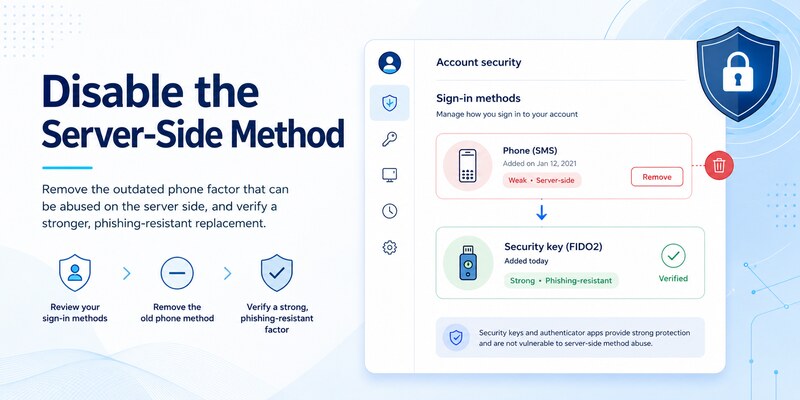
Passwordless phone sign-in is distinct from ordinary push-based MFA. If the real goal is microsoft authenticator turn off passwordless, open the Microsoft account entry in Authenticator and use the option that disables phone sign-in, when available. The wording can vary by account type and app version. Confirm the change through the Microsoft account security settings as well.
For a personal Microsoft account, make sure the password is known and current before turning passwordless off. Some users rarely enter it after enabling phone sign-in and discover too late that the password is forgotten. Resetting the password first may sign out sessions or trigger extra verification, so complete recovery checks in advance.
Separate passwordless, push, and TOTP behavior
Turning off passwordless phone sign-in may leave Authenticator registered for approval notifications or verification codes. Likewise, removing a push method does not necessarily remove a TOTP credential for another provider. Test the specific behavior you intended to change instead of assuming one switch disabled everything.
For how to disable microsoft authenticator without weakening the account, replace passwordless phone sign-in with a passkey or security key and retain an independent recovery method. Then sign out and verify that the new primary method works. Try one ordinary login and one sensitive security-settings action because step-up authentication can use a different policy.
If the disable option is unavailable on a work account, organization policy may require passwordless authentication or may restrict user changes. Do not remove the local tile as a workaround. Ask the help desk to confirm the allowed authentication methods and the approved offboarding or device-replacement process.
Finally, check the account’s device and security-method lists. Remove only the retired credential, not the current phone or a separate recovery key. A successful how to disable microsoft authenticator flow leaves a clear replacement path and no stale passwordless registration.
🗺️ Browse How-To Guides: Microsoft Authenticator App Not Showing Code: How to Fix It
5. Disable Authenticator for Microsoft 365 Work or School
Determine what the organization permits
The answer to how to disable microsoft authenticator app for office 365 depends on Microsoft Entra ID policy. An organization can require MFA through Conditional Access, Security Defaults, authentication strength, risk policies, or legacy per-user MFA. A user may be allowed to replace Authenticator but not to disable MFA altogether.
Open the organization’s official Security info page and review the registered methods. Add and test an approved replacement before deleting Authenticator. If delete controls are missing, the method is required, or sign-in is already blocked, contact the published help desk rather than attempting repeated removals.
Coordinate administrator-controlled changes
An administrator may need to delete the Authenticator method, require MFA re-registration, remove passwordless phone sign-in, revoke sessions, delete a lost device record, or issue a Temporary Access Pass for enrollment. Provide the username, tenant, phone model, operating system, time, exact error, and desired replacement. Never send a password, live verification code, recovery code, or QR image.
For managed accounts, how to disable microsoft authenticator should include an explanation of business impact. A different method might not satisfy the authentication strength required for finance, administration, remote access, or regulated data. SMS may appear in Security info yet still be rejected by a stronger policy.
After IT completes the change, test a routine Microsoft 365 application and a resource that triggers the relevant Conditional Access rule. Confirm the replacement method, revoke the old phone where appropriate, and preserve the support ticket number without secrets. Guest accounts may need separate changes in each host tenant even when the same email address is shown.
Do not try to bypass company controls by uninstalling the app, blocking notifications, or deleting the local work tile. Those actions can cause lockout while leaving the server registration and compliance requirement intact.
In a managed tenant, the approved answer to how to disable microsoft authenticator must align with both identity policy and the user’s required applications.
6. Remove Authenticator from Third-Party Accounts

Make the change at the original provider
Authenticator stores codes for many services that are unrelated to Microsoft. To disable microsoft authenticator for a social network, exchange, code repository, bank, or other provider, sign in to that provider’s official security settings. Microsoft cannot revoke a TOTP secret that another company issued.
Choose whether to replace the authenticator, switch to a security key or passkey, or deliberately disable two-factor authentication. Add and test the replacement first. If the provider supports only one TOTP credential, keep a trusted session open, obtain fresh recovery codes, disable the old registration, and immediately enroll the new method.
Delete the local tile only after validation
Perform a signed-out login with the new configuration. Then remove the obsolete Authenticator tile. Deleting it earlier destroys the phone’s copy of the secret while the provider may continue requesting codes generated from that secret.
When users ask how to disable microsoft authenticator, they sometimes mean they want fewer prompts from one service. Check whether the provider offers remembered devices, passkeys, or a less intrusive phishing-resistant method. Avoid turning off MFA merely to silence repeated approvals; unsolicited approvals should be treated as a possible attack, followed by a password change and session review.
Some providers rotate recovery codes or invalidate trusted sessions when 2FA changes. Save the new codes securely and review active devices, API tokens, app passwords, connected applications, and recovery contacts. For financial or administrator accounts, consider keeping two independent strong factors.
Complete the task provider by provider. A local app uninstall affects all stored credentials at once, whereas a controlled how to disable microsoft authenticator procedure proves each account remains accessible and secure before the next one is changed.
That provider-by-provider inventory is especially important when how to disable microsoft authenticator spans personal, financial, and administrator accounts on the same phone.
7. Retire a Lost or Replaced Phone Safely
Revoke access before local cleanup
If the old phone is lost, stolen, traded in, or unavailable, how to disable microsoft authenticator becomes an incident-response task. From a known-clean device, change the account password when compromise is plausible, remove the lost phone’s authentication method, revoke active sessions, review recent activity, and use remote lock or erase where supported.
Do not rely on uninstalling the app remotely or removing a local tile. The important action is server-side revocation at every provider. For a managed phone, notify the organization immediately so administrators can retire the device, reset methods, revoke tokens, and check sign-in logs.
Migrate and verify the replacement phone
Register the new phone through each provider’s official security page. Restored account names do not prove that push, passwordless, or organization-bound credentials work. Resolve any Action required message, test the replacement in a private browser, and confirm that prompts go only to the intended device.
If the phone is still in your possession, keep it until the new configuration and fallback have passed. Then remove old provider registrations, sign out accounts, erase the device, and confirm the erasure before sale or recycling. If it is missing, prioritize email, password manager, Microsoft account, financial services, and administrator identities because those can unlock other accounts.
The safest response to turn off microsoft authenticator on an old phone is not simply disabling notifications. Notifications can stop while tokens and sessions remain usable. Review registered devices, security methods, session lists, recovery contacts, application consent, and recent activity.
Close how to disable microsoft authenticator with a dated inventory showing every provider migrated or revoked. Exclude secrets from that record, but retain enough detail to prove that the retired phone no longer has an accepted authentication path.
🗺️ Browse How-To Guides: Microsoft Authenticator Recovery: Regain Access Safely
8. Verify Security After the Change
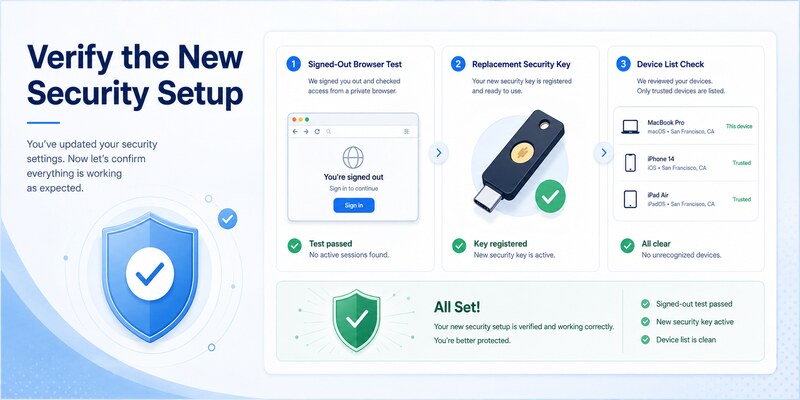
Run acceptance tests from a signed-out session
After completing how to disable microsoft authenticator, open a private browser and sign in with the replacement method. Test an independent recovery path too. For managed accounts, verify both a normal application and a resource that enforces the organization’s stronger policy.
Confirm that the retired phone no longer receives actionable prompts and that its Authenticator or passwordless record is absent from the provider’s security-method list. A delayed push notification alone does not prove the method remains active, so rely on current server settings and fresh sign-in tests.
Review the remaining security design
| Verification | Expected result | If it fails |
|---|---|---|
| Replacement login | Signed-out access succeeds | Restore old method or use recovery |
| Independent fallback | Works without the retired phone | Add another approved factor |
| Old method check | Removed or explicitly disabled | Revoke it at the provider |
| Session review | Only recognized sessions remain | Revoke and change password |
| Recovery review | Current and controlled by the owner | Update contacts and codes |
Keep MFA enabled where possible, preferably with a phishing-resistant passkey or security key. Update the device, use a strong screen lock, enable encryption and remote protection, and store recovery codes securely offline. Deny unexpected prompts and investigate them immediately.
Document the account, change time, replacement factor, tests, old method removal, and session review without saving sensitive values. Schedule a small recovery drill after major phone, password, or organization-policy changes.
The objective of how to disable microsoft authenticator is not merely to make the app disappear. It is to remove the intended credential, preserve authorized access, prevent stale approvals, and leave the account with a tested security and recovery design.
9. Frequently Asked Questions
Does deleting the Microsoft Authenticator app disable MFA?
No. Deleting the app removes local access to its credentials but may leave server-side methods registered. Change each provider’s security settings first, test a replacement, and then uninstall only if no remaining account needs the app.
Can I disable Authenticator but keep two-step verification?
Yes, if the provider supports another approved factor. Add and test a passkey, security key, another authenticator, or other supported method before deleting Authenticator. Keeping strong MFA is normally safer than reverting to password-only access.
Why can’t I remove Authenticator from my work account?
Your organization may require it through Microsoft Entra policy, or it may be the only method satisfying authentication strength. Contact the official help desk to request an approved replacement or administrator-assisted reset.
Does turning off passwordless phone sign-in stop approval prompts?
Not necessarily. Passwordless phone sign-in and push-based MFA are separate registrations. Review both the Authenticator account settings and the provider’s Security info page, then test the exact behavior.
What should I do if the old phone is lost?
Remove its server-side authentication method, revoke sessions, review activity, and remotely lock or erase it when possible. For work accounts, notify IT. Change the password if theft or compromise is plausible.
Can Microsoft disable Authenticator for a third-party website?
No. The website that issued the QR code controls its TOTP registration. Use that provider’s official security page or account-recovery process to replace or disable the method.
Is SMS a good replacement for Authenticator?
SMS may be convenient and is better than having no recovery route, but it is generally more vulnerable to phishing and phone-number attacks. Prefer a passkey or security key when supported, with a separate recovery method.
How do I know the old Authenticator method is really disabled?
Check that it is absent from the provider’s current security-method list, perform a signed-out login with the replacement, verify fallback access, and confirm the retired device cannot approve a fresh request.
This FAQ completes the practical checks behind how to disable microsoft authenticator without confusing local deletion, server revocation, and organization policy.
🗺️ Browse How-To Guides: Microsoft Authenticator Reset: Safe Step-by-Step Guide for Beginner
10. Final Thoughts
The safe answer to how to disable microsoft authenticator is a controlled replacement sequence: identify the exact feature, preserve recovery, add and test a new factor, revoke the old server-side method, remove obsolete local data, and verify the result from a signed-out session.
Avoid uninstalling first, deleting every tile, or weakening a protected account merely to stop prompts. Personal Microsoft accounts, work or school tenants, passwordless phone sign-in, and third-party TOTP accounts each use different controls. Organization policy may also require administrator involvement.
Whenever possible, keep strong MFA by moving to a passkey, security key, or another approved authenticator. Review sessions and recent activity, especially when the old phone is lost or unexpected approvals appeared.
Keep a dated, non-secret record of the replacement and the final signed-out test. Recheck recovery contacts and stored recovery codes after the change, then remove duplicate or stale methods. If the account belongs to an employer or school, retain the help-desk reference and follow its device-retirement requirements. These final checks make how to disable microsoft authenticator a complete security transition rather than a cosmetic app change.
Revisit the configuration after a major password, phone, or policy change. A short recovery drill should prove that an independent method works when the primary device is unavailable. That resilience is the lasting measure of a successful authentication change.
Following how to disable microsoft authenticator carefully preserves both control and recovery.
For clear setup, migration, recovery, and troubleshooting guidance, visit Authenticator App and keep every authentication change tested, recoverable, and free of stale device access.
Download Authenticator App
Secure your accounts with fast, reliable two-factor authentication. Download now and protect your login in seconds.
