
Microsoft Authenticator Remove Account: Safe Guide
A safe microsoft authenticator remove account process separates the mobile app tile from the authentication method stored by the provider. Deleting a tile can erase local codes without unregistering the phone server-side, while removing only the provider method can leave a harmless stale tile in the app.
Before deleting anything, preserve another way to sign in and test it. Recovery codes, a security key, an alternate factor, a trusted session, another registered device, or administrator assistance can prevent lockout.
This guide covers local removal, server-side cleanup, managed identities, missing Remove options, accidental deletion, and secure phone retirement.
1. Understand What Removing an Account Actually Does
Separate the app tile from provider registration
Authenticator stores local account entries that may generate TOTP, receive push, or represent passwordless credentials. The provider separately records which authentication methods and devices are allowed. These two records are related but not identical.
In a microsoft authenticator remove account task, decide whether the goal is to hide a local tile, stop codes, stop push to a phone, revoke passwordless access, remove a lost device, close the online account, or clean up an obsolete tenant.
Choose the correct removal scope
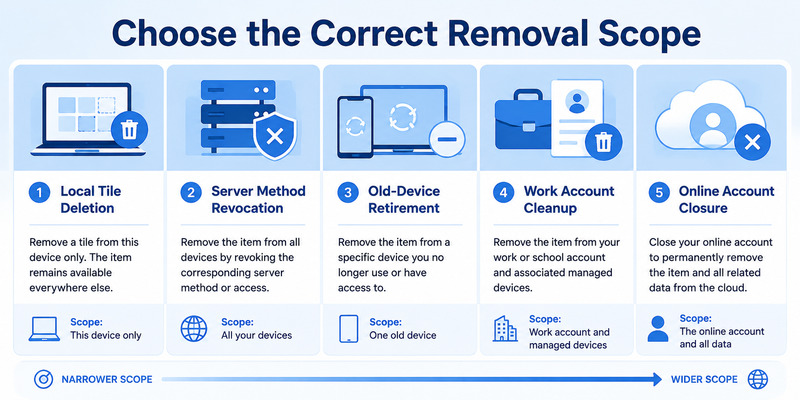
| Goal | Required action | Important warning |
|---|---|---|
| Remove a stale local tile | Delete entry inside Authenticator | May not unregister server method |
| Stop push to old phone | Remove provider security method/device | Test new phone first |
| Replace a TOTP secret | Re-enroll at provider, then delete old tile | Preserve fallback |
| Remove work access | Follow organization process | Admin may control device record |
| Delete the online account | Use provider account-closure flow | App deletion is insufficient |
Deleting Authenticator itself is broader than removing one entry and can erase many local credentials. Clearing app storage has similar risk. Neither should be used as a shortcut for a single-account problem.
Write down the provider, full username, tenant, credential type, current phone, registered devices, and desired result. This short inventory makes microsoft authenticator remove account precise and reversible until testing is complete.
Add a rollback column to the inventory. Record which trusted session or fallback can restore access if removal produces an unexpected prompt. A planned microsoft authenticator remove account change should always have a tested path back before the first deletion.
🗺️ Browse How-To Guides: Microsoft Authenticator Code Not Working: How to Fix It
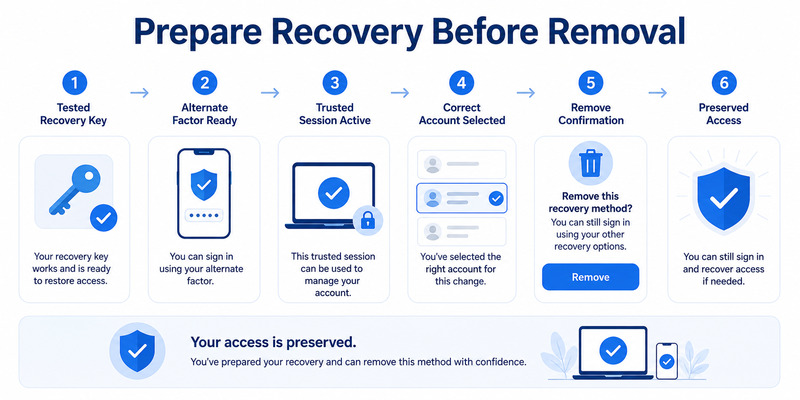
2. Prepare Recovery Before Removing Anything
Prove an independent sign-in route
Test a recovery code, security key, alternate authenticator, recovery email or phone, trusted browser session, another registered device, or administrator-assisted method. The route should not depend only on the tile you intend to delete.
Before microsoft authenticator remove account, sign in through the provider’s official page in a private browser and confirm the alternate method works. Merely seeing it listed in security settings does not prove that it is current.
Review account and device security
Save newly issued recovery codes in an encrypted password manager, secure offline record, or protected physical location. Do not screenshot QR secrets, current TOTP values, or backup codes into an ordinary photo library.
Review recent activity, active sessions, security methods, and registered devices. If the removal follows theft, compromise, or an unexpected push, change the password, revoke suspicious sessions, and contact the organization as appropriate.
For work or school accounts, confirm the official help-desk route and whether a Temporary Access Pass, MFA reset, or managed-device procedure is available. Users may not have permission to clean up every server object.
Only after fallback, account identity, and target scope are verified should microsoft authenticator remove account proceed. This preparation is the difference between routine maintenance and self-inflicted lockout.
If the phone is lost rather than merely retired, prioritize server revocation from a trusted device. Do not wait to recover the physical handset before starting microsoft authenticator remove account cleanup. Change the password when theft or compromise is plausible and review recent activity.
Download Authenticator App
Secure your accounts with fast, reliable two-factor authentication. Download now and protect your login in seconds.
🗺️ Browse How-To Guides: Why Is My Microsoft Authenticator Not Working? Fixes
3. Remove an Account from Authenticator on Android or iPhone
Open the exact account entry
Launch Authenticator, locate the provider and full username, and open the account’s detailed view. Similar names, guest tenants, duplicates, and test identities can look alike. Confirm the tile by provider and recent successful sign-in before deleting it.
For microsoft authenticator remove account, use the account menu and choose the available remove or delete action. Interface wording can vary by platform and app version, so follow the current controls shown in the official app.
Confirm the local effect
Read the warning. Removing a standard TOTP tile deletes the local secret and its future codes from that app instance. The provider may still expect that secret at the next login, creating a lockout if no fallback exists.
After local deletion, do not assume push or passwordless registration is revoked. Test the provider’s security information from a trusted session. If the server method remains, remove or replace it there according to the microsoft authenticator remove account goal.
On Android, check whether the account exists inside a work profile, secure folder, cloned app, or another user profile. On iPhone, confirm the official app instance and expected Apple account. Deleting a tile in one instance does not affect another.
The phrase remove account from microsoft authenticator app describes only the local half of many cleanups. Complete provider-side verification before treating the removal as final.
4. Remove the Server-Side Authentication Method

Use the provider’s official security page
Sign in from a trusted device and open Security info, two-step verification, MFA methods, passkeys, or the provider’s equivalent page. Identify the old Authenticator entry by device name, registration date, method type, or last use.
During microsoft authenticator remove account, add and test the replacement method before removing the old one. If the provider allows only replacement, test recovery immediately before continuing and keep the active session open.
Verify revocation after removal
Remove the obsolete authenticator method or phone registration, revoke stale sessions, and review registered devices. Start a signed-out login and confirm the old phone no longer receives push and the deleted TOTP no longer authorizes access.
| Verification | Expected result | If it fails |
|---|---|---|
| New method sign-in | Current phone or key succeeds | Restore or re-register before cleanup |
| Old push test | Retired phone receives nothing | Remove remaining device registration |
| Old TOTP test | Provider rejects obsolete secret | Review duplicate methods |
| Recovery test | Independent fallback succeeds | Replace recovery before retirement |
Do not confuse removing a security method with closing the online account. To delete an email, social, cloud, or other provider account, use that provider’s account-closure procedure and understand retention, billing, and data consequences.
Server-side confirmation completes the microsoft authenticator remove account workflow when the goal is revocation rather than simple local organization.
Record the test time and the device that received the replacement approval. Confirm the deleted method is absent after a page refresh and another signed-out session. This evidence prevents microsoft authenticator remove account from ending with a stale but still-authorized registration.
🗺️ Browse How-To Guides: Microsoft Authenticator App Not Showing Code: How to Fix It
5. Handle Work, School, Guest, and Managed Accounts
Review organization Security info
For a Microsoft Entra work or school identity, use the organization’s approved Security info page. Guest access can create several entries with the same email across different tenants, each with separate registration and policy.
If microsoft authenticator remove account involves a managed identity, record the tenant and account before acting. Removing the home-tenant tile does not necessarily remove a guest credential, and deleting the wrong entry can interrupt client access.
Respect device and policy management
Conditional Access, authentication methods policy, passwordless registration, Intune compliance, and device objects may be controlled by administrators. A local Remove action cannot delete every organization record or retire a managed device.
Capture the username, tenant, phone OS, Authenticator version, device name, exact error, and desired outcome. Do not include passwords, live codes, QR secrets, or recovery codes. Contact the published help desk rather than a caller requesting approval.
An administrator can inspect authentication methods, sign-in logs, device registrations, and compliance. They may reset MFA, require re-registration, remove an obsolete device, or issue a Temporary Access Pass where supported.
After administrator cleanup, enroll and test the intended replacement through the official flow. A managed microsoft authenticator remove account task is complete only when policy passes, necessary access remains, and the old registration is confirmed inactive.
6. Fix Missing Remove Options or Unresponsive Tiles
Update and unlock the app
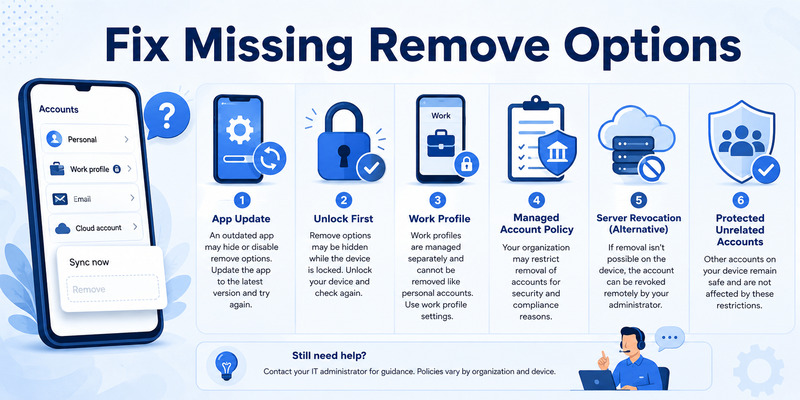
Install the latest supported Authenticator version and phone operating-system updates. Restart the phone, unlock Authenticator fully, and check App Lock. Confirm sufficient storage and that no screen overlay or accessibility issue blocks the menu.
When there is no option to remove account from microsoft authenticator, open the full account details rather than pressing the tile briefly. Menu placement differs across versions. Work-profile or device-managed entries may expose fewer local controls.
Diagnose account ownership and app state
A grayed or inactive account can be created by another app for single sign-on and may not require local management. A work account can be controlled by policy. A restored Action required entry may need sign-in before its state is clear.
Do not clear storage or uninstall just because the Remove option is absent. That can delete unrelated TOTP entries. Verify backup, recovery-account access, and provider recovery for every account first.
If a tile remains unresponsive, record the app version, OS, account type, profile, and screen state. Use Authenticator’s feedback path or official support. For work devices, include Company Portal and compliance status.
Meanwhile, remove or disable the server-side method through the provider if access allows. Server revocation can achieve the security goal even when the local microsoft authenticator remove account control is unavailable.
After server revocation, a stuck local tile may be treated as residual display data rather than active access. Preserve all unrelated credentials, report the app issue, and defer a full reinstall until every account has a verified backup or provider recovery route.
🗺️ Browse How-To Guides: Microsoft Authenticator: Complete Setup, Login, Backup & Troubleshooting Guide
7. Recover an Account Removed by Mistake
Determine what was deleted
If only the local tile was removed, the provider may still expect the old secret. If the server method was removed, the online account may remain accessible through another factor. If the entire app was deleted, multiple local credentials may be affected.
After an accidental microsoft authenticator remove account, do not create random duplicate tiles. Use a recovery code, security key, alternate factor, trusted session, another device, recovery email or phone, or provider recovery.
Rebuild the credential through the provider
Open the official security page, add a new authenticator method, and scan the freshly issued QR. Complete the provider’s first-code or push test, then perform a separate signed-out login. An account name alone cannot recreate a deleted third-party TOTP secret.
If a compatible cloud backup exists, restore according to Microsoft’s platform rules. Android backups restore to Android and iOS backups to iOS. Work, school, and passwordless accounts may still require sign-in or re-registration.
For managed identities without another factor, contact the administrator. They may reset methods or issue a temporary credential. Consumer support cannot bypass another organization’s tenant policy.
Finish by generating new recovery codes, testing an independent factor, reviewing activity, and documenting the new registration date. Recovery closes an accidental delete account from microsoft authenticator incident only after provider validation.
8. Retire a Phone and Clean Up Old Registrations
Migrate before deleting
Back up supported accounts, enroll or restore the replacement phone, complete Action required entries, and test every provider. Cross-platform moves require service-by-service enrollment rather than direct restore.
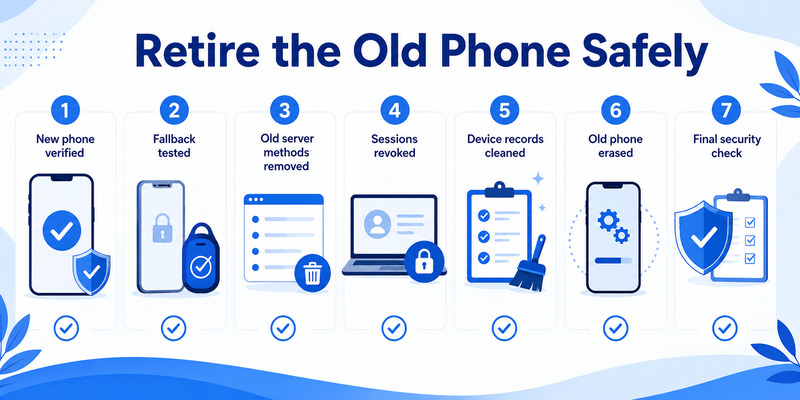
For phone retirement, the microsoft authenticator remove account order is: verify new phone, verify fallback, remove old server methods, revoke old sessions, remove old device records, delete local tiles, and finally factory-reset the old device.
Audit after retirement
Review each provider’s security methods and registered devices. Confirm only intended phones, keys, passkeys, and recovery routes remain. An old device name can represent a phone registration, passwordless credential, managed device object, or remembered session; remove the correct object.
Monitor account activity for unexpected approvals or sign-ins. A prompt on the new phone that you did not initiate may indicate password compromise, not a migration error. Deny it and secure the account.
Keep a migration inventory without codes or QR secrets. Record provider, username, new method tested, fallback tested, old method removed, sessions revoked, and old phone erased.
The microsoft authenticator change phone guide provides complete migration detail. A phone-retirement microsoft authenticator remove account process should leave no dependency on the erased device and no unnecessary registration behind.
🧭 Explore Guides: How to Use Microsoft Authenticator: Complete Guide
Does removing an account from Authenticator delete the online account?
No. It generally removes the local app entry, not the provider’s email, social, cloud, or work account. Use the provider’s account-closure flow if you intend to delete the online account itself.
Will deleting the tile stop push notifications?
Not always. Push may continue while the server still registers the phone. Remove the old Authenticator method or device through provider security information after testing a replacement.
Why is there no Remove option?
The control may be inside account details, the app may need updating or unlocking, the entry may belong to another profile or SSO app, or organization policy may manage it. Do not clear all app data casually.
Can I restore an account deleted by mistake?
Restore a compatible backup when available or use provider recovery to issue a fresh authenticator credential. The account label alone cannot recreate a deleted TOTP secret.
Should I remove the old phone before adding the new one?
No. Add or restore the new phone, test it and a fallback, then remove the old server registration. Keep the source phone until migration is verified.
How do I remove a work or school account?
Use the organization’s Security info and device-management process. Local removal may not delete tenant methods or managed device records. Contact the help desk if policy blocks cleanup.
10. Final Thoughts
A safe microsoft authenticator remove account procedure starts by identifying the desired scope. Local tile deletion, server-method revocation, device retirement, and online account closure are different actions.
Test independent recovery before deleting anything. Add and verify a replacement method first whenever possible, then remove the obsolete server record and confirm it no longer authorizes sign-in.
For work, school, guest, and managed identities, track the tenant and let administrators handle policy-controlled methods or devices. Missing local controls do not justify clearing all app data.
If deletion was accidental, recover through the provider or compatible backup and issue a fresh credential. Test both normal sign-in and fallback before closing the incident.
For compatible services, evaluate a reputable Authenticator App by publisher, secure storage, backup behavior, recovery, and export policy. Complete microsoft authenticator remove account with provider-side proof, clean device records, current recovery codes, and no reliance on the deleted credential.
Finish with a signed-out acceptance test and a recovery test. Confirm the replacement method works, the old phone receives no request, the obsolete TOTP is rejected, and active sessions are expected. Document the outcome without secrets. When those checks pass, microsoft authenticator remove account is complete rather than merely hidden from the phone screen.
Download Authenticator App
Secure your accounts with fast, reliable two-factor authentication. Download now and protect your login in seconds.
