
Why Is My Microsoft Authenticator Not Working? Fixes
If you are asking why is my microsoft authenticator not working, begin with the exact symptom. An app that will not open, a missing push, a rejected six-digit code, a sign-in loop, a failed restore, and an organization policy block have different causes and fixes.
Preserve access before changing anything. Do not uninstall, clear app data, or remove the account until a backup, recovery code, security key, alternate factor, trusted session, or administrator reset is available.
This guide provides a symptom-first sequence for app startup, notifications, codes, loops, new phones, passkeys, managed accounts, and safe recovery.
1. Identify the Exact Authenticator Failure
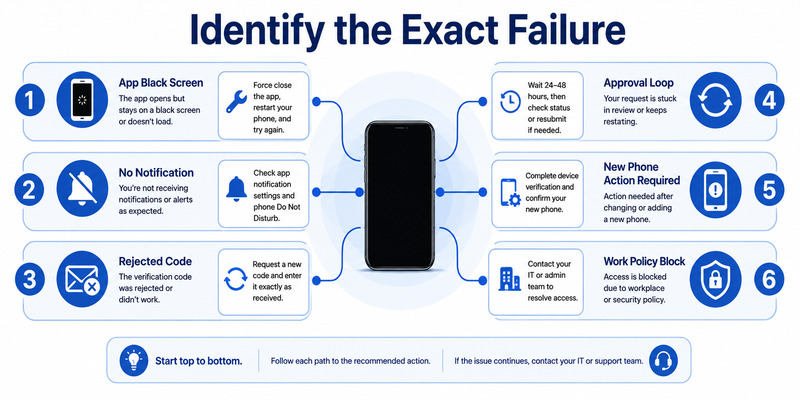
Describe what fails and where
Record the account, provider, phone model, operating system, Authenticator version, network, time, and exact prompt. Note whether the failure occurs before the app opens, during account selection, after approval, or when the provider validates a code.
The answer to why is my microsoft authenticator not working becomes clearer when the problem is observable. “Not working” can mean a black screen, crash, hidden tile, no notification, expired prompt, wrong method, server error, or access denied by policy.
Use a symptom map
| Symptom | Likely layer | Safe first check |
|---|---|---|
| App crashes or stays black | App or phone OS | Update, restart, storage, supported OS |
| No push notification | Network or notification channel | Open app, permissions, Wi-Fi/mobile data |
| Six-digit code rejected | Time, tile, or enrollment | Automatic time, fresh code, correct account |
| Approval succeeds but login repeats | App session or policy | Close duplicates, test supported browser |
| New phone shows Action required | Incomplete restore | Sign in or re-register credential |
| Work account says blocked | Tenant policy or compliance | Capture error and contact administrator |
Test one controlled sign-in from an official provider page. Close other login windows first. This removes duplicate transactions and shows whether the phone receives one expected request.
Do not approve an unsolicited prompt while testing. Deny it, protect the account, and review activity. Unauthorized sign-in attempts are security incidents, not ordinary microsoft authenticator problems.
Write one sentence that completes “why is my microsoft authenticator not working?” with the observable failure, such as “the app opens, but one work account receives no push.” That precision selects the right branch and prevents unrelated resets.
💡 Discover Helpful Guides: Microsoft Authenticator Passwordless Sign-In: Complete Guide
2. Fix App Startup, Black Screen, and Freezing
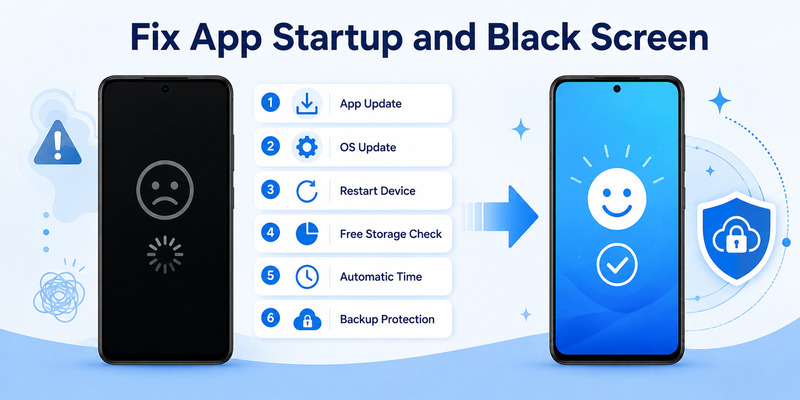
Refresh the supported environment
Update Microsoft Authenticator through the official app store and install current phone operating-system updates. Microsoft advises using a current app version. Restart the phone, confirm sufficient free storage, and enable automatic date, time, and time zone.
When why is my microsoft authenticator not working refers to a black screen or freeze, force-close and reopen the app once. Disable screen overlays or accessibility tools temporarily only if they interfere, and re-enable required security controls after the test.
Preserve data before deeper repairs
Check whether the phone is rooted, jailbroken, in an unsupported state, or restricted by device management. Microsoft introduced root or jailbreak detection for certain work or school credentials, and an administrator may require a compliant device.
Do not clear storage or uninstall as an early fix. Those steps can delete local TOTP secrets. Verify cloud backup, recovery-account access, provider recovery codes, and a second factor first. A current backup does not guarantee every work or passwordless credential will restore.
If the app continues crashing, capture the time, OS, version, available storage, and what appeared before failure. Use Authenticator’s feedback path when accessible or the official support route. For a managed phone, include Company Portal and compliance status.
An operating-system or app repair answers why is my microsoft authenticator not working only if a controlled login succeeds afterward. Opening the app is necessary but not sufficient evidence that its credentials work.
After the app starts normally, test a low-risk account first and then the affected identity. If the failure remains account-specific, stop changing the phone environment. The question why is my microsoft authenticator not working has moved from the app layer to registration, provider, or policy.
Download Authenticator App
Secure your accounts with fast, reliable two-factor authentication. Download now and protect your login in seconds.
3. Restore Notifications and Push Approval
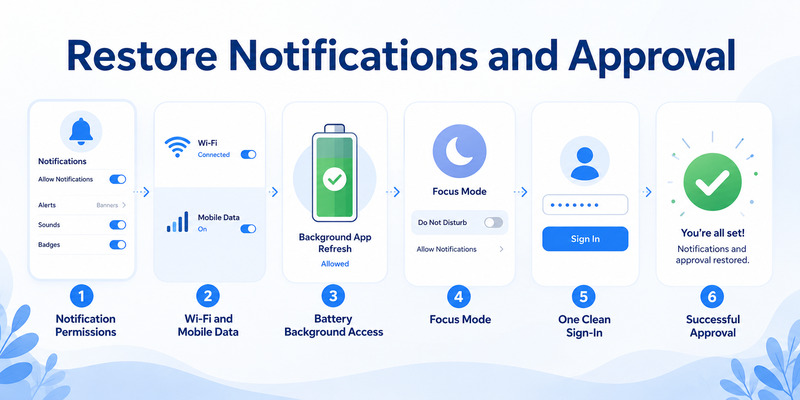
Check notification delivery
Enable Authenticator notifications in the phone settings and in the app. Check sound or vibration, Do Not Disturb, Focus or Quiet modes, background data, and battery optimization. Microsoft specifically recommends allowing notifications and disabling restrictive battery optimization where applicable.
If why is my microsoft authenticator not working means no push arrives, open the app directly. Switch once between trusted Wi-Fi and mobile data, disable airplane mode, and temporarily disconnect a VPN to isolate network routing. Then initiate one clean sign-in.
Separate delayed from missing requests
Old pushes may arrive after network recovery and look like duplicates. Cancel every browser request, let pending notifications expire, and start a new transaction. Compare the account, application, number, and approximate location before approving.
If only one account lacks notifications while others work, its server registration may be stale. Preserve a fallback, remove and add only the affected method through the provider’s security page, and complete a test approval. Do not delete the local tile first.
If no applications receive notifications, the problem likely belongs to phone permissions, the platform push channel, connectivity, or the app. If many users fail simultaneously, an administrator should review service health and recent policy changes.
Record whether opening Authenticator manually reveals a pending request. That detail helps answer why is my microsoft authenticator not working: a hidden pending request suggests notification delivery, while no request suggests server registration or the initiating client.
Unexpected notifications require denial and account containment. Never approve to make them stop. The microsoft authenticator keeps asking for approval guide covers repeated-request incidents in depth.
🧭 Explore Guides: Microsoft Authenticator Extension: Safe Browser Guide
4. Correct Rejected Verification Codes
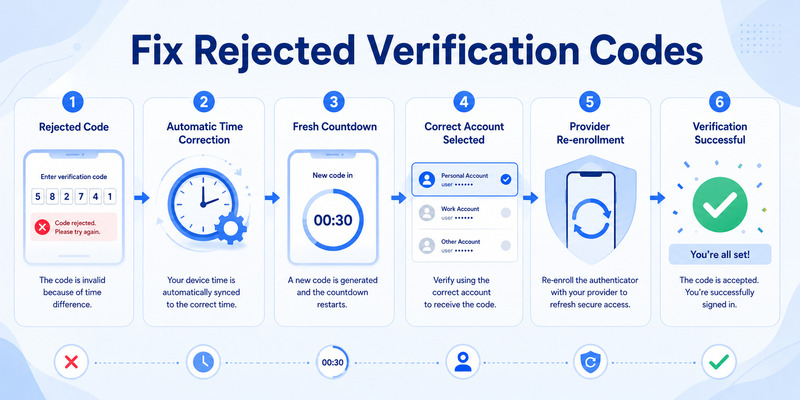
Verify time and account selection
Enable automatic date, time, and time zone, then restart the phone. Wait for a fresh code and enter every digit, including a leading zero. Make sure the provider asks for an authenticator-app code rather than SMS, email, recovery code, or number matching.
When why is my microsoft authenticator not working describes rejected TOTP, compare the full username and provider label. Duplicate tiles often represent old and new secrets; only the entry tied to the current server registration will validate.
Replace stale enrollment safely
A visible code proves the phone can calculate a value, not that the provider expects the same secret. If automatic time and the correct tile do not help, the enrollment may have been replaced, deleted server-side, or restored incorrectly.
Secure another factor or trusted session. Open the provider’s official security settings, add a fresh authenticator credential, scan the new QR, and verify the first code. Test a signed-out login before removing the old method or tile.
Never share a live code, manual secret, or QR with a caller or message sender. Phishing pages can relay a current code in real time. If a code was entered on an untrusted page, change the password, revoke sessions, and review security information.
Use the microsoft authenticator verification code guide for code-specific diagnostics. Correct time plus a provider-confirmed secret resolves the verification-code branch of why is my microsoft authenticator not working.
5. Escape Sign-In and Approval Loops
Create one clean transaction
Close duplicate browser tabs and sign-in windows. Exit desktop mail, collaboration clients, VPN software, and other applications that may retry an expired token. Open a supported, updated browser in a private window and start one official login.
If why is my microsoft authenticator not working means approval returns to the same prompt, compare the number and account, approve once, and record the browser’s final error. A successful phone response can still be followed by a device, risk, or policy requirement.
Isolate the requesting client
Reopen applications one at a time. If prompts resume with one client, sign out of only that account, update the client, and reauthenticate. Damaged cookies, unsupported embedded browsers, privacy restrictions, clock errors, or token-broker state can prevent session storage.
For work accounts, Conditional Access may require MFA more frequently, a compliant device, a permitted location, or stronger authentication. Users cannot fix those conditions by approving repeatedly. Administrators should correlate the timestamp with sign-in logs and policy results.
| Loop pattern | Likely source | Next action |
|---|---|---|
| One app only | Client token or cache | Update, sign out, clean reauthentication |
| Every browser on one phone | Device or broker | Check time, registration, compliance |
| Every device for one user | Identity policy or risk | Review sign-in logs and methods |
| Many users at once | Service or policy change | Administrator checks health and changes |
Preserve the functioning factor until the loop cause is known. Reinstalling Authenticator rarely repairs a server-side session or policy failure.
If the private-browser test succeeds but one application loops, the answer to why is my microsoft authenticator not working is probably that client session, not Authenticator. Repair the smallest affected scope and preserve other working tokens.
6. Repair Authenticator After a New Phone
Understand restore limits
Microsoft supports backup and restore within the same device type. Android backup restores to Android; iOS backup restores to iOS. Work, school, and passwordless entries may restore only the account name and show Action required.
If microsoft authenticator not working on new phone, confirm the recovery account or iCloud configuration, complete every Action required flow, and test a real provider login. Do not assume visible names represent functional push or passwordless credentials.
Re-register and retire the old phone
For cross-platform moves, add a fresh authenticator method at each provider. For work or school accounts, use the approved Security info page. Scan a newly issued QR and complete the server’s test request.
Keep the old phone and trusted sessions until the replacement works and a fallback succeeds. Then remove the old server registration, revoke stale sessions, and erase the retired phone. Deleting the mobile tile alone may not stop server push to the old device.
If the old phone is unavailable and no backup works, use provider recovery codes, a security key, alternate factor, trusted session, or administrator reset. Microsoft cannot recreate a third-party TOTP secret from its account name. This lost-device condition is a common answer to why is my microsoft authenticator not working on the replacement.
Follow the microsoft authenticator change phone procedure for detailed sequencing. New-device registration is the answer to why is my microsoft authenticator not working when the credential remains bound to the previous phone.
7. Handle Passkey, Work Account, and Policy Errors
Diagnose passkey failures
A passkey requires a supported device, browser or app, screen lock, and an eligible account. If “failed to add passkey” appears, record the exact error and confirm that the provider permits the requested authenticator or platform credential.
When why is my microsoft authenticator not working involves passkeys, do not confuse them with TOTP or push. Passkeys use cryptographic challenge-response and may be stored or managed outside the Authenticator flow depending on the platform and provider.
Escalate managed-account evidence
For a work or school identity, capture timestamp, username, tenant, phone OS, Authenticator version, network, device compliance, and full error. Do not include passwords, codes, QR secrets, or recovery codes.
Conditional Access, authentication methods policy, authentication strength, risk, device state, registration campaign, or location controls may block access. An administrator can inspect sign-in logs, authentication details, policy evaluation, and device records.
If re-registration is needed, secure another factor or Temporary Access Pass first. Remove only the broken method, enroll the current phone through Security info, and test normal and sensitive applications. Guest tenants may require separate enrollment.
Ask the administrator to state the failing control in the ticket. A policy name, device-compliance result, or authentication-method restriction gives why is my microsoft authenticator not working a specific answer and a responsible owner.
Rooted or jailbroken devices can be disallowed for work or school credentials. The appropriate fix is a supported, compliant device—not bypassing security checks. Policy explains some microsoft authenticator issues that cannot be solved inside the app.
💡 Discover Helpful Guides: Microsoft Authenticator Passwordless Sign-In: Complete Guide
8. Recover Safely Without Removing the Only Factor
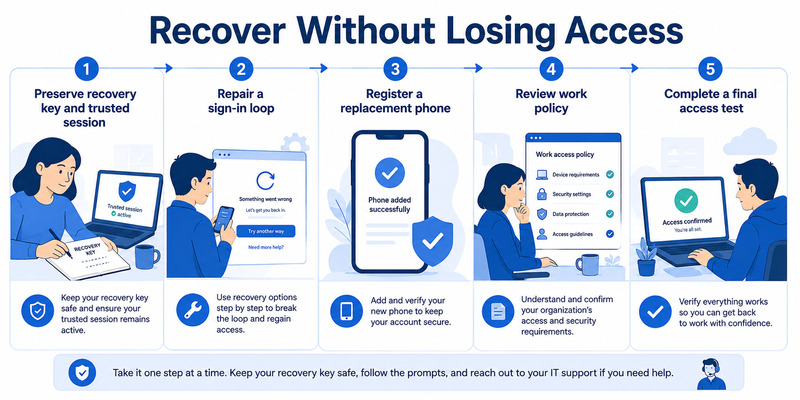
Preserve every remaining path
Inventory recovery codes, security keys, alternate email or phone, trusted sessions, a second registered device, and administrator assistance. Test one route that does not depend on the failing Authenticator instance before making destructive changes.
If why is my microsoft authenticator not working has already become a lockout, use the provider’s official recovery page. Start with email and password-manager access because they often unlock other accounts. Work users must use the organization’s published help desk.
Rebuild a resilient setup
After recovery, revoke lost devices and unfamiliar sessions, change passwords when compromise is possible, enroll the current phone, and generate fresh recovery codes. Add a phishing-resistant security key or passkey where supported. Record why is my microsoft authenticator not working in the recovery note along with the confirmed root cause.
Enable supported Authenticator backup and protect its recovery identity independently. Remember that backup is same-platform and may restore only names for some Microsoft or work credentials. Test the recovery design without erasing the production phone.
Document the final cause: app crash, notification permissions, time drift, stale enrollment, client loop, failed restore, policy, or compromise. Record the successful remedy and test result without secrets.
This disciplined closeout means the next why is my microsoft authenticator not working investigation begins with evidence and fallbacks, rather than risky trial and error.
9. Frequently Asked Questions
Why did Authenticator suddenly stop working?
An app or OS update, notification permission, network change, clock drift, replaced enrollment, expired session, phone migration, or organization policy can be responsible. Identify the exact symptom before applying a fix.
Should I reinstall Microsoft Authenticator?
Only after verifying a compatible backup and independent provider recovery. Reinstallation can delete local TOTP credentials and may not solve notification, server-registration, session, or policy problems.
Why does a code look correct but fail?
The phone clock may be wrong, the code may expire, the wrong tile may be selected, or the provider may expect a different secret. Use automatic time, a fresh value, and provider-side re-enrollment if needed.
Why does approval succeed but the website asks again?
Another window may have created a duplicate, the client may not save its token, or a later Conditional Access requirement may fail. Start one clean sign-in and record the final browser error.
What if Authenticator does not work on my new phone?
Complete same-platform restore and every Action required entry, or re-register each account. Push and passwordless credentials may remain tied to the old device until server security information is updated.
Is there a Microsoft Authenticator outage?
Check official Microsoft service health or your organization’s admin health dashboard for current incidents. If only one account or device fails, local registration, client, or policy is more likely than a broad outage.
🛠️ Learn with Step-by-Step Guides: Microsoft Authenticator App Not Showing Code: How to Fix It
10. Final Thoughts
The best answer to why is my microsoft authenticator not working starts with the symptom, not a reinstall. App startup, push, TOTP, session loops, restore, passkeys, and policy belong to separate diagnostic branches.
Use a current app and OS, correct time, working network, and verified notification settings. Create one controlled sign-in and protect the account if any request is unexpected.
Preserve a fallback before resetting credentials. After a phone change, complete restore or provider-side re-registration and test every important account before retiring the old device.
For work or school identities, exact timestamps and errors let administrators diagnose policy, compliance, and device registration. Security requirements cannot be bypassed by repeated approvals.
For compatible accounts, compare a trustworthy Authenticator App by publisher, secure storage, backup, recovery, and standards support. When why is my microsoft authenticator not working is resolved through evidence and provider validation, access returns without sacrificing recovery or security.
Finish with one signed-out acceptance test, one independent recovery test, and a review of security information and active sessions. Document the cause and final result without secrets. This closes why is my microsoft authenticator not working with verified access instead of assuming that a temporary prompt or app restart solved the underlying issue.
Protect your accounts with fast, secure two-factor authentication. Generate verification codes, manage multiple accounts, and keep your sign-ins protected wherever you go. Download Authenticator App Now
Download Authenticator App
Secure your accounts with fast, reliable two-factor authentication. Download now and protect your login in seconds.
