
Microsoft Authenticator Download: Safe Install Guide 2026
A safe microsoft authenticator download starts with the official Apple App Store or Google Play Store, not a third-party APK site, desktop installer, email attachment, or advertising link. Microsoft Authenticator is a mobile app for iOS and Android. Microsoft’s current support guidance says it is not available as a PC or Mac application.
Downloading is only the first step. You must verify the publisher, protect recovery access, add each account through its provider’s official security page, and complete server-side verification. Installing the app alone does not activate MFA or transfer credentials from an old phone.
This guide explains the safe Android and iPhone routes, managed-device considerations, initial setup, updates, and common download failures. It also shows how to avoid fake apps and lockout during migration.
1. Choose the Official Download Route
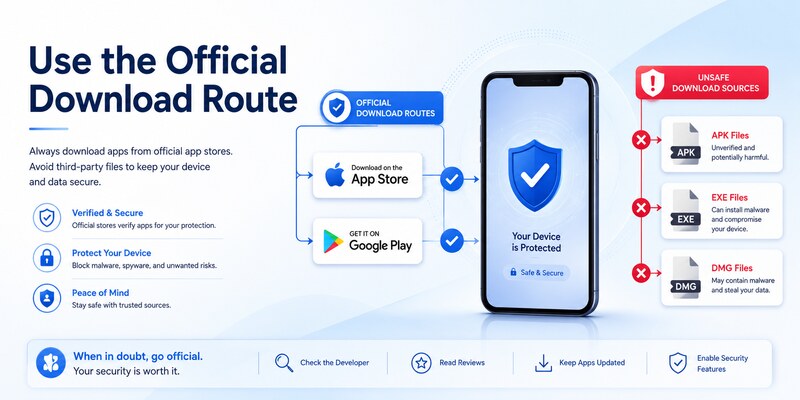
Use a trusted store or Microsoft’s official page
Begin microsoft authenticator download from Microsoft’s official Authenticator download page, the Apple App Store, or Google Play Store. On a phone, Microsoft also directs users through its official mobile Authenticator address. Type the known address yourself or reach it from Microsoft Support rather than following an unexpected message.
| Device | Approved route | Avoid |
|---|---|---|
| Android phone or supported tablet | Google Play Store or managed organization store | Random APK repositories and file-sharing links |
| iPhone or supported iPad | Apple App Store or managed organization catalog | Configuration profiles from unknown websites |
| Managed mobile device | Organization portal or IT-approved store path | Personal installation that bypasses policy |
| Windows PC or Mac | Use a supported phone; manage setup in a browser | Sites offering a desktop Authenticator installer |
Understand what you are downloading
Authenticator can hold verification codes for Microsoft and third-party accounts, receive approval notifications, and support passwordless or passkey-related sign-in experiences where available. It is not a general desktop password manager. Microsoft retired Authenticator autofill in July 2025 and made stored passwords unavailable in the app from August 2025, so a current microsoft authenticator download should not be presented as a password-autofill solution.
Microsoft’s support page also states that Authenticator versions more than one year old are no longer supported. Install the current store version and keep automatic updates enabled where your organization permits.
Users in China should follow Microsoft’s dedicated regional download instructions because store availability and push behavior can differ. Do not solve a regional availability problem by obtaining an unverified package.
These source checks make microsoft authenticator download both safer and easier to support later.
🧭 Explore Guides: Microsoft Authenticator Unable to Add the Account: Easy Fix it
2. Prepare Your Phone Before Installation
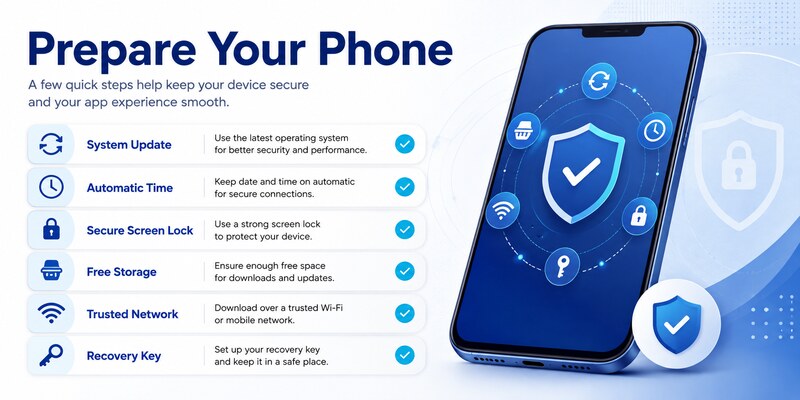
Protect existing recovery paths
Before microsoft authenticator download, confirm that you know the passwords for the accounts you will add and possess an independent recovery method. Keep the old phone, trusted browser sessions, recovery codes, security keys, or administrator-assisted access until the new phone has passed a signed-out test.
If this is a migration rather than a first installation, verify backup status on the old phone. A compatible restore can help on the same platform, but work, school, and passwordless entries may still require re-registration. The microsoft authenticator backup guide explains what backup can and cannot restore.
Check device readiness
Update the operating system, enable a secure screen lock, confirm device encryption, free storage, and use a trusted network. Set date, time, and time zone to automatic. Accurate time is essential for time-based one-time passwords.
Make sure the phone has access to its official app store and that the store account is controlled by you. For a managed device, confirm whether the app must be delivered through Company Portal, Managed Google Play, Apple Business Manager, or another organization catalog.
Do not delete Authenticator from an old phone merely because the new microsoft authenticator download has completed. A newly installed app contains no usable provider credentials until accounts are restored or enrolled and verified.
Create a non-secret migration checklist with provider name, username, tenant, old device, new method, test result, and old method removed. Never record QR images, manual TOTP keys, passwords, live codes, recovery codes, or approval numbers.
3. Download Microsoft Authenticator on Android
Install from Google Play
Open Google Play on the Android device and search for Microsoft Authenticator. Confirm the app title and Microsoft publisher shown by the store. Review the listing, then select Install. Open the app from the store page or the device launcher after installation finishes.
For microsoft authenticator download, do not accept an APK delivered by email, messaging, a pop-up, or an unofficial download portal. Sideloaded packages can be outdated, modified, or designed to steal QR secrets and approval information. A security app deserves a stricter source check than an ordinary utility.
Handle managed Android devices
If the phone has a work profile, the organization may publish Authenticator in Managed Google Play. Install the work-profile copy when policy requires it. A personal-profile copy may not receive organization enrollment handoffs or satisfy compliance rules.
After download microsoft authenticator app completes, grant permissions only when the related feature needs them. Camera access is used to scan setup QR codes. Notifications support approval requests. Background or battery settings may affect timely push delivery. Authenticator should never need you to send a password or live verification code to a support agent.
If Play Store says the app is unavailable, check the device’s Android version, region, account restrictions, parental controls, storage, certification, and organization policy. Update Google Play services and restart the phone. For China, use Microsoft’s official regional instructions.
Complete the Android microsoft authenticator download by checking for an Update button, opening the app, and confirming that its settings page displays a current version. Installation success does not yet mean any account is protected; enrollment comes later.
🗺️ Browse How-To Guides: Microsoft Authenticator Recovery: Regain Access Safely
4. Download Microsoft Authenticator on iPhone or iPad
Install from the Apple App Store
Open the App Store and search for Microsoft Authenticator. Check that the listing is the official Microsoft app, then select Get and approve installation with the Apple account’s normal device authentication. Open it from the App Store page or Home Screen.
A legitimate microsoft authenticator download does not require a separate configuration profile, desktop package, or payment. Avoid websites that ask you to trust an enterprise developer, install an unknown profile, or enter an Apple password outside the App Store flow.
Configure iOS permissions deliberately
Allow camera access when you are ready to scan an enrollment QR code. Enable notifications for approval requests and review Focus settings if time-sensitive prompts are hidden. Background operation and network access must be available for reliable push behavior.
For a managed iPhone or iPad, the organization may install Authenticator through its management system or direct you to a managed App Store listing. Follow that path so application protection, account handoff, and Conditional Access behave as designed.
If microsoft authenticator app download is blocked, review iOS version, App Store region, Screen Time restrictions, device storage, Apple account state, and mobile-device-management policy. Restart after updates and retry from a trusted network.
After installation, keep iOS and Authenticator current. Microsoft says versions older than one year are unsupported. A current microsoft authenticator download reduces compatibility and security problems but still requires provider-by-provider enrollment and verification.
5. Verify the App Before Opening It
Confirm identity and source signals
Before entering account information, return to the store listing and verify the app name, Microsoft publisher, store domain, update status, and expected permissions. Check the icon and screenshots as supporting signals, but do not rely on appearance alone because fake apps can copy visual branding.
For microsoft authenticator download, the strongest practical source signal is that installation came directly through the official operating-system store or an authorized organization catalog reached from Microsoft or IT guidance. Search advertisements and sponsored results are not proof of authenticity.
Recognize suspicious download behavior
Stop if a site offers an EXE, DMG, browser extension, ZIP, mobile configuration profile, or APK as Microsoft Authenticator for ordinary use. Microsoft’s official download guidance identifies iOS and Android mobile versions and states that the app is not available for PC or Mac.
Also stop if the installer or “support” asks for a password, recovery code, QR screenshot, manual setup key, live one-time code, or approval number. Store installation does not require those account secrets. QR codes are used later between you and the provider’s official enrollment page.
If you previously installed a questionable copy, do not enter credentials. Remove it according to device guidance, run the platform’s security checks, change exposed account passwords from a known-clean device, revoke sessions, and review authentication methods. Notify organization security for a work device.
A verified download microsoft authenticator package is the foundation for every later step. Do not trade that verification for convenience, especially when a search result promises a desktop edition or preconfigured account.
6. Complete First Launch and Add an Account
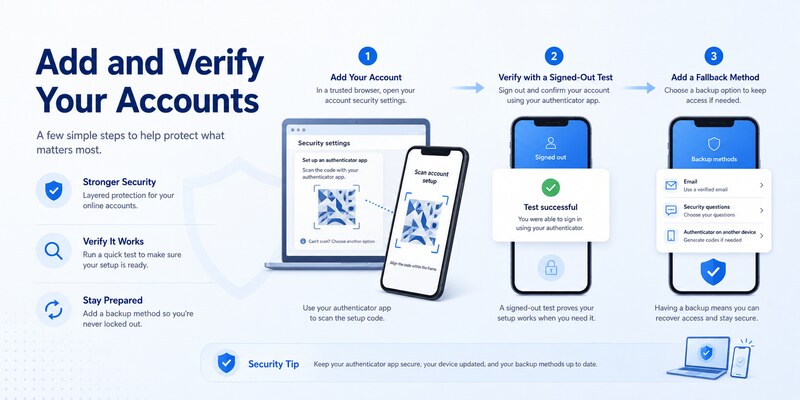
Configure the app without exposing secrets
Open Authenticator, review the privacy information and settings, and enable App Lock when appropriate. Decide whether to enable cloud backup using the correct recovery identity. Backup is not a substitute for provider recovery codes or a second strong factor.
After microsoft authenticator download, add an account from the provider’s official security page. Choose personal Microsoft, work or school, or other account as appropriate. Generate a fresh QR code and scan it directly. Never reuse a QR screenshot stored in email, notes, photos, or chat.
Complete provider-side verification
For TOTP, enter a fresh code on the provider page. For Microsoft push, approve the test and complete number matching if requested. Finish every confirmation before closing the browser. A visible tile in Authenticator does not prove the server accepted the new credential.
Perform a signed-out login in a private browser and test an independent fallback. Then save fresh recovery codes securely and remove obsolete device registrations only after the new method works. The full microsoft authenticator setup guide covers account enrollment in detail.
If microsoft authenticator download followed a phone change, migrate providers one at a time. Push, TOTP, passwordless, and work-account registrations may require different actions. Follow microsoft authenticator change phone before erasing the old device.
The installation is complete only when the app, server registration, signed-out login, fallback, and recovery plan have all been verified.
That acceptance test is the practical finish line for microsoft authenticator download.
7. Install for a Work or School Account
Follow the organization’s approved route
An employer or school may require microsoft authenticator download through Company Portal, Managed Google Play, an Apple managed-app catalog, or a documented public-store link. Use the organization’s instructions because app protection and device compliance can depend on the correct profile and management channel.
Keep the setup browser open on a trusted device, install Authenticator on the phone, and return to the official Security info workflow. Add the work or school account, scan the fresh QR code or use the approved sign-in flow, and complete the test request.
Respect tenant and authentication policy
Microsoft Entra policy can require Authenticator, number matching, passwordless sign-in, a phishing-resistant method, a compliant device, or an approved location. Installing the app cannot bypass Conditional Access, authentication strength, risk, or device-compliance requirements.
If microsoft authenticator app down is suspected because enrollment or push fails, first check whether other apps and existing TOTP codes work. Record the exact error, time, tenant, device model, OS, app version, network, and failing step. Contact the published help desk rather than reinstalling repeatedly.
An administrator may need to reset an incomplete method, require MFA re-registration, issue a Temporary Access Pass, or correct policy. Never send IT a password, live code, QR image, manual key, recovery code, or approval number.
After managed microsoft authenticator download and enrollment, test a normal Microsoft 365 app and a resource that triggers the relevant policy. Confirm that prompts reach the intended device and remove the retired phone through the approved process.
Document the approved microsoft authenticator download route so future device replacements follow the same policy.
🗺️ Browse How-To Guides: Microsoft Authenticator App Not Showing Code: How to Fix It
8. Update or Repair a Download Problem
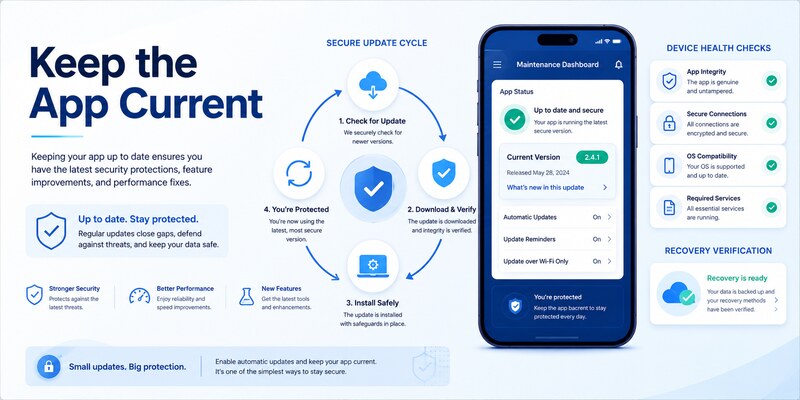
Fix store and installation failures
If microsoft authenticator download will not start, verify storage, network, store sign-in, operating-system support, region, parental controls, device certification, and management policy. Restart the phone, update the app store and operating system, and try one trusted network change.
Do not clear the existing Authenticator app’s data or uninstall it just to fix a store update. Those actions can remove local credentials. Confirm cloud backup, provider recovery, trusted sessions, and independent factors for every account before any destructive repair.
Diagnose app or service symptoms
An app that opens but cannot add one account usually has an enrollment or provider problem, not a download failure. A missing push can involve notification permission, background restrictions, network filtering, stale server registration, or organization policy. Existing TOTP codes can continue working during a push-service issue because they are generated locally.
For microsoft authenticator app down, compare behavior across networks and accounts, check official Microsoft service information where relevant, and capture timestamps. Avoid status websites or social posts as the only evidence for a security decision.
If the installed version is over a year old, update it because Microsoft no longer supports such versions. For regional or China-specific availability, use Microsoft’s dedicated instructions instead of an unofficial package.
Close the repair with a version check, signed-out login, fallback test, security-method review, and backup confirmation. A successful microsoft authenticator download means the current official app is installed and every required account works—not merely that an icon appears on the phone.
9. Frequently Asked Questions
Where should I download Microsoft Authenticator?
Use Microsoft’s official download page, Apple App Store, Google Play Store, or an organization-approved managed catalog. Avoid third-party APK sites, advertisements, email attachments, and desktop installers.
Is Microsoft Authenticator available for Windows or Mac?
Microsoft’s official support guidance says Authenticator is not available for PC or Mac. Use the supported mobile app on iOS or Android and complete account setup through the provider’s browser page.
Is Microsoft Authenticator free?
The official mobile app can be installed without an app purchase. Mobile data, device, organization, or account-service costs may still apply. A site demanding payment for an Authenticator installer is a warning sign.
Does installing the app automatically add my accounts?
No. Restore a compatible backup or enroll each account through its provider’s official security settings. Work, school, and passwordless entries may require re-registration even after restore.
Can I download an APK if Google Play is unavailable?
Do not use an unverified APK source. Follow Microsoft’s official regional instructions or your organization’s managed distribution path. This is especially important for a security app that handles enrollment secrets.
Why can’t I find Authenticator in my app store?
Possible causes include unsupported OS, region, store account restrictions, parental controls, device certification, management policy, or China-specific availability. Update the device and consult official Microsoft or organization guidance.
Should I keep automatic updates enabled?
Yes, when policy permits. Microsoft states that Authenticator versions older than one year are unsupported. Current software reduces security, compatibility, and enrollment problems.
What should I do after installation?
Enable device protection, add accounts through official provider pages, finish server verification, test a signed-out login and fallback, save recovery codes, and remove obsolete methods only after success.
These answers cover the most common questions that follow microsoft authenticator download without encouraging unsafe packages or incomplete enrollment.
🧭 Explore Guides: How to Disable Microsoft Authenticator: Safe Step-by-Step Guide
10. Final Thoughts
The safest microsoft authenticator download comes from Microsoft’s official route, Apple App Store, Google Play Store, or an authorized organization catalog. Verify the publisher and platform before opening the app, and reject third-party packages, desktop installers, unknown profiles, and requests for authentication secrets.
Prepare recovery before installation, especially during a phone change. Keep the old device and trusted sessions until the new app, provider registration, signed-out login, and independent fallback all work. Installing an icon is not the same as activating a verified method.
Use the current mobile version, keep the operating system updated, and remember that Microsoft does not offer Authenticator as a PC or Mac app. Users in China and managed organizations should follow their dedicated official distribution instructions.
After microsoft authenticator download, enroll each account at its original provider, protect QR secrets, save recovery codes, and remove stale devices only after testing. Visit Authenticator App for additional setup, migration, backup, and troubleshooting guidance.
A careful download and verification process prevents fake-app exposure, avoids lockout, and gives every later authentication step a trustworthy foundation.
Review the app version and recovery design after major phone or policy changes. A short signed-out test confirms the installation still supports real access, while a separate recovery factor protects you if the phone becomes unavailable. This ongoing check keeps microsoft authenticator download useful, current, and recoverable.
