
Microsoft Authenticator Unable to Add the Account: Easy Fix it
The message microsoft authenticator unable to add the account can appear before a QR code is scanned, immediately after scanning, during a push test, or after an apparently successful restore. Each stage points to a different cause: an expired enrollment session, wrong account type, network block, clock problem, stale server registration, organization policy, or unsupported device state.
Do not delete existing working accounts or repeatedly scan new QR codes. Preserve a trusted session and an independent recovery method first. Then isolate the failing layer and run one clean enrollment from the provider’s official security page.
This guide covers personal Microsoft accounts, Microsoft 365 work or school accounts, and third-party TOTP providers. It also explains what evidence to collect when administrator or provider support is required.
1. Identify Which Add-Account Step Is Failing
Record the exact stage and account type
When microsoft authenticator unable to add the account appears, note whether the failure happens while choosing an account type, opening the camera, scanning the QR code, saving the tile, approving the first test, or signing in afterward. Also record whether the identity is personal Microsoft, work or school, or another provider.
| Failure point | Likely layer | First check |
|---|---|---|
| Camera will not open | Permission or device restriction | Camera permission and managed profile |
| QR is not recognized | Wrong QR, damaged display, or expired session | Generate one fresh enrollment QR |
| Account saves but code fails | Time, stale secret, or wrong tile | Automatic time and clean re-enrollment |
| Push test never arrives | Server registration, notifications, or network | Security method list and notification access |
| Organization rejects setup | Entra policy, license, risk, or device compliance | Official Security info page and help desk |
| Restore shows Action required | Device-bound credential needs re-registration | Complete provider-side enrollment |
Preserve the exact error instead of guessing
Capture the error text, timestamp, Authenticator version, phone model, operating system, network, username, and tenant name. Do not capture the QR code, manual secret, live one-time code, password, recovery code, or approval number. Those values can grant access and should never be placed in a ticket or chat.
The wording unable to add the account microsoft authenticator is a symptom, not a diagnosis. If only one provider fails while existing accounts work, avoid clearing app data or reinstalling the app. If every account fails, investigate the device, app, network, storage, time, and operating system before changing provider settings.
A precise timeline turns microsoft authenticator unable to add the account from a vague app problem into a specific enrollment-stage failure that can be tested safely.
Download Authenticator App
Secure your accounts with fast, reliable two-factor authentication. Download now and protect your login in seconds.
2. Check the Phone, App, Network, and Time
Apply non-destructive device fixes
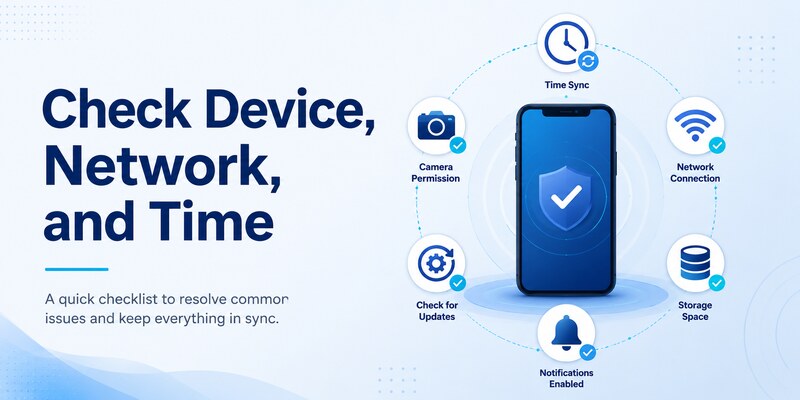
Update Microsoft Authenticator from the official app store and install supported operating-system updates. Restart the phone, confirm sufficient free storage, and enable automatic date, time, and time zone. TOTP verification depends on accurate time; even a small clock drift can make a newly scanned credential appear invalid.
For microsoft authenticator unable to add the account, review camera permission, notification permission, background activity, battery optimization, mobile-data access, and App Lock behavior. A camera restriction explains scan failures, while notification or background restrictions can allow enrollment but break its first push test.
Separate network failure from account failure
Switch once between a trusted Wi-Fi connection and mobile data. Disable a VPN, DNS filter, proxy, captive portal, or aggressive security filter temporarily only if policy allows, then retry through the provider’s official site. Do not weaken managed-device protections without administrator approval.
Set the default browser to a supported, updated browser and allow required cookies and redirects for the setup session. Close duplicate enrollment tabs. Private browsing can help isolate cached sessions, but organization policies may require the managed browser or device profile.
If microsoft authenticator unable to add the account occurs on a rooted, jailbroken, unsupported, or noncompliant phone, use a supported device. A reinstall cannot make an unsupported device satisfy an organization’s compliance policy.
Test only one meaningful change at a time and record the result. If existing codes and approvals still work, preserve them. The broader why is my microsoft authenticator not working guide helps when the entire app, rather than one enrollment, is failing.
This device-first review can resolve microsoft authenticator unable to add the account without risking credentials that already work.
🗺️ Browse How-To Guides: Microsoft Authenticator Recovery: Regain Access Safely
3. Start a Clean QR Enrollment
Generate one fresh enrollment session
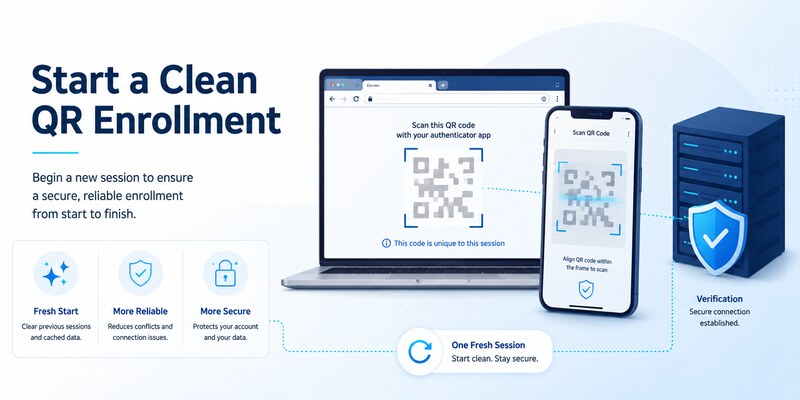
Sign in to the provider’s official security settings from a trusted computer or browser. Keep that session open, choose to add an authenticator method, and generate one new QR code. In Authenticator, select the correct account category and scan the code directly from the screen.
For microsoft authenticator unable to add the account, old screenshots and previously generated QR codes are common causes. Enrollment sessions may expire, and starting another session can invalidate the earlier code. Close duplicate tabs and use only the newest QR.
Complete server verification before leaving
Wait for a fresh six-digit value if TOTP is used, enter it on the provider’s page, and finish every confirmation step. For Microsoft push enrollment, approve the test and complete number matching if shown. Do not assume that a visible tile means the server accepted the credential.
If scanning fails, clean the camera lens, increase screen brightness, remove display zoom, and ensure the entire QR code is visible. Use the provider’s manual setup key only when it is officially offered; enter it on the phone without copying it into insecure notes. Treat that key like a password.
When microsoft authenticator unable to add the account persists after scanning, cancel the provider-side attempt, delete only the incomplete local tile, wait briefly, and start one new session. Repeatedly adding partially configured tiles makes it harder to identify the valid credential.
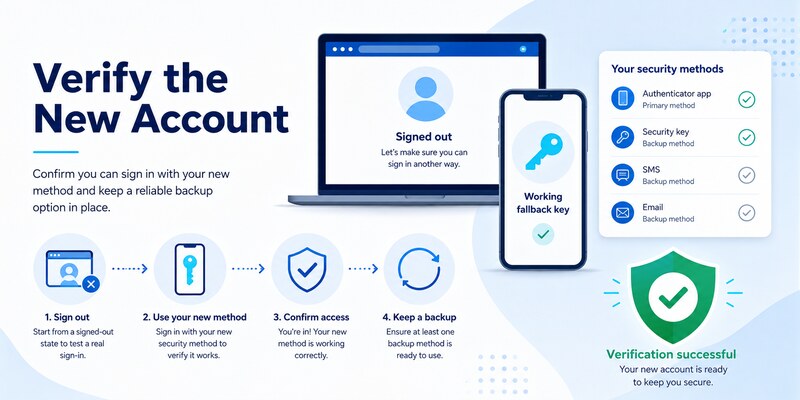
Follow the full microsoft authenticator setup sequence for a clean baseline. Finish with a signed-out test and an independent fallback before closing the trusted session.
4. Fix Personal Microsoft Account Enrollment
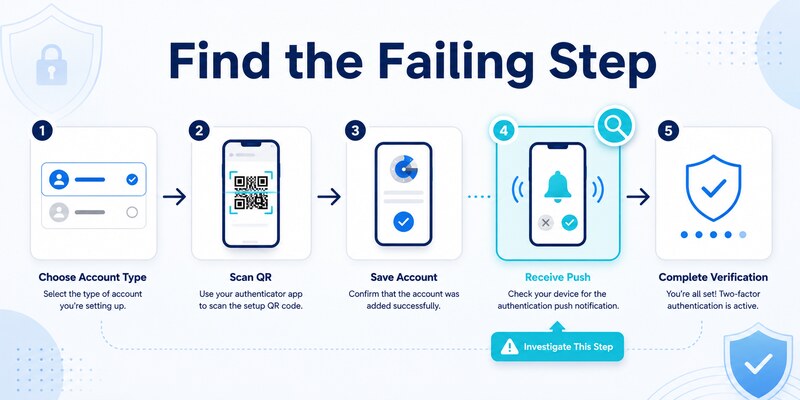
Verify identity and security-method status
For a personal Microsoft account, open the official Microsoft account security page and review the existing ways to prove identity. Confirm the username and alias being enrolled. An account can look similar to a work identity but use a different directory and setup path.
If microsoft authenticator unable to add the account occurs, remove only an incomplete Authenticator registration after confirming another factor works. Then add Microsoft Authenticator again from the security page rather than beginning from an arbitrary QR image or the app alone.
Resolve passwordless and alias conflicts
Phone sign-in and ordinary verification are related but distinct. Complete the basic Authenticator registration first; then enable passwordless phone sign-in if desired and supported. A device can show the account yet still need an additional passwordless registration.
Check whether a recent password reset, security-info change, alias change, or account-recovery action imposed a waiting period or extra verification. Keep the recovery email, phone, security key, or recovery code available. Avoid removing the last working method during that period.
When the app displays microsoft authenticator unable to add the account, try signing out of the browser setup session, starting a new private session at the official Microsoft URL, and generating one fresh registration. Do not use QR codes sent through email or support messages.
After enrollment, sign out and test the intended method. Review recent activity and remove obsolete phone registrations. A personal-account repair is complete only when the new method works, fallback access is confirmed, and the old or incomplete record no longer appears.
That final server check confirms microsoft authenticator unable to add the account has been repaired rather than temporarily hidden.
🗺️ Browse How-To Guides: Microsoft Authenticator App Not Showing Code: How to Fix It
5. Fix Work or School Account Enrollment
Use the correct tenant and Security info page
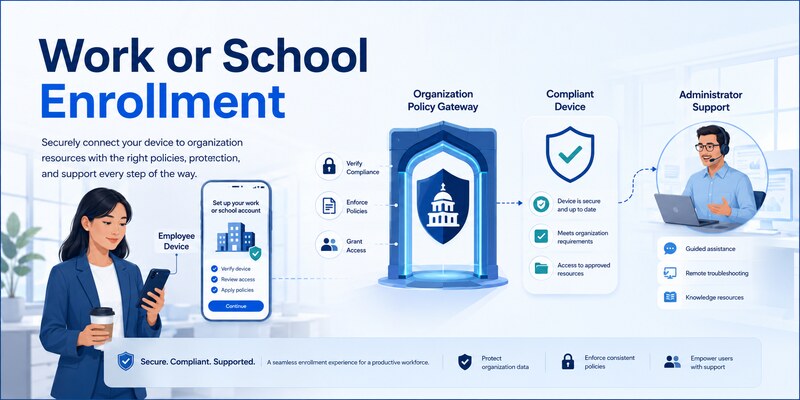
Work and school identities are managed in Microsoft Entra ID. Use the organization’s official Security info page and sign in to the correct tenant. A guest account can require a separate registration in each host tenant even when the same email address appears.
The error microsoft authenticator unable to add the account may result from authentication-method policy, Conditional Access, registration campaign, authentication strength, risk state, device compliance, location, or a stale method. Reinstalling Authenticator does not bypass those controls.
Ask an administrator for the specific reset
If self-service enrollment is blocked, contact the published help desk. Provide username, tenant, time, device model, OS, Authenticator version, network, exact error, and the stage that failed. An administrator can inspect sign-in and audit logs, delete an incomplete method, require MFA re-registration, reset passwordless phone sign-in, or issue a Temporary Access Pass if policy permits.
Never ask the administrator to disable security controls as a shortcut for microsoft authenticator unable to add the account. Request an approved enrollment path. SMS or voice may appear in settings yet fail a stronger authentication policy, so confirm which replacement methods are permitted.
Managed profiles can also restrict camera access, browser handoff, notifications, or app data. Use the organization-approved app instance and profile. If personal and work versions of Authenticator coexist, confirm which profile receives the enrollment link.
After repair, test a normal Microsoft 365 application and a resource that triggers the relevant Conditional Access policy. Record the successful test time and ticket number without secrets. That evidence helps the administrator close the server, device, and policy sides of the incident.
6. Resolve Third-Party TOTP Setup Problems
Confirm that the QR code is an authenticator secret
Microsoft Authenticator can scan third-party TOTP enrollment codes, but not every QR code represents an authenticator secret. A sign-in QR, payment code, device-pairing code, website link, or migration format from another app may be unsupported. Generate the code from the provider’s two-factor authentication settings.
When microsoft authenticator unable to add the account affects one third-party service, confirm that the provider expects a standards-based authenticator app. Choose “other account” in Authenticator unless the provider documents a different choice.
Correct secret, algorithm, and verification issues
Use automatic date and time, wait for a fresh code, and ensure the correct tile is selected. If the provider offers a manual key, type it exactly and choose the documented account type. Most consumer services use time-based codes, but some systems use different digits, periods, or algorithms that a generic app may not support.
If the first verification fails, cancel the setup at the provider, remove only the incomplete tile, and generate a new secret. Do not keep scanning new codes into multiple tiles. Existing recovery codes or trusted sessions should remain available throughout the repair.
The message unable to use microsoft authenticator app can also mean the provider restricts approved authenticators or requires its own application. Follow the provider’s official documentation rather than forcing an incompatible QR format.
Once the new code passes server verification, perform a signed-out login, save fresh recovery codes securely, and remove the old TOTP registration. For microsoft authenticator unable to add the account, successful local scanning is only halfway complete; provider-side acceptance is the authoritative test.
🧭 Explore Guides: How to Use Microsoft Authenticator: Complete Guide
7. Handle Duplicate, Restored, or Stale Registrations
Distinguish visible names from working credentials
A cloud restore can recover account names and some TOTP credentials, but work, school, and passwordless entries may show Action required and need re-registration. Duplicate tiles can represent different secrets, tenants, or enrollment attempts. Never assume two identical labels are interchangeable.
If microsoft authenticator unable to add the account appears after a phone migration, keep the old phone and trusted sessions until the replacement is tested. Resolve entries one provider at a time. Rename or document accounts outside the app using only non-secret identifiers such as tenant and username.
Clean up both server and phone records
Open the provider’s security-method list and identify current and old device registrations. Add or repair the new method, complete server verification, perform a signed-out test, and then remove obsolete registrations. Finally, delete the corresponding stale local tiles.
Removing a local tile first can destroy the only copy of a TOTP secret while the provider still expects it. Removing a server record first is safer only when a tested fallback and trusted session are available. The microsoft authenticator remove account guide explains this distinction.
For repeated microsoft authenticator unable to add the account errors, an administrator may need to remove a corrupt or stale work-account method and require re-registration. A user cannot reliably repair a server-side object by clearing app cache.
After cleanup, confirm that prompts reach only the intended phone, the new code verifies, fallback works, and old devices are absent. Do not erase or trade in the source phone until these checks pass.
Orderly cleanup prevents microsoft authenticator unable to add the account from returning through a stale registration.
8. Collect Evidence and Escalate Safely
Build a useful, secret-free incident record
If microsoft authenticator unable to add the account continues after a clean enrollment and non-destructive checks, record the provider, username, tenant, phone model, OS, Authenticator version, network type, time zone setting, exact time, error text, and failing stage. Include whether other accounts work and whether another device reproduces the issue.
Screenshots should exclude QR codes, manual keys, passwords, live verification codes, recovery codes, approval numbers, personal messages, and unrelated accounts. Redact device identifiers when they are not required by the authorized support team.
Route the case to the correct authority
| Account type | Correct escalation | Useful evidence |
|---|---|---|
| Personal Microsoft | Official Microsoft account support | Account alias, time, error, security-method state |
| Work or school | Organization help desk or identity administrator | Tenant, sign-in time, policy result, device compliance |
| Third-party TOTP | Original provider support | Setup stage, QR source, code format, server error |
| Managed device | Organization mobility team | Work profile, compliance, camera and network restrictions |
Avoid unofficial recovery services, remote-control offers, and anyone asking for live codes or QR images. Support cannot safely use those secrets to diagnose microsoft authenticator unable to add the account.
After a fix, run acceptance tests: signed-out login, independent fallback, old-method removal, session review, and recovery-code refresh. Document the result and root cause without sensitive values. If unexpected approval prompts or account changes occurred during troubleshooting, change the password, revoke sessions, and review recent activity.
A strong escalation record reduces repeated advice and lets the correct team inspect the server, policy, or device logs that the app itself cannot expose.
9. Frequently Asked Questions
Why does Authenticator say it cannot add my account?
Common causes include an expired QR session, wrong account type, blocked camera or network, incorrect phone time, duplicate registration, organization policy, unsupported device, or provider-specific QR format. Identify the exact failing stage before changing data.
Should I reinstall Microsoft Authenticator?
Only after verifying backup and independent recovery for every stored account. Reinstallation is a broad last resort and rarely fixes server policy, stale registration, or an expired enrollment session.
Can I reuse a screenshot of the QR code?
Do not rely on it. Enrollment QR codes contain sensitive secrets and sessions may expire or be invalidated. Generate one fresh QR on the provider’s official security page and scan it directly.
Why does the account appear but the first code fails?
The phone may have inaccurate time, the tile may contain an old secret, or server verification was never completed. Enable automatic time and perform one clean re-enrollment.
Who fixes a work or school enrollment block?
The organization’s help desk or identity administrator can inspect Microsoft Entra logs and policy, reset the method, require re-registration, or issue an approved temporary enrollment credential.
Does restoring a backup fully restore work accounts?
Not always. Work, school, and passwordless entries can restore only their names and require new provider-side registration. Complete every Action required prompt through the official tenant process.
Is it safe to send the QR code to support?
No. A QR code or manual key can contain the credential secret. Send the error, time, account type, version, and failing stage, but never the QR image, password, live code, or recovery code.
What proves the problem is fixed?
A fresh signed-out login succeeds, an independent fallback works, the new method appears in server settings, and obsolete registrations are removed. A visible local tile alone is not proof.
These answers address the most common versions of microsoft authenticator unable to add the account while keeping enrollment secrets protected.
🧭 Explore Guides: How to Disable Microsoft Authenticator: Safe Step-by-Step Guide
10. Final Thoughts
The reliable way to fix microsoft authenticator unable to add the account is to diagnose the failing stage, preserve recovery, check the phone and network, and run one clean enrollment from the provider’s official security page. Repeated scans, duplicate tabs, old QR screenshots, and premature app deletion usually make the problem harder.
Personal Microsoft, work or school, and third-party TOTP accounts use different authorities. Microsoft account security settings control personal registrations, organization policy controls managed identities, and the original provider controls third-party TOTP. Escalate to the team that owns the failing server-side method.
Keep Authenticator and the operating system updated, use automatic time, protect QR secrets, and test from a signed-out browser. Remove old records only after the replacement and an independent fallback work. If compromise is possible, also change the password, revoke sessions, and review recent activity.
For step-by-step enrollment and recovery guidance, visit Authenticator App. A successful repair is not just an added tile: it is a verified credential, a clean server registration, a tested fallback, and a documented result with no exposed secrets.
Following this sequence turns microsoft authenticator unable to add the account into a controlled troubleshooting task and leaves the account safer than an improvised reset would.
Download Authenticator App
Secure your accounts with fast, reliable two-factor authentication. Download now and protect your login in seconds.
