
Microsoft Authenticator Download Mac: Safe Best Options
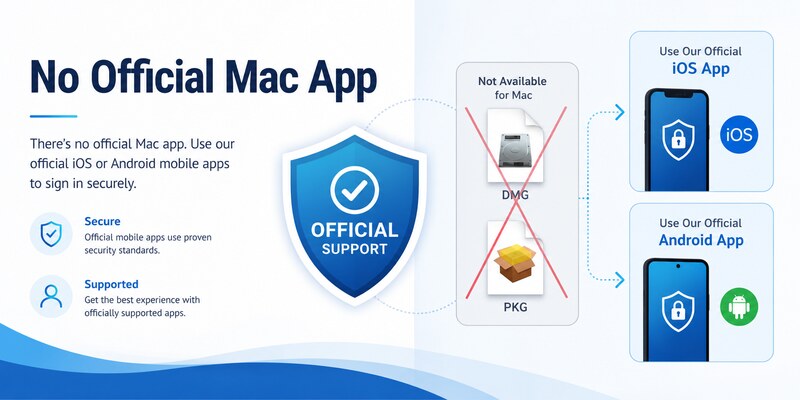
The official answer to microsoft authenticator download mac is that Microsoft Authenticator is available as a mobile app for iOS and Android, not as a macOS application. Microsoft’s current download guidance explicitly says Authenticator is not available for PC or Mac. A DMG, PKG, browser extension, or “Mac edition” from another site is not an official substitute.
Mac users can still use Authenticator easily. Safari or another supported browser shows the account sign-in, QR enrollment, or number-matching step, while the registered iPhone or Android phone stores the credential and approves the request. Mac-native passkeys, Touch ID, and FIDO2 security keys may also provide secure alternatives where supported.
This guide explains the correct Mac-and-phone workflow, personal and managed account enrollment, safe alternatives, fake download risks, and recovery when the mobile device is unavailable.
1. Confirm the Official Mac Availability
Separate browser setup from a Mac application
Search results for microsoft authenticator download mac can be confusing because Microsoft account pages work in Safari, Chrome, Edge, and other supported Mac browsers. Those pages manage security methods and display enrollment information; they do not install the Authenticator app on macOS.
| Mac screen or action | Actual purpose | Credential location |
|---|---|---|
| Microsoft account Security page | Add or remove sign-in methods | Phone, passkey, or security key |
| Work or school Security info | Register an organization-approved factor | Mobile or other approved authenticator |
| QR code displayed in Safari | Enroll a phone-based credential | Authenticator on the phone |
| Number shown during sign-in | Match a Mac request to phone approval | Registered mobile device |
| macOS passkey or Touch ID prompt | Use a platform credential | Apple device hardware and keychain |
Follow the official mobile distribution model
Microsoft directs users to Apple App Store and Google Play and says no PC or Mac version is available. It also states that Authenticator versions older than one year are unsupported. Install the latest mobile version and update it regularly.
An authentic microsoft authenticator mac download therefore does not arrive as a DMG or PKG. The supported setup combines the mobile app with an account-security page opened on the Mac.
Managed users and users in China may have different store or distribution instructions. Use Microsoft’s dedicated regional guidance or the employer’s approved application catalog. Regional restrictions do not validate an unofficial macOS package.
This distinction resolves microsoft authenticator download mac before a deceptive installer can obtain device or account access.
Keep the official support page bookmarked so future microsoft authenticator download mac checks begin from the same trusted source.
Download Authenticator App
Secure your accounts with fast, reliable two-factor authentication. Download now and protect your login in seconds.
2. Understand Why Authenticator Stays on Mobile
Keep the authentication factor separate
When the password or browser session is on the Mac and the approval credential is on a phone, one compromised device does not automatically expose both. The user can compare the requested site, location, application, and number before approving a sign-in.
Installing an unofficial microsoft authenticator download mac clone on the same computer can collapse that separation. Malware controlling the Mac may then reach the password, browser cookies, copied QR secrets, and supposed second-factor interface together.
Benefit from mobile security controls
Supported phones provide screen lock, device encryption, application sandboxing, controlled store distribution, secure hardware, biometric unlock, and remote lock or erase. Authenticator can use these controls for TOTP secrets, push registration, and passwordless credentials.
Mobile separation is not automatic protection against every attack. Keep the OS and app current, enable App Lock, reject unexpected approval prompts, protect cloud recovery, and remove lost-device registrations. Never share a live code, QR screenshot, manual setup key, or approval number.
macOS has strong native authentication options of its own. Touch ID, platform passkeys, and external FIDO2 security keys are designed to protect desktop sign-in. They are safer than forcing a mobile app into an unsupported Mac package.
The architecture behind microsoft authenticator download mac is intentional: use the mobile device for Authenticator, the Mac browser for account management, and native Mac or hardware credentials where the provider permits.
3. Use Authenticator with a Mac Safely
Install Authenticator on the phone
On iPhone or iPad, use Apple App Store or an organization-approved catalog. On Android, use Google Play or an approved managed store. Verify the Microsoft publisher, current version, and expected permissions. The microsoft authenticator download guide covers the official mobile routes.
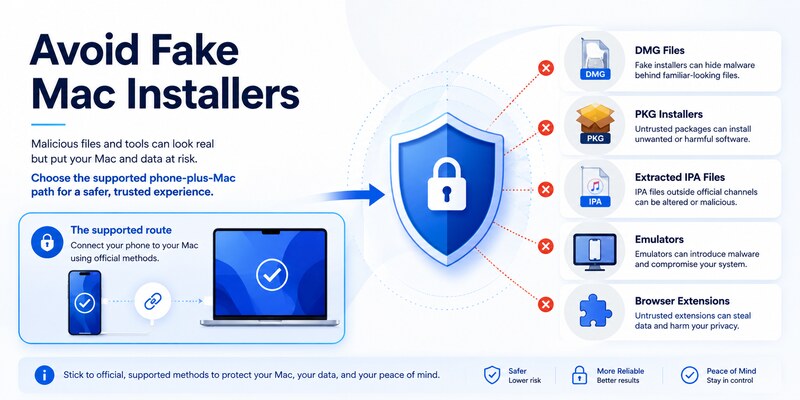
This mobile installation is the safe response to microsoft authenticator download mac. Avoid DMG files, PKG installers, browser extensions, unofficial iOS sideloading, emulators, and websites that promise a native desktop port.
Approve a Mac sign-in from the phone
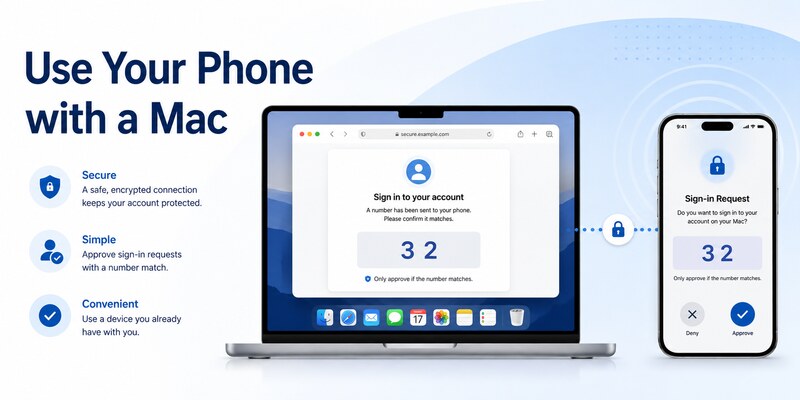
Open the provider’s official sign-in page in Safari or another supported browser. Enter the username and choose Authenticator if it is registered. The Mac may display a number; open the notification on the phone, unlock Authenticator, match the number, and approve only a request you initiated.
If no prompt arrives, check the phone’s network, notification permission, background operation, Focus settings, date and time, and current server registration. Use a verified fallback rather than approving a delayed or unexpected notification.
During enrollment, the Mac displays a fresh QR code. Scan it directly with Authenticator and complete the provider’s test before closing the browser. Do not save the QR to Photos, cloud storage, email, or chat.
Once this workflow is verified, there is no need for authenticator app microsoft download on macOS. The Mac and phone deliberately perform different roles.
That verified two-device sequence is the supported implementation of microsoft authenticator download mac.
🗺️ Browse How-To Guides: Microsoft Authenticator Reset: Safe Step-by-Step Guide for Beginner
4. Set Up a Personal Microsoft Account from macOS
Add the mobile method through account security
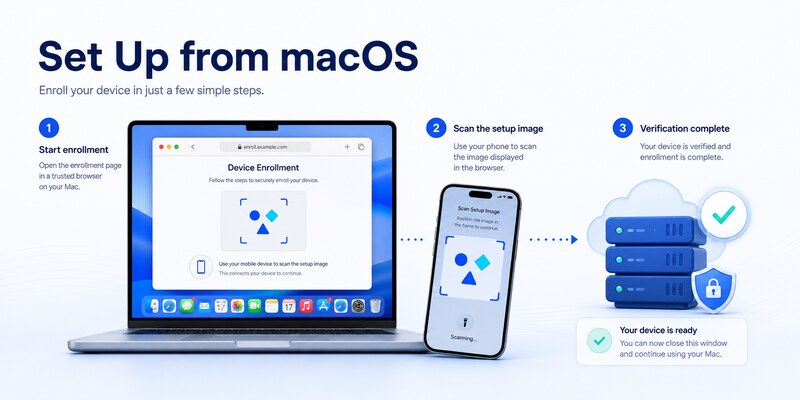
Open the personal Microsoft account’s official Security page in Safari. Confirm that an independent recovery method works, then choose to add Microsoft Authenticator. On the phone, open the official app, select the personal account option, and scan the new QR code displayed on the Mac.
For microsoft authenticator download mac, the browser is the enrollment coordinator, not the credential container. Complete the first approval or verification code while the setup session remains open.
Test and harden the account
Use a private browser window to perform a signed-out login with Authenticator. Test another factor that does not depend on the same phone. Generate fresh recovery codes where available and store them securely offline.
Review recent activity, registered devices, recovery email and phone, application consent, and current security methods. If the setup follows a phone migration, keep the old phone until the replacement and fallback have passed. Then remove the old server method, revoke obsolete sessions, and erase the retired device.
Passwordless phone sign-in, a passkey on the Mac, and ordinary push approval can require separate registrations. One successful approval does not prove every sign-in mode works.
The detailed microsoft authenticator setup workflow provides a clean enrollment sequence. Completing those tests makes microsoft authenticator download mac a supported Mac-plus-phone configuration rather than an unsafe desktop install.
5. Enroll a Work or School Account from a Mac
Use the organization’s approved Security info page
Open the employer or school’s official Security info portal on the Mac and sign in to the correct tenant. Install Authenticator on the phone from Apple App Store, Google Play, Company Portal, a managed app catalog, or another approved route.
Workplace text that says download authenticator app microsoft “on your Mac” may simply mean that the Mac should display the official download link or enrollment QR. Ask the help desk if the instructions are ambiguous; Microsoft does not provide a native macOS Authenticator app.
Satisfy identity and device policy
Microsoft Entra authentication-method policy, Conditional Access, authentication strength, sign-in risk, location, and device compliance can affect enrollment. A managed mobile profile may control the correct Authenticator instance, camera access, notifications, network, and account handoff.
If enrollment fails, send the authorized help desk the username, tenant, time, Mac browser, phone model, phone OS, Authenticator version, network, exact error, and failing step. Never send passwords, live codes, QR images, manual keys, recovery codes, or approval numbers.
An administrator may remove an incomplete method, require MFA re-registration, issue a Temporary Access Pass, or approve a different factor. A DMG or emulator cannot bypass policy and may create a security incident.
After enrollment, test a routine Microsoft 365 application and a resource that triggers the relevant policy. A complete microsoft authenticator download mac process leaves the mobile method registered, the macOS browser flow verified, the fallback tested, and the retired device removed through approved channels.
Document this approved microsoft authenticator download mac path for the next managed-device replacement.
🗺️ Browse How-To Guides: Microsoft Authenticator App Not Showing Code: How to Fix It
6. Choose Secure Mac Sign-In Alternatives
Use passkeys and Touch ID
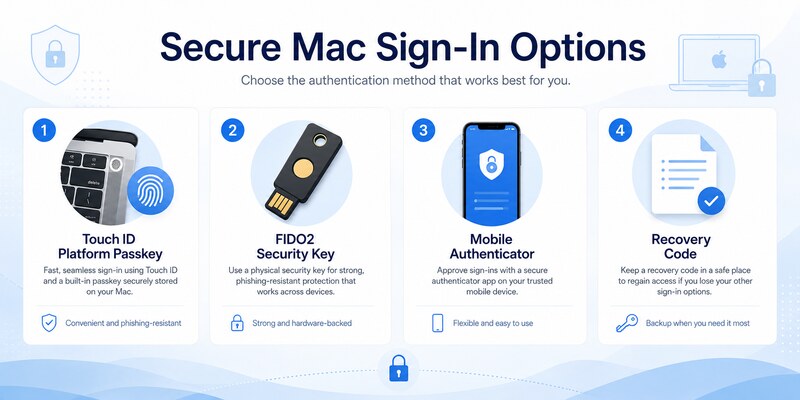
A platform passkey can use Touch ID or the Mac login credential to authorize a phishing-resistant sign-in when the provider and browser support it. The private credential remains protected by the Apple platform instead of being copied into a supposed microsoft authenticator download mac package.
Protect the Mac with current macOS updates, FileVault, a strong login password, secure recovery, and a separate standard account for routine work when appropriate. Review which devices and keychain account can use synced passkeys.
Register a hardware security key
A FIDO2 security key provides a portable, phishing-resistant factor for supported accounts. Register two keys for critical access when possible, store the spare securely, and test each one in a signed-out browser.
| Mac-friendly method | Strength | Main limitation |
|---|---|---|
| Touch ID platform passkey | Fast, phishing-resistant, integrated | Depends on account and ecosystem support |
| External FIDO2 key | Portable, hardware-protected | Physical key must be carried and backed up |
| Mobile Authenticator | Broad push and TOTP compatibility | Requires a supported phone |
| Recovery code | Useful for emergencies | Must be stored securely and may be single-use |
| Organization hardware token | Central policy and support | Availability depends on administrator |
Keep at least one factor independent of the Mac. If every credential, recovery key, and trusted session lives on the same laptop, loss or compromise can cause a complete lockout.
These alternatives answer the convenience goal behind microsoft authenticator download mac without weakening the supported security model.
7. Avoid Fake DMG, PKG, and Sideloaded Apps
Recognize malicious download patterns
Warning signs include a Microsoft Authenticator DMG, PKG, ZIP, browser extension, cracked “premium” edition, or installer that asks you to bypass Gatekeeper. Microsoft’s official support says Authenticator is not available for Mac, so familiar branding does not make such packages legitimate.
Sites targeting microsoft authenticator download mac can imitate support pages, buy sponsored listings, copy store screenshots, and fabricate reviews. Verify the domain and official documentation independently. Do not type a password or approve a request to “activate” an installer.
Treat sideloading and emulation cautiously
Apple silicon can run some iPhone or iPad apps only when their developer distributes and supports them for Mac. Microsoft’s official guidance still says Authenticator is not available for Mac. Do not obtain an extracted IPA, use an unofficial sideloading service, or modify security controls to force installation.
Mobile emulators and virtual machines can expose snapshots, shared clipboards, host storage, debug interfaces, and credential files. Organization policy may block them as unsupported or noncompliant devices.
If an unofficial microsoft app authenticator download was installed, stop using it. Remove it with normal macOS tools, review Login Items and browser extensions, update macOS, run trusted security checks, and change exposed passwords from a known-clean device. Revoke sessions and rotate any TOTP secret or QR credential entered into the fake app.
Notify the organization’s security team if a work account or managed Mac was involved. Deleting the package does not revoke credentials already copied to an attacker.
These precautions are a necessary part of microsoft authenticator download mac safety, not an optional cleanup.
8. Recover When the iPhone or Android Phone Is Missing
Use a tested independent factor
If the phone is lost, broken, or unavailable, microsoft authenticator download mac is not a recovery method. Use a registered passkey, Touch ID credential, FIDO2 security key, recovery code, alternate authenticator, trusted session, approved email or phone method, or the provider’s formal identity-recovery process.
For work or school identities, contact the official help desk. An authorized administrator may revoke the missing device, reset methods, require re-registration, or issue a Temporary Access Pass. Microsoft consumer support cannot override another organization’s tenant policy.
Register a replacement mobile device
Install Authenticator from the official mobile store and restore a compatible backup where available. Work, school, and passwordless entries often show Action required and need provider-side enrollment even when their names return.
Register and test the replacement, verify a fallback, remove the lost phone’s server methods, revoke sessions, review recent activity, and change passwords when compromise is possible. Use remote lock or erase where supported.
The microsoft authenticator recovery guide covers lost-access procedures. Never pay an unofficial recovery service or send passwords, QR images, manual keys, live codes, or recovery codes.
After access returns, register a Mac passkey or hardware security key where supported. This independent backup prevents future phone loss from turning microsoft authenticator download mac into an emergency.
9. Frequently Asked Questions
Is Microsoft Authenticator available in the Mac App Store?
Microsoft’s current support guidance says Authenticator is not available for PC or Mac. Use the official mobile app on iOS or Android with the Mac’s browser-based sign-in or setup page.
Can I install the iPhone version on an Apple silicon Mac?
Do not force or sideload it. iPhone and iPad apps run on Mac only when the developer distributes and supports them. Microsoft’s official guidance does not offer Authenticator for Mac.
Is there an official DMG or PKG?
No official macOS Authenticator installer is provided. Treat DMG, PKG, ZIP, browser-extension, and “Mac edition” offers as untrusted unless Microsoft’s current documentation explicitly changes.
How do I scan a QR code displayed in Safari?
Open Authenticator on the phone, choose the correct account type, and scan the fresh QR directly from the provider’s official security page. Complete server verification before closing Safari.
Can a passkey replace Microsoft Authenticator?
For some providers and organization policies, yes. A passkey can provide strong phishing-resistant sign-in. It does not universally replace TOTP or push, so confirm account requirements.
What if I do not own a smartphone?
Ask the provider or administrator about a FIDO2 security key, platform passkey, hardware token, or other approved method. Do not install an unofficial Mac clone.
Can I approve a Mac login from my phone?
Yes. When Authenticator is registered, a browser sign-in can send a notification to the phone and may display a number to match. Approve only a request you initiated.
What should I do after installing a fake version?
Stop using it, remove it, review the Mac for persistence, change exposed passwords from a clean device, revoke sessions, rotate affected credentials, and notify organization security when applicable.
These answers resolve the usual intent behind microsoft authenticator download mac without relying on unsupported desktop software.
🧭 Explore Guides: How to Disable Microsoft Authenticator: Safe Step-by-Step Guide
10. Final Thoughts
There is no official microsoft authenticator download mac application in Microsoft’s current support model. The supported mobile app runs on iOS or Android, while Safari or another Mac browser displays the sign-in and enrollment steps. Keeping the approval credential on a separate phone preserves useful factor separation.
Use Apple App Store, Google Play, Microsoft’s official download page, or an organization-approved catalog. Reject DMG, PKG, extracted IPA, emulator, and browser-extension shortcuts. Never provide an installer or support agent with a password, QR image, manual secret, recovery code, or live verification code.
For Mac-native convenience, consider Touch ID passkeys or a FIDO2 security key where the provider and policy support them. Keep a tested recovery method outside the Mac and phone so one lost device cannot block access.
Visit Authenticator App for setup, backup, migration, recovery, and troubleshooting guidance. A safe response to microsoft authenticator download mac uses the official mobile app, verifies the browser workflow, and avoids fake desktop packages completely.
Recheck the configuration after major macOS, phone, or organization-policy changes. A signed-out login, fallback test, and server-method audit prove the design remains secure and recoverable.
Keep the phone and Mac updated, review registered devices, and deny every approval you did not initiate. Store recovery codes outside both devices and test a separate strong factor periodically. These habits make microsoft authenticator download mac a predictable setup workflow rather than a risky search for unsupported software.
Download Authenticator App
Secure your accounts with fast, reliable two-factor authentication. Download now and protect your login in seconds.
