
Microsoft Authenticator Download Windows: Safe Guide
Published August 17, 2026 · Updated August 18, 2026
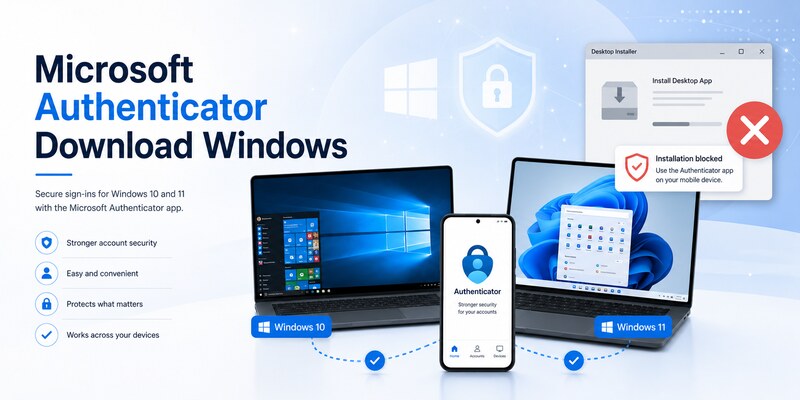
The official answer to microsoft authenticator download windows is that Microsoft Authenticator runs on supported iOS and Android devices, not as a Windows desktop application. Microsoft’s current download page says the app is unavailable for PC or Mac. Windows 10 or 11 can display sign-in and enrollment pages, while the registered phone holds the Authenticator credential.
Do not install an EXE, MSI, ZIP, browser extension, or emulator that claims to be an official Windows Authenticator. For Windows-native sign-in, use Windows Hello, a platform passkey, or a FIDO2 security key where the account and organization support them.
This guide separates those roles, shows how to pair a Windows browser with the mobile app, covers personal and managed accounts, and explains safe troubleshooting and recovery.
1. Get the Official Answer for Windows
Recognize the supported platform model
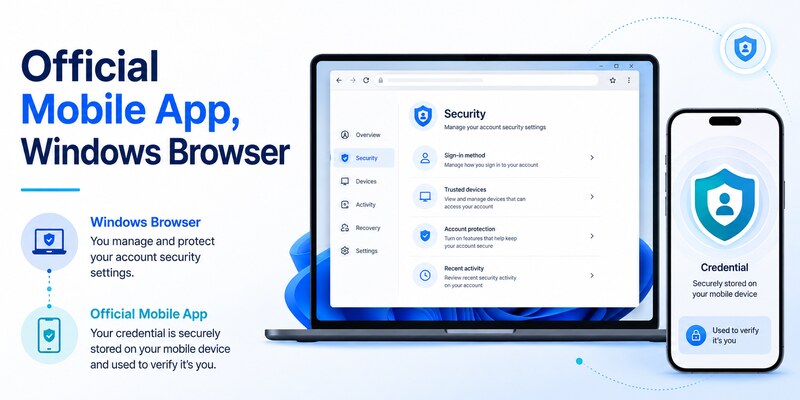
Microsoft’s official Authenticator download guidance lists iOS and Android and explicitly says the app is not available for PC or Mac. Therefore, microsoft authenticator download windows should lead to a mobile installation plus a Windows browser workflow—not a desktop installer.
| Item on Windows | Legitimate role | Warning sign |
|---|---|---|
| Microsoft account Security page | Manage authentication methods | Lookalike domain requesting a QR secret |
| Work or school Security info | Enroll organization-approved methods | Unofficial portal or remote-control request |
| QR shown during setup | Transfer a fresh secret to the phone | Saved, emailed, or public QR screenshot |
| Number-matching page | Confirm a request on the registered phone | Unsolicited approval or mismatched number |
| Windows Hello settings | Create a Windows-bound credential | Website claiming it installs mobile Authenticator |
Reject fake Windows packages
There is no official Authenticator EXE or MSI in Microsoft’s current model. A site promising microsoft authenticator windows download may use copied branding, sponsored search placement, fake reviews, or a “download manager” to deliver malware.
Stop if instructions ask you to disable antivirus, bypass SmartScreen, install a root certificate, add a browser extension, or enter a password or live verification code to activate software. Store and account setup never require you to send a QR screenshot, manual TOTP key, recovery code, or approval number to support.
Use Microsoft’s official page, Apple App Store, Google Play, or an organization-managed catalog for the mobile app. Microsoft also says Authenticator versions older than one year are unsupported, so keep the phone and app current.
This source check establishes the safe meaning of microsoft authenticator download windows before any credential is exposed.
Bookmark the official guidance so every future microsoft authenticator download windows check starts from a trusted source.
Download Authenticator App
Secure your accounts with fast, reliable two-factor authentication. Download now and protect your login in seconds.
🗺️ Browse How-To Guides: Microsoft Authenticator Download Mac: Safe Best Options
2. Decide Which Authentication Job You Need
Match the goal to the correct tool
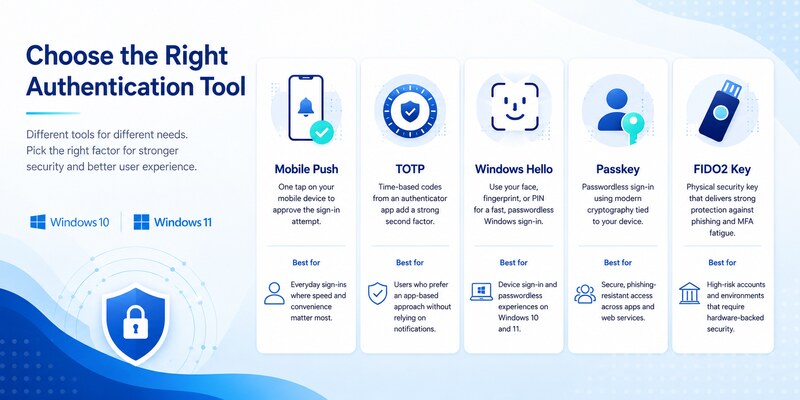
Users searching microsoft authenticator download windows may actually need one of several different functions. Identify the target before installing anything.
| Goal | Correct tool | Where it runs |
|---|---|---|
| Approve a Microsoft web sign-in | Microsoft Authenticator | Supported phone |
| Generate TOTP for a third-party site | Authenticator or approved TOTP app | Supported phone or approved hardware |
| Unlock Windows locally | Windows Hello | Windows PC |
| Use phishing-resistant website login | Passkey or FIDO2 key | Windows platform or hardware key |
| Recover without the phone | Recovery code or independent factor | Stored securely outside primary devices |
| Meet organization MFA policy | Administrator-approved method | Managed phone, key, token, or platform |
Preserve factor separation
Keeping the password and browser session on Windows while the approval credential stays on a separate phone reduces the chance that one compromised PC exposes both factors. An emulator or desktop clone can collapse that separation by storing the password, session, and TOTP secret in one environment.
If the real goal is passwordless Windows unlock, configure Windows Hello instead of looking for microsoft authenticator for windows free download. If the goal is web MFA, install the official mobile app and register it through the provider’s security page. If a smartphone is not available, ask about a FIDO2 key or approved hardware token.
Record the provider, username, account type, current method, intended method, fallback, and test result without saving secrets. A clear target prevents destructive experiments and unnecessary account lockout.
That goal-first decision makes microsoft authenticator download windows a precise setup task instead of a risky software search.
🗺️ Browse How-To Guides: Microsoft Authenticator: Complete Setup, Login, Backup & Troubleshooting Guide
3. Install the Supported Mobile Companion
Download from an official mobile store
On Android, use Google Play or the organization’s managed store. On iPhone or iPad, use Apple App Store or an approved catalog. Confirm the Microsoft publisher, app name, update status, and expected permissions. The microsoft authenticator download guide covers these routes in detail.
The supported answer to download microsoft authenticator app for windows 11 is the same as Windows 10: install Authenticator on a supported phone, then use the Windows browser to enroll or sign in. The Windows version does not change the mobile app requirement.
Prepare the phone securely
Update the phone OS, enable a strong screen lock and encryption, set date and time to automatic, and use a trusted network. Allow camera access only for scanning enrollment codes and notifications for approval requests. Review background or battery restrictions if push is delayed.
Enable App Lock and verify cloud backup where appropriate, but keep an independent provider recovery method. Backup can restore some data, while work, school, and passwordless entries may still require re-registration.
Do not remove Authenticator from an old phone because the new app has installed. Complete provider enrollment, signed-out login, fallback testing, and old-method revocation first.
Once the current mobile app is ready, microsoft authenticator download windows moves to the supported two-device configuration rather than an unsafe Windows package.
Keep the store receipt and version information as evidence of a legitimate microsoft authenticator download windows route.
🗺️ Browse How-To Guides: Is Microsoft Authenticator Free to Use? Everything You Need to Know
4. Use Authenticator for Windows Browser Sign-Ins
Approve a request you initiated
Open the provider’s official sign-in page in an updated Windows browser and enter the username. Choose Authenticator if it is already registered. Windows may display a number; open the notification on the phone, unlock the app, match the number, and approve only if you initiated that exact sign-in.
For microsoft authenticator download windows, the browser presents the challenge and the phone holds the credential. No Authenticator desktop process needs to run in the Windows taskbar or notification area.
Respond safely to unexpected prompts
Deny any request you did not initiate. Change the password from a known-clean device, revoke suspicious sessions, and review recent activity and security methods if unsolicited prompts continue. An approval attack can mean an attacker already knows the password.
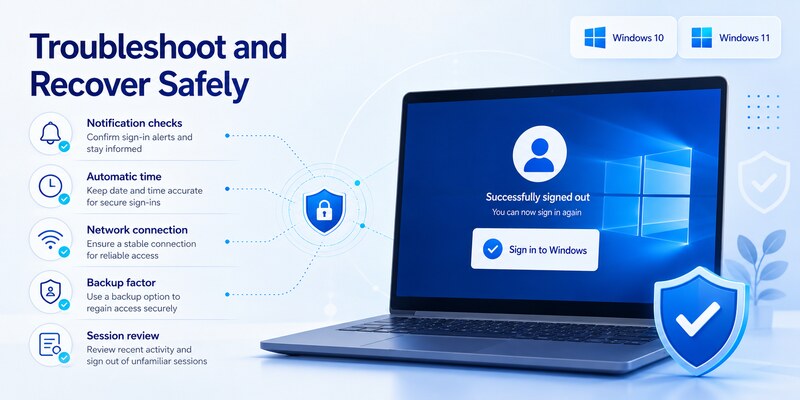
If expected notifications do not arrive, check the phone’s network, notification permission, background operation, battery optimization, Focus or Do Not Disturb, automatic time, and current registration. Try a verified alternate factor rather than repeatedly sending prompts.
Some TOTP codes are generated locally and can work even during a push-service issue. Choose the correct account tile and wait for a fresh value. Never share the code in chat, email, or a support ticket.
A successful signed-out Windows login proves the two-device microsoft authenticator download windows workflow is operating correctly.
Repeat that test after major phone or browser changes to keep microsoft authenticator download windows reliable.
💡 Discover Helpful Guides: Microsoft Authenticator Passwordless Sign-In: Complete Guide
5. Enroll Accounts from Windows 10 or 11
Generate a fresh setup session
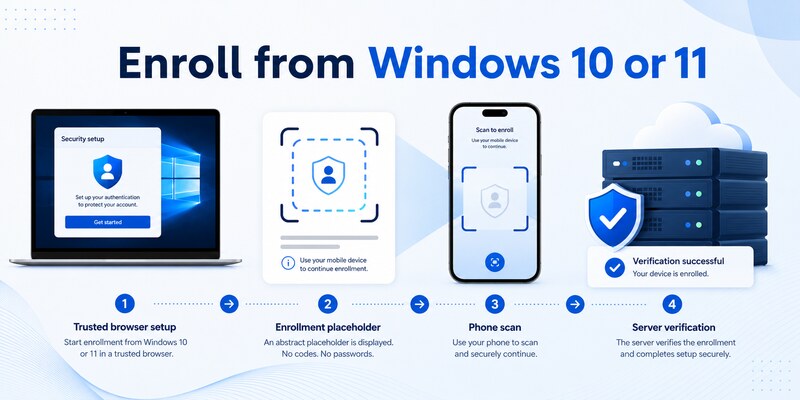
On Windows, sign in to the provider’s official security settings and choose to add an authenticator app. Keep the browser session open. On the phone, choose the correct account type and scan the newly generated QR code directly from the monitor.
Do not search for microsoft authenticator qr code download. An enrollment QR is created specifically by the account provider and can contain a live credential secret. A generic QR, screenshot from a tutorial, or image sent by email cannot safely enroll your account.
Complete server verification
For TOTP, enter a fresh code on the provider page. For Microsoft push, approve the test and complete number matching when shown. Finish every confirmation before closing the browser. A tile visible on the phone does not prove the provider accepted it.
Run a signed-out test in a private window and verify another factor. Generate new recovery codes where available and store them securely offline. Remove obsolete methods only after the replacement works.
For a phone change, keep the old device until all providers have migrated. Push, TOTP, passwordless, and organization credentials can require separate registrations. The microsoft authenticator setup guide provides a complete baseline.
Windows 10 and 11 use the same fundamental browser-to-phone pattern. This is why microsoft authenticator windows 11 download does not require a special desktop edition.
Server verification, not the presence of a Windows icon, completes microsoft authenticator download windows enrollment.
💡 Discover Helpful Guides: Microsoft Multi Factor Authentication: Complete MFA Guide
6. Use Windows Hello, Passkeys, or Security Keys
Configure a Windows-native credential
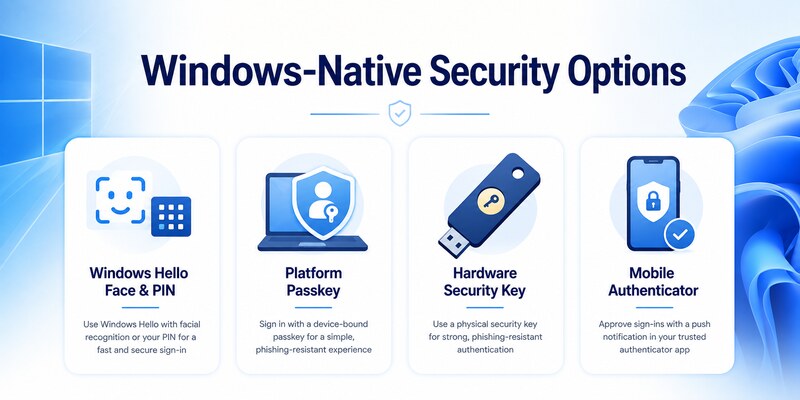
Windows Hello can use a device-bound PIN, fingerprint, or face recognition. A platform passkey can offer phishing-resistant web sign-in when the provider and browser support it. These methods provide the desktop convenience users often expect from microsoft authenticator download windows.
Protect the PC with current updates, device encryption, Secure Boot and TPM where supported, a strong recovery process, and a standard user account for routine work. A Windows Hello PIN is local to the device and is not simply the online password.
📖 Explore Articles: Microsoft Authenticator Remove Account: Safe Guide
Add a FIDO2 security key
A hardware security key protects its private credential on the device and resists phishing. Register two keys for critical accounts when possible, store the spare securely, and test both before removing other factors.
| Method | Best use | Recovery consideration |
|---|---|---|
| Windows Hello | Fast sign-in on a trusted PC | Preserve account and device recovery |
| Platform passkey | Phishing-resistant website login | Understand sync and device coverage |
| FIDO2 key | Portable strong authentication | Register and secure a spare key |
| Mobile Authenticator | Broad push and TOTP support | Keep phone recovery and fallback |
| Recovery code | Emergency access | Store offline and refresh after use |
Confirm that a replacement satisfies the provider or organization’s authentication strength. SMS may be available yet rejected by a stronger policy.
These Windows-native choices solve the convenience problem behind microsoft authenticator download windows without copying mobile secrets onto the PC.
Document which alternative passed so future microsoft authenticator download windows decisions preserve the required authentication strength.
7. Configure Work or School Access
Use the organization’s approved distribution path
An employer or school may direct users through Company Portal, Managed Google Play, an Apple managed catalog, or a public mobile store link. Follow the documented path and enroll the correct work-profile copy of Authenticator.
Instructions that say download microsoft authenticator app windows 10 may mean “open the setup page on Windows 10 and install the app on your phone.” Confirm with the help desk if the wording suggests a desktop installer.
Complete Microsoft Entra enrollment
Open the organization’s Security info page in Windows, sign in to the correct tenant, add Authenticator, scan the fresh QR with the phone, and complete the test. Guest accounts can require separate registration in each host tenant even when the same email appears.
Conditional Access, authentication methods policy, authentication strength, sign-in risk, location, and device compliance may affect the result. An unofficial Windows app cannot bypass these controls.
If setup fails, give the authorized help desk the username, tenant, time, PC browser, phone model, phone OS, app version, network, exact error, and failing stage. Never send a password, live code, QR image, manual key, recovery code, or approval number.
After enrollment, test a routine Microsoft 365 application and a resource that triggers the relevant policy. A managed microsoft authenticator download windows process ends with the mobile method verified, fallback confirmed, and old device removed through approved channels.
8. Troubleshoot Sign-In and Recovery Problems
Fix the correct layer
If one account fails but other Authenticator entries work, investigate that provider’s enrollment, server method, and policy. If every push fails, check phone network, notifications, background operation, app version, and service status. If TOTP codes fail, enable automatic time and confirm the correct tile.
Reinstalling the app is a last resort for microsoft authenticator download windows problems because it can remove local credentials while leaving server registrations intact. Verify cloud backup and independent recovery for every account first.
Recover without a Windows desktop app
Use a passkey, security key, recovery code, alternate authenticator, trusted session, approved email or phone method, or provider identity recovery. For work accounts, contact the official help desk; an administrator may reset methods or issue a Temporary Access Pass.
If the phone is lost, revoke its server methods and sessions, review recent activity, change passwords when compromise is plausible, and remotely lock or erase it. Install Authenticator on a replacement from the official mobile store and re-register device-bound entries.
The microsoft authenticator recovery guide covers lost-access workflows. Avoid paid recovery services and anyone requesting passwords, QR images, manual keys, or live codes.
Close the incident with a signed-out login, fallback test, current security-method review, old-device removal, and refreshed recovery codes. These checks complete microsoft authenticator download windows without introducing unsupported software.
🗺️ Browse How-To Guides: Microsoft Authenticator Reset: Safe Step-by-Step Guide for Beginner
9. Frequently Asked Questions
Can I install Microsoft Authenticator on Windows 11?
Microsoft’s official guidance says Authenticator is not available for PC or Mac. Install the mobile app on iOS or Android and use it with Windows 11 browser sign-ins and enrollment pages.
Is there a Windows 10 version?
No official Authenticator desktop app is provided for Windows 10. The supported model is the same: Windows displays the challenge, and the registered phone holds and uses the credential.
Is Microsoft Authenticator free?
The official mobile app can be installed without an app purchase. Device, data, account-service, or organization costs may still apply. Payment demands for a Windows installer are a warning sign.
Where do I get the setup QR code?
Generate it from the account provider’s official security settings. There is no universal QR code to download. Treat each enrollment QR as a secret and scan it directly.
Can I use an Android emulator on Windows?
It is not the supported model and can weaken factor separation, storage protection, and compliance. Use a supported phone, Windows Hello, passkey, FIDO2 key, or approved hardware token.
Can Windows Hello replace Authenticator?
For some providers and policies, yes. It does not universally replace TOTP or mobile push. Confirm the account’s supported methods and required authentication strength.
What if I do not have a smartphone?
Ask the provider or administrator about a FIDO2 security key, platform passkey, hardware token, or other approved method. Do not install a desktop clone.
What should I do after installing a fake version?
Remove it, scan the PC, change exposed passwords from a clean device, revoke sessions, rotate affected credentials, review security methods, and notify organization security when applicable.
These answers cover the main intent behind microsoft authenticator download windows while keeping users on supported and verifiable paths.
🧭 Explore Guides
Microsoft Authenticator Desktop: Complete PC & Mac Guide
10. Final Thoughts
There is no official microsoft authenticator download windows desktop application in Microsoft’s current support model. Authenticator runs on iOS or Android, while Windows 10 or 11 displays browser sign-in and enrollment steps. That separation helps prevent one compromised PC from controlling both the primary session and the second factor.
Use Microsoft’s official mobile page, Apple App Store, Google Play, or an organization-approved catalog. Reject EXE, MSI, ZIP, emulator, and browser-extension offers. Never expose passwords, QR images, manual TOTP keys, recovery codes, or live verification codes.
For Windows-native convenience, use Windows Hello, a platform passkey, or a FIDO2 security key where supported. Keep an independent recovery method and test it before the phone becomes unavailable. Managed users should follow administrator policy and approved distribution.
Visit Authenticator App for download, enrollment, backup, recovery, and troubleshooting guidance. A safe microsoft authenticator download windows setup uses the official mobile app, verifies the Windows browser workflow, and avoids fake desktop packages.
Review the system after major Windows, phone, or policy changes. A signed-out login, fallback test, and current server-method audit prove that authentication remains secure and recoverable.
Keep the PC and phone updated, remove stale device records, and deny every unexpected approval. Store recovery codes outside both devices and periodically test a separate strong factor. These habits turn microsoft authenticator download windows into a maintained security design rather than a one-time installation attempt.
Download Authenticator App
Secure your accounts with fast, reliable two-factor authentication. Download now and protect your login in seconds.
