
Steam Authenticator Recovery Code: How to Find and Use It Safely
Published August 17, 2026 · Updated August 20, 2026
A steam authenticator recovery code is the emergency value Steam presents when the Steam Guard Mobile Authenticator is added or transferred. Valve tells users to write it down and keep it safe because it can help recover the account after the phone or authenticator becomes unavailable.
This recovery value is not the same as the 30-second Steam Guard login code, an SMS confirmation value, or a set of printable backup codes. Mixing them up causes failed recovery attempts and makes it easier for scammers to steal the one credential that matters.
This guide explains how to find the recovery code in the Steam Mobile app, how to store it, what to do when the old phone or number is still available, when to contact Steam Support, how trade restrictions can apply, and how to avoid fake recovery services.
1. Distinguish Steam Recovery, Login, SMS, and Backup Codes
Identify the recovery credential
Steam presents the steam authenticator recovery code after mobile-authenticator enrollment succeeds and again during the official transfer flow. It is designed for account recovery if the user loses the phone or authenticator. It should be recorded once and stored away from the device.
A login code is different: the Steam Mobile app generates a new Steam Guard value every 30 seconds for routine sign-in. An SMS code confirms a specific phone-number, transfer, recovery, or removal action. Printable backup codes can replace phone-generated login codes during an emergency.
| Code type | Typical purpose | Safe handling |
|---|---|---|
| Authenticator recovery code | Recover access after phone or authenticator loss | Store offline and never share |
| Mobile login code | Authorize routine Steam sign-in | Enter only in official Steam surfaces |
| SMS confirmation/removal code | Confirm a current device or account change | Use only for the action just initiated |
| Backup code | One-time emergency login | Print or store securely; track use |
Do not substitute one value for another
A current mobile code will expire and cannot serve as a permanent recovery record. The steam authenticator recovery code is not a rotating value to type at every login. An SMS removal code should never be sent to a trader, moderator, tournament organizer, or “support agent.”
Steam Support states that Valve employees will not ask for the password or mobile authenticator code. Treat the recovery value with at least the same care. Anyone who obtains the right recovery or removal information may be able to weaken the mobile factor and target the inventory.
Before using any code, read the prompt inside the official Steam app, client, or help site. Confirm the account, requested operation, and destination. A code is evidence of authorization, not a general identity test.
Download Authenticator App
Secure your accounts with fast, reliable two-factor authentication. Download now and protect your login in seconds.
2. Find the Recovery Code During or After Setup
Record it when the authenticator is added
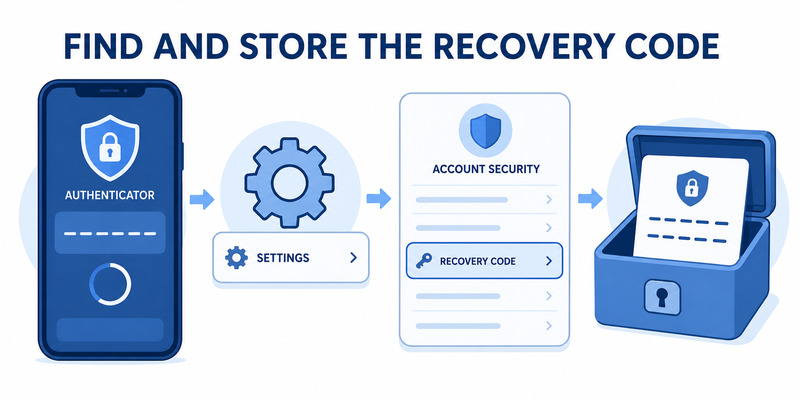
In Steam’s official setup sequence, the user signs in to Steam Mobile, opens Steam Guard, adds an authenticator, and completes any phone confirmation. Steam then displays a recovery code and explicitly tells the user to write it down and store it safely. Do not skip that screen.
Record the steam authenticator recovery code exactly, including letters, digits, and capitalization if shown. Do not paste it into a chat, email it to yourself, or include it in a screenshot containing account details. Confirm that the saved copy is readable before continuing.
The code can also be presented when moving the authenticator to a new device. Treat a newly issued value as the current recovery record and retire any old copy once the transfer and login tests succeed.
Find it later in Steam Mobile
For users asking how to find steam authenticator recovery code, Steam’s current support guidance directs them to the Steam Guard page in the Steam Mobile app, then the gear icon and Recovery Code. Interface labels can change, so use Valve’s current help page if the control is not visible.
Open the app on a private screen and make sure the correct Steam account is selected. One phone can protect several Steam accounts, and each account has its own recovery relationship. Avoid displaying the value during streaming, screen sharing, or remote support.
If the app is already unavailable, do not search local files, install an extractor, or pay a third-party service. Move to the official recovery branch that matches the available phone number, email, backup codes, and proof of ownership.
After locating the steam authenticator recovery code, close the screen and store the value outside the phone. Simply knowing where the menu is does not help if the device is the item that later disappears.
💡 Discover Helpful Guides
Steam Authenticator App: Complete Steam Guard Setup, Codes & Recovery Guide
3. Store Recovery Information Without Creating New Risk
Keep an offline primary copy
Write the steam authenticator recovery code on paper and place it in a secure location, or store it in a reputable encrypted password manager protected by strong authentication. Keep it separate from the Steam password and the phone whenever practical.
Do not label a visible note with the full Steam account name, email, password, and recovery value together. A useful record can identify the service and owner without bundling every credential needed for takeover.
Steam recommends printing backup codes rather than saving screenshots on the computer. The same principle helps with the authenticator recovery value: a screenshot may be copied into photo backup, chat attachments, desktop sync, or device previews without the owner realizing it.
Build redundancy without uncontrolled copies
For a valuable account, maintain a second protected copy in a different physical or encrypted location. Count and review copies periodically. Destroy superseded values after an authenticator transfer or recovery changes the active record.
| Storage choice | Benefit | Main risk |
|---|---|---|
| Paper in secure location | Offline and simple | Fire, loss, or unauthorized physical access |
| Encrypted password manager | Searchable and backed up | Manager account becomes high value |
| Plain phone note | Convenient | Lost phone exposes factor and recovery together |
| Screenshot on gaming PC | Easy to find | Malware, sync, and screen capture exposure |
| Chat or email draft | Accessible | Account compromise and accidental forwarding |
Never test a steam authenticator recovery code on a website that promises to “check” whether it works. A verification form outside Valve’s official domain is likely collecting account-recovery secrets.
Review storage after moving house, replacing a phone, sharing a device, changing a password manager, or recovering the Steam account. Recovery planning is an ongoing security control, not a one-time note.
Record the review date without exposing the steam authenticator recovery code, then repeat the check after every security-sensitive account change.
💡 Discover Helpful Guides: Steam Mobile Authenticator: Setup and Security Guide
4. Recover When the Old Phone Still Works
Prefer the official transfer workflow
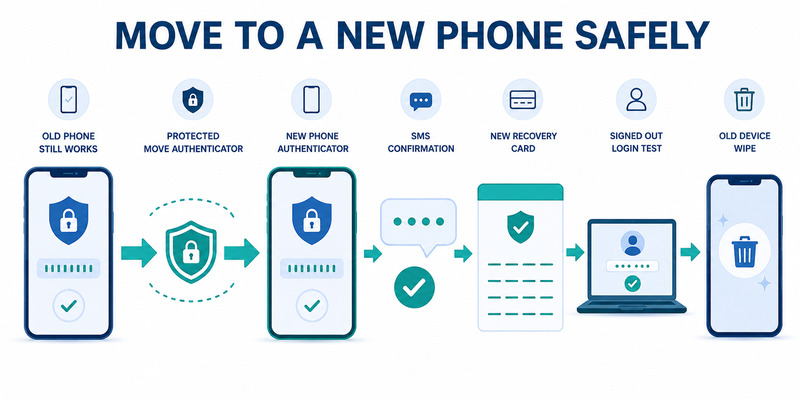
If the old phone and authenticator still work, install Steam Mobile on the new phone and sign in. Confirm the new sign-in using the existing authenticator, open Steam Guard on the new device, and choose Move Authenticator. Follow the in-app confirmation and any SMS step.
Steam presents a recovery code after a successful transfer. Save the new steam authenticator recovery code and verify that the new phone can approve a login before erasing the old device. Review Security & Devices and remove sessions that are no longer trusted.
Valve’s current guidance says a two-day trade and Community Market restriction follows an authenticator transfer. This protective period is expected and should not be bypassed by an unofficial tool.
Retire the old device safely
Confirm the registered phone number and contact email, generate fresh backup codes if appropriate, and complete one signed-out login on the new device. Test the account that owns valuable items separately from any secondary account in the same mobile app.
Sign out of Steam Mobile on the old phone and factory-reset it through the operating system before selling, trading, or giving it away. Removing only the icon or clearing a Home Screen does not erase app data.
Do not manually copy authenticator files or use a desktop importer. The server-supported transfer establishes which device now owns the credential and supplies a current steam authenticator recovery code. A copied secret can create untracked exposure without a valid server transition.
Keep the old recovery record only until the new phone, new value, login, and fallback have been verified. Then destroy the superseded copy so an outdated credential is not mistaken for the active one during an emergency.
5. Recover a Lost Phone with the Same Number
Restore phone-number access first
In a steam authenticator lost phone event, contact the mobile carrier promptly and secure the number. If possible, obtain a replacement SIM or eSIM with the same number. Protect the carrier account with a PIN and warn the provider if theft or SIM swapping is suspected.
Install the official Steam Mobile app on the replacement phone and sign in. When Steam asks for the old authenticator, choose the option indicating that access is no longer available. Follow the official transfer or recovery steps using the SMS sent to the registered number.
Use the saved steam authenticator recovery code only in the official recovery flow. Never tell it to someone over chat or phone. Steam Support can guide account recovery without asking the user to disclose routine mobile codes to another person.
Secure the account after recovery
Change the Steam password and email password from a trusted device if theft or compromise is possible. Deauthorize unfamiliar sessions, review Security & Devices, inspect recent trades and Market listings, and check that the correct phone number and email remain registered.
Save the newly presented recovery value and create fresh backup codes. Test the replacement phone with a signed-out login. A visible Steam Guard screen is not enough; the server must accept QR, push, or current code authentication.
Report unauthorized inventory activity through Steam Support. Do not negotiate with an alleged thief or pay an “unlock” service. Preserve receipts, product keys, billing records, prior account names, and email history that may prove ownership.
After a lost steam authenticator recovery, expect protective trade restrictions. They provide time to detect and respond to hostile changes. Current duration depends on the recovery operation, so check the official Steam support page rather than relying on an old forum post.
📘 Find the Right Guide
How to Enable Mobile Authenticator on Steam Safely
6. Recover Without the Phone, Number, or Recovery Code
Use Steam’s help wizard
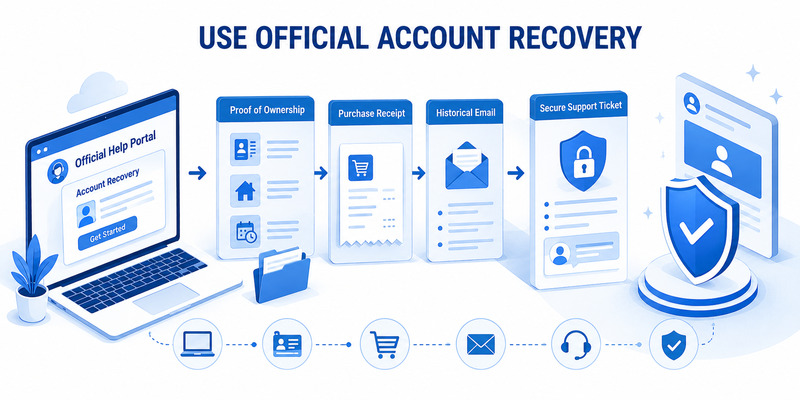
If the phone is gone, the number is unavailable, and the steam authenticator recovery code was not saved, go directly to help.steampowered.com. Choose the sign-in or Steam Guard recovery path and follow the prompts. Steam’s support page states that assistance is required when both phone access and the recovery code are unavailable.
Use a known-clean device and navigate to the help site manually. Do not follow a recovery link sent by a stranger who contacted you first. Steam Support tickets belong on Valve’s domain, not in Discord, Telegram, social media, or a screen-sharing application.
Prepare proof of account ownership
Steam may request information that supports ownership, especially when the contact email is also inaccessible. Useful evidence can include previous account names, historical email addresses, purchase receipts, payment details requested through the secure ticket, retail product keys, or other records tied to the account.
Provide only what the official form requests and redact unrelated financial information. Never send the password, a current authenticator code, an SMS removal value, or a steam authenticator recovery code to a community volunteer or another player.
Be consistent and patient. Creating multiple tickets, guessing data, purchasing suspicious account-recovery services, or repeatedly changing network and device context can complicate the review. Record the ticket number and communicate only inside the case.
Once access returns, change credentials, review devices and sessions, verify email and phone information, re-enable the official mobile authenticator, store the new recovery value, generate backup codes, and inspect inventory activity. Recovery is complete only after the account is secure again.
📖 Read More Guides: How to Move Steam Authenticator to New Phone Safely
7. Generate Backup Codes and Review Account Access
Create one-time emergency codes
Steam allows users to generate backup codes from Account Details and Manage Steam Guard. Choose the backup-code option, complete the current confirmation, and print or securely store the resulting one-time values. Steam sends an email when new codes are created or used.
Backup codes supplement the steam authenticator recovery code; they do not replace it. A backup code can authorize a login when the phone is temporarily unavailable, while the recovery value supports restoring or removing the authenticator relationship.
Do not photograph backup codes or keep them in a plain file on the same gaming PC that stores the Steam session. Mark a code as used and generate a fresh set if the list is exposed, lost, or nearly exhausted.
Review sessions and recovery dependencies
Open Security & Devices and inspect computers, browsers, and phones with account access. Deauthorize devices that are unfamiliar, sold, shared, or no longer needed. Steam Mobile users can see information about devices connected to the account.
Confirm that the contact email is protected, the phone number is current, the Steam password is unique, and the mobile app is updated. Test one backup route without unnecessarily consuming multiple emergency codes.
| Recovery layer | Review question |
|---|---|
| Mobile authenticator | Does the current phone approve a clean login? |
| Recovery code | Is a readable protected copy stored away from the phone? |
| Backup codes | Are unused values available and secure? |
| Phone number | Can the owner receive a Steam SMS? |
| Contact email | Is the mailbox secure and recoverable? |
| Ownership proof | Are purchase records available if support needs them? |
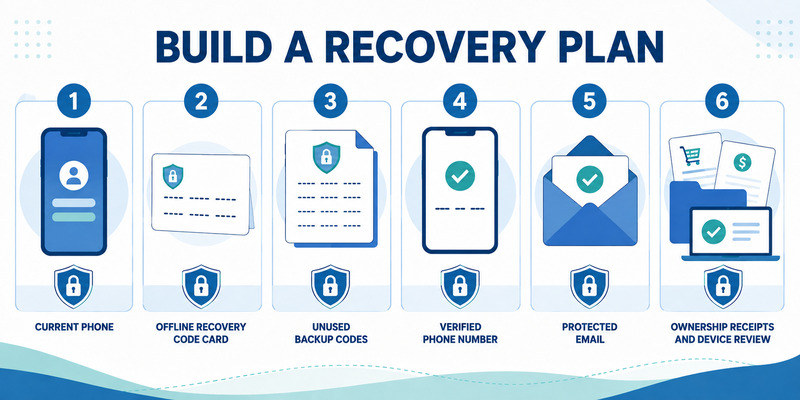
This layered check prevents one lost device from becoming total account loss and keeps the steam authenticator recovery code within a broader recovery plan.
Test the layers while access is healthy so the steam authenticator recovery code is never the only unverified path left during an emergency.
8. Avoid Recovery Scams and Understand Restrictions
Recognize social engineering
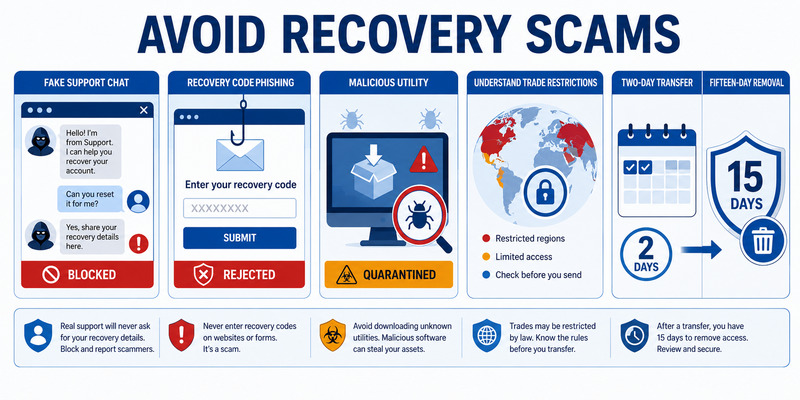
Scammers may claim the account is reported, an item must be verified, a tournament requires authentication, or a support agent needs a recovery value. They may copy Valve branding, alter a profile name, or place the victim in a group chat with fake moderators.
No trader or community contact needs the steam authenticator recovery code. Do not enter it on a third-party marketplace, giveaway, team page, skin checker, or “appeal” form. Steam Support will never need the user to approve a trade to recover an account.
Never install a recovery utility, desktop authenticator, browser extension, or “inventory protection” program suggested in chat. It may steal browser sessions, passwords, API access, mobile secrets, or recovery material.
Expect protective trade delays
Steam applies restrictions after security-sensitive changes. Current support guidance documents a two-day trade and Market restriction after an authenticator transfer and a 15-day restriction after authenticator removal. A newly added authenticator also has a seven-day period during which trades or listings can be held for 15 days.
These delays protect inventory while the owner detects unauthorized changes. Paying a service or removing protection will not safely bypass them. An existing item hold is not shortened just because the authenticator is added.
If the steam authenticator recovery code or SMS removal value was exposed, act from a clean device: change Steam and email passwords, revoke sessions, review Security & Devices, inspect API keys and transactions, and contact Steam Support. Reissue recovery and backup information after the account is stable.
Keep screenshots of suspicious messages and transaction details, but never include the recovery value itself. Evidence helps support investigate without creating another copy of the secret.
📘 Find the Right Guide: Steam App Authenticator Not Working: Complete Fixes
9. Frequently Asked Questions
Where can I see the recovery code in Steam Mobile?
Open Steam Guard for the correct account, tap the gear icon, and select Recovery Code according to Steam’s current support guidance. Hide the screen from viewers and store the value away from the phone.
Is the recovery code the same as the 30-second login code?
No. The login code rotates every 30 seconds. The recovery value is a separate emergency credential presented during setup or transfer and accessible through Steam Guard settings.
Can Steam Support tell me my recovery code?
If the phone and recovery value are unavailable, use Steam’s official help wizard. Support may verify account ownership and help remove or restore the authenticator; do not expect another user to retrieve the secret.
Can I recover with the same phone number?
Often, yes. Install Steam Mobile on the replacement device, choose that the old authenticator is unavailable, and follow Steam’s SMS-based transfer flow if the registered number is accessible.
What if I changed phone numbers?
Use the saved recovery value or official Steam Support. Provide ownership evidence through the secure ticket when requested. Do not pay a third party to change the number.
Should I screenshot the recovery code?
No. Screenshots can sync to cloud storage, appear in previews, and remain on old devices. Prefer a protected paper copy or an encrypted password manager.
What happens to trading after recovery?
The effect depends on the operation. Steam currently documents two days after transfer and 15 days after removal, with separate initial activation holds. Review live Steam Support guidance.
What if someone asked me for the code?
Do not provide it. End contact, secure the Steam and email accounts, revoke sessions, review inventory, and contact Steam Support if any secret or approval was already exposed.
These answers cover common steam authenticator recovery code situations while keeping every sensitive action inside Steam’s official app or help site.
💡 Discover Helpful Guides: Steam Mobile Authenticator Download: Official Android & iPhone Guide
10. Final Thoughts
Save the steam authenticator recovery code as soon as Steam presents it during setup or transfer. Keep a protected copy away from the phone, password, and gaming PC, and maintain printable backup codes as a separate emergency login option.
If the old phone works, use Move Authenticator. If it is gone but the registered number works, use Steam’s official SMS transfer path. If the phone, number, and recovery value are all unavailable, go directly to help.steampowered.com and prepare proof of ownership.
Never share a recovery value, SMS removal code, current login code, password, or trade approval with another player. Steam Support does not need a trade or third-party program to recover an account. Treat unexpected requests as phishing.
Visit Authenticator App for broader guidance on two-factor recovery, device changes, backup planning, and account security. A reliable steam authenticator recovery code plan combines a secure copy, current phone number, protected email, unused backup codes, reviewed devices, and ownership records.
After every recovery or transfer, test a signed-out login, save the newly issued value, generate fresh backup codes if needed, deauthorize old sessions, and inspect trade and Market activity. Expect Steam’s protective restrictions instead of trying to bypass them.
Review the recovery record periodically and destroy obsolete copies. The best time to verify a steam authenticator recovery code is while the account and phone still work—not during an urgent lockout.
Download Authenticator App
Secure your accounts with fast, reliable two-factor authentication. Download now and protect your login in seconds.
