
How to Enable Mobile Authenticator on Steam Safely
Published August 17, 2026 · Updated September 15, 2026
To learn how to enable mobile authenticator on steam, install the official Steam Mobile app, sign in to the correct account, open the Steam Guard tab, choose Add Authenticator, verify a phone number, and save the displayed recovery code somewhere outside the phone. Complete one test sign-in before relying on the new setup.
Steam Guard Mobile Authenticator creates a rotating code about every 30 seconds and also supports QR sign-in and approval prompts. It strengthens account access, but the setup is only complete when the recovery path works. A saved recovery code, protected email, and current phone number matter as much as the code generator itself.
This guide explains preparation, enrollment, daily use, troubleshooting, trading considerations, recovery, phone changes, and ongoing account hygiene without asking you to reveal a live code or password.
1. Prepare the Account and Phone
Confirm access before changing security
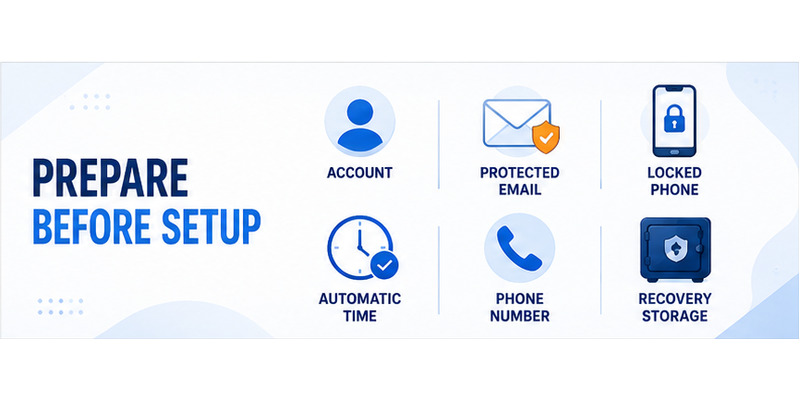
Before following how to enable mobile authenticator on steam, verify that the Steam account opens normally in a browser or desktop client. Confirm the account name, password, contact email, and country or phone details. Resolve a pending password reset or suspected compromise first, because adding a new factor to an unstable account can make recovery harder.
Protect the contact email with a unique password and its own multifactor method. Steam may use that inbox for security notices and recovery. Do not begin while responding to an unsolicited trade message, screen-share request, or “account verification” instruction. Steam staff and legitimate traders do not need your password, SMS value, recovery code, or rotating Steam Guard code.
Prepare a compatible, trustworthy device
Use a phone you control, update its operating system, enable a screen lock, and install apps only from the official Apple App Store or Google Play listing. Steam currently documents iOS 13 or later and Android 5.0 or later for the mobile app. Turn on automatic date and time so rotating codes remain synchronized.
Have a phone number capable of receiving the verification SMS. Avoid a temporary number that may disappear. Decide where the recovery code will be stored—such as an encrypted password manager or a secure offline record—before enrollment begins.
| Preparation item | Recommended check | Reason |
|---|---|---|
| Steam account | Test password and email | Prevents lockout during enrollment |
| Phone | Updated, locked, and personally controlled | Protects the new factor |
| Time settings | Automatic date, time, and zone | Keeps codes synchronized |
| Phone number | Long-term number can receive SMS | Supports verification and recovery |
| Recovery storage | Secure location outside the phone | Survives loss or damage |
This preparation makes how to enable mobile authenticator on steam a controlled security change instead of a rushed response to a login prompt.
Treat how to enable mobile authenticator on steam as an account-security project: verify each dependency first, then make the change from a trusted device.
Download Authenticator App
Secure your accounts with fast, reliable two-factor authentication. Download now and protect your login in seconds.
2. Install and Sign In to Steam Mobile
Get the official application
The answer to what authenticator app does steam use is the official Steam Mobile app. Search the phone’s official store, inspect the publisher and listing, and avoid third-party APK sites, browser extensions, or apps that imitate Steam branding. Open the app only after the installation source is confirmed.
The question can i use google authenticator for steam often arises because many services accept standard QR secrets. Steam Guard’s consumer enrollment is designed for Steam Mobile, including its login approvals, QR scanner, account controls, and recovery workflow. Do not paste Steam credentials or recovery data into an unrelated generator.
Sign in without exposing a code
Launch Steam Mobile and enter the account name and password on the official screen. If Steam sends an email code, retrieve it directly from the protected mailbox. Never read that value to someone in chat, paste it into a remote-support form, or approve a prompt you did not initiate.
After sign-in, confirm the profile identity before learning how to enable mobile authenticator on steam. A phone may hold several Steam accounts, and adding protection to the wrong profile leaves the intended account unchanged. Check the account name and avatar rather than relying on a familiar display name alone.
If login fails, stop after a small number of careful attempts. Reset the password through Steam’s official recovery route, scan the device for suspicious software, and review the email account. Repeated guessing can add confusion and may trigger rate limits.
The related steam mobile authenticator overview explains the role of the mobile factor before you continue with how to enable steam authenticator.
At this point, how to enable mobile authenticator on steam should proceed only inside the authenticated Steam Mobile session you personally opened.
💡 Discover Helpful Guides: Steam Mobile Authenticator: Setup and Security Guide
3. Enable Steam Guard Mobile Authenticator
Start enrollment from Steam Guard
Open the menu in Steam Mobile, select Steam Guard, and choose Add Authenticator. Interface wording can change slightly by app version, but the enrollment belongs inside the official Steam Guard area. Read each screen before proceeding and make sure no one is directing the process through a voice call or screen share.
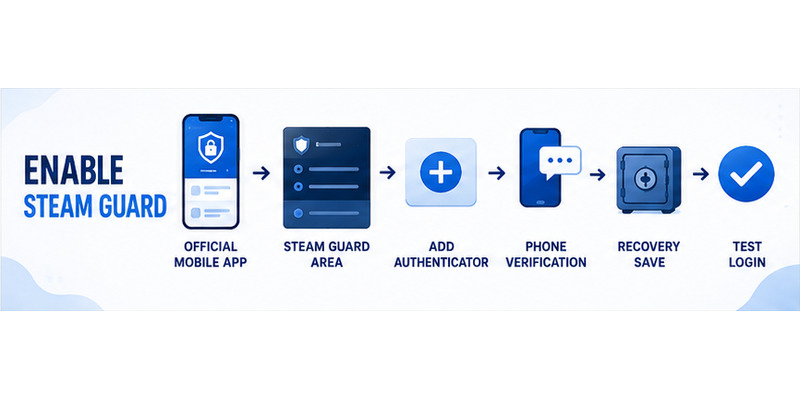
When users ask steam guard how to enable, the critical sequence is account sign-in, Steam Guard, Add Authenticator, phone verification, and recovery-code storage. Do not treat the final button as the finish line; verification and recovery preparation still need to be completed.
Follow the enrollment sequence
Use this practical order for how to enable mobile authenticator on steam:
- Open the official Steam Mobile app and select the correct account.
- Open Steam Guard and choose Add Authenticator.
- Enter or confirm a long-term mobile number.
- Submit the SMS verification value only inside Steam.
- Record the recovery code outside the phone.
- Confirm that the rotating code appears.
- Perform one signed-out test login on a trusted device.
If Steam reports that an authenticator already exists, do not immediately remove it. Determine whether an old phone still holds the active credential. Transfer or recover the existing authenticator through the official path; blind removal can create a longer trading restriction and weaken the account.
Understanding how to enable steam guard mobile authenticator also means recognizing phishing. A real enrollment never requires sending a screenshot of the QR scanner, recovery code, SMS message, or current rotating value to another person. Close suspicious pages and navigate to Steam independently.
Finish how to enable mobile authenticator on steam only when the code generator and a tested recovery route both belong to you.
That verification turns how to enable mobile authenticator on steam from a sequence of taps into a dependable protection plan.
Documenting how to enable mobile authenticator on steam also helps you repeat the correct transfer or recovery steps when the phone changes.
💡 Discover Helpful Guides: Where to Find Steam Mobile Authenticator Code Fast
4. Verify the Phone Number and Recovery Code
Complete phone verification safely
Steam may ask for a mobile number and send a one-time SMS value. Enter it only in the Steam Mobile enrollment screen. Check the country code and number before requesting another message. If delivery is delayed, wait briefly, verify cellular service, and avoid repeatedly generating values that can expire or arrive out of order.
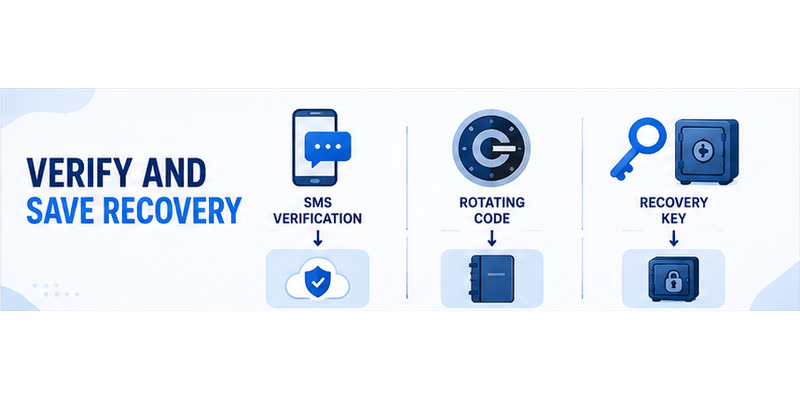
The SMS step verifies access to the number; it is not the rotating Steam Guard code used for routine sign-in. Distinguishing those values prevents a common setup error. A scammer requesting the SMS value may be trying to register or remove a security method, so never share it.
Store the recovery code outside the phone
Steam displays a recovery code during setup. Save it exactly as shown in an encrypted password manager or another secure location that will remain available if the phone is lost. Do not keep the only copy in a screenshot on that same device, in public cloud notes, or in a message to yourself.
The steam authenticator recovery code guide explains storage and recovery choices in more depth. A recovery code is not a daily login code and should not be entered into a trade site.
| Credential | Normal purpose | Safe handling |
|---|---|---|
| SMS verification value | Confirm phone-number control | Enter only during official Steam flow |
| Rotating Steam Guard code | Approve a current sign-in | Never send to another person |
| Recovery code | Restore or remove authenticator | Store offline or in encrypted vault |
| Password | Primary account secret | Unique and never reused |
This stage completes the foundation of how to enable mobile authenticator on steam. Verify the saved recovery record is readable, then return to Steam Guard and confirm a fresh rotating code appears.
Do not consider how to enable mobile authenticator on steam complete if the only recovery copy remains on the enrolled phone.
5. Use Codes, QR Sign-In, and Push Approval
Choose the right sign-in method
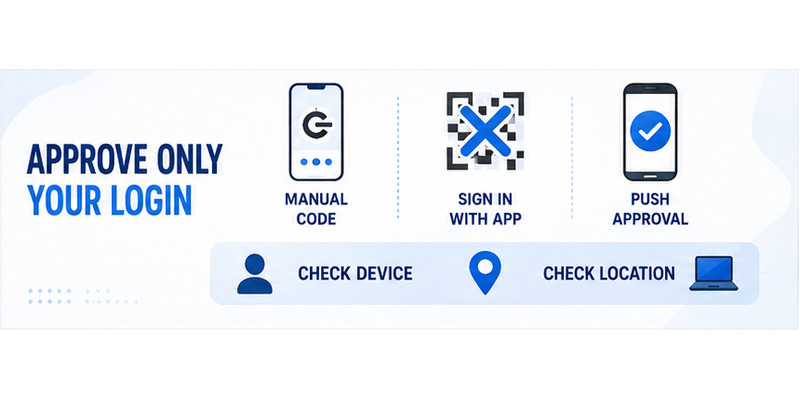
Knowing how to use steam mobile authenticator starts with recognizing three common methods. A rotating code can be typed into a trusted Steam login. The QR scanner can authorize a sign-in displayed by the desktop client or official website. A push prompt can approve or reject a new session after showing context about the request.
For manual entry, open Steam Guard and read the current code. Steam says it changes about every 30 seconds. If only a few seconds remain, wait for the next value rather than rushing. The where to find steam mobile authenticator code walkthrough provides a focused visual explanation.
Verify every request before approval
To understand how to use steam guard mobile authenticator, compare the device and location details in an approval prompt with the sign-in you just initiated. Reject anything unexpected, then change the password and review authorized devices. An approval tap is equivalent to handing over a valid code; convenience does not remove the need to verify context.
For QR sign-in, open the scanner from Steam Mobile and scan only a QR code currently displayed by the official Steam client or a verified `steampowered.com` page you opened yourself. Do not scan an image sent through Discord, chat, email, or a marketplace listing. The steam guard qr code guide covers this threat in detail.
After learning how to enable mobile authenticator on steam, practice one login and one rejection on your own devices. That brief rehearsal makes suspicious prompts easier to spot later and confirms the credential works before an emergency.
Daily how to enable mobile authenticator on steam habits should always connect an approval to a login you can see and recognize.
💡 Discover Helpful Guides: Steam Mobile Authenticator: Setup and Security Guide
6. Fix Setup and Code Problems
Diagnose invalid or missing codes
If a code is rejected after how to enable mobile authenticator on steam, enable automatic date, time, and time zone on the phone. Confirm that the correct Steam account is selected, wait for a fresh value, and type it once. Steam notes that mobile codes can be generated offline, but accurate device time remains important.
When users ask how to find steam authenticator code, the normal location is the Steam Guard area of Steam Mobile. If the shield or code is missing, update and reopen the official app, verify the signed-in account, and confirm enrollment completed. Reinstalling blindly can remove local access without fixing an account-side issue.
Resolve enrollment and SMS failures
For SMS problems, check the country prefix, cellular reception, message blocking, and whether the number can receive ordinary texts. Wait for the latest requested value and ignore older arrivals. Do not use an online “SMS receiver” because whoever controls that service may gain access to the verification flow.
If a QR scan fails, clean the camera lens, increase screen brightness, resize the code, or use the official manual-code or push option. If the app repeatedly crashes, update the operating system and Steam Mobile, restart the phone, and use Steam Support if the fault persists.
| Symptom | First safe check | Avoid |
|---|---|---|
| Code rejected | Automatic time and correct account | Repeated rapid guesses |
| No SMS | Number, prefix, service, latest request | Public SMS websites |
| No Steam Guard tab | Official app and correct profile | Look-alike apps |
| QR will not scan | Brightness, camera, official fallback | QR images from strangers |
| Unexpected approval | Reject and review sessions | Approving to “make it stop” |
Troubleshooting how to enable mobile authenticator on steam should preserve the existing recovery path. If ownership cannot be verified, use official Steam Support rather than a paid recovery contact or community moderator.
Safe how to enable mobile authenticator on steam troubleshooting changes one variable at a time and never exposes credentials to a stranger.
💡 Discover Helpful Guides: Disable Steam Authenticator Safely: Complete Guide
7. Protect Trades, Recovery, and Device Changes
Understand initial trading protections
Steam documents a seven-day period after adding the mobile authenticator during which newly created trades or Community Market listings can receive 15-day holds. An existing hold is not shortened merely because the authenticator was added. Plan enrollment before a time-sensitive legitimate trade instead of reacting to pressure from another user.
These delays are protective controls, not evidence that how to enable mobile authenticator on steam failed. Never remove and re-add the authenticator to bypass a hold. Steam’s current guidance says removal can create a 15-day restriction, while an official transfer to a new phone carries a shorter two-day restriction.
Prepare for loss and phone replacement
Keep the recovery code and contact email current. If the phone disappears but the registered number still works, use Steam’s official recovery workflow. If both the device and number are unavailable, Steam Support may request ownership evidence such as account history or purchase information; submit it only through the official help portal.
When replacing a working phone, follow how to move steam authenticator to new phone instead of removing protection. Confirm the new device generates valid codes before wiping the old one.
Questions such as how to get steam authenticator code without phone have no legitimate shortcut that exposes the active secret. Use the saved recovery code, verified number, another already authorized session, or Steam Support. Anyone promising to “calculate” a code is attempting fraud or account theft.
Good recovery planning is part of how to enable mobile authenticator on steam, because a strong factor should block attackers without permanently blocking its owner.
Planning ahead also keeps how to enable mobile authenticator on steam from becoming an emergency when a device is replaced, damaged, or stolen.
8. Maintain a Secure Steam Authenticator
Review devices and account activity
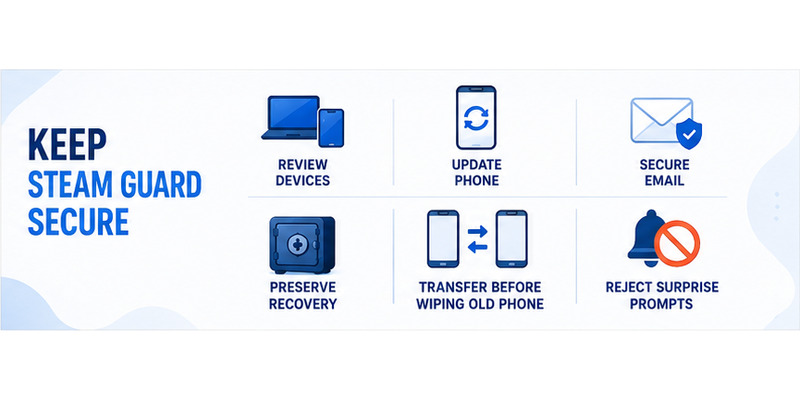
After setup, open Steam’s security and device controls and review signed-in sessions. Deauthorize devices you no longer control, especially shared computers, old phones, and systems used while traveling. Change the password if any session, trade, inventory action, or approval looks unfamiliar.
Keep Steam Mobile and the phone operating system updated. Maintain a screen lock, hide sensitive notification previews, and avoid rooting or jailbreaking the device used for authentication. Back up the recovery code securely, but do not back up live screenshots or export secrets into unencrypted storage.
Build safe everyday habits
Learning how to use steam authenticator is mostly about intent. Initiate the login yourself, verify the domain or client, compare approval details, and reject surprises. Never approve a request merely because it appeared immediately after a trader, tournament organizer, or “Steam admin” contacted you.
Use a password manager to create a unique Steam password and secure the linked email with a separate factor. Review Steam API access and authorized devices after visiting third-party trading services. Log out of browser sessions on shared machines instead of assuming the rotating code protects an unattended session forever.
Once a month, confirm the recovery record is readable, the phone number is current, and the email can be accessed. Do not type the recovery code merely to test it; verify its stored format and location. If compromise is suspected, use a clean device to change credentials and contact official support.
A maintained setup preserves the benefit of how to enable mobile authenticator on steam long after the first successful code appears.
Reviewing sessions and recovery details periodically keeps how to enable mobile authenticator on steam effective as devices, numbers, and habits change.
The long-term value of how to enable mobile authenticator on steam comes from combining the factor with careful approvals and reliable recovery records.
9. Frequently Asked Questions
What authenticator does Steam use?
The official method is Steam Guard Mobile Authenticator inside the Steam Mobile app. It supports rotating codes, QR sign-in, and approval prompts tied to Steam’s account and recovery systems.
How do I get a Steam authenticator code?
Open Steam Mobile, select the correct account, and open Steam Guard. The displayed code refreshes approximately every 30 seconds. Enter it only into an official sign-in you initiated.
Can Steam Guard codes work offline?
Yes. Steam says the mobile authenticator can generate codes without network access. The phone’s date and time still need to be accurate, so automatic time settings are recommended.
Can one phone protect multiple Steam accounts?
Steam permits multiple accounts in the mobile app, but each Steam account can have only one mobile authenticator active at a time. Always confirm the selected profile before reading or approving a code.
What if I lose the phone after setup?
Use the saved recovery code, the registered phone number, an authorized session, or official Steam Support. Keep the recovery record outside the phone so the loss of one device does not remove every path back in.
Why are my trades held after enrollment?
Steam’s protective rules can hold trades or Market listings created during the first seven days after the authenticator is added. Adding it does not shorten a hold that already exists.
Should I remove Steam Guard when buying a new phone?
Usually no. Use Steam’s Move Authenticator flow when the old phone or registered number is available. Transfer maintains stronger protection and generally has a shorter documented restriction than removal.
How long does how to enable mobile authenticator on steam take?
The taps usually take only a few minutes if the account, email, and phone number are ready. Allow extra time to save the recovery code and test a signed-out login; those checks are essential, not optional.
10. Final Thoughts
The safe method for how to enable mobile authenticator on steam is straightforward: prepare the account and phone, install Steam Mobile from an official store, open Steam Guard, add the authenticator, verify the number, save the recovery code, and test a login. The setup becomes durable when email, phone, recovery storage, and device security are all maintained.
Use rotating codes, QR sign-in, and push approvals only for actions you initiated. A code or approval can authorize an attacker just as effectively as it authorizes you. Reject unexpected prompts, distrust urgent requests, and never reveal the SMS value or recovery code to another person.
Plan phone transfers before wiping an old device, understand the initial trading safeguards, and use official Steam Support when normal recovery options are unavailable. Avoid third-party code generators, public SMS services, and anyone claiming they can bypass account ownership checks.
For broader guidance on account protection, recovery, and two-factor authentication, visit Authenticator App. A careful how to enable mobile authenticator on steam process creates a factor that is both harder to steal and practical for the legitimate owner to recover.
Complete the setup when you have time to verify it calmly, then record the date and recovery location in your private security checklist. Revisit that checklist after a phone upgrade, number change, suspicious login, or major account change.
Download Authenticator App
Secure your accounts with fast, reliable two-factor authentication. Download now and protect your login in seconds.
