
Where to Find Steam Mobile Authenticator Code Fast
Published August 17, 2026 · Updated August 20, 2026

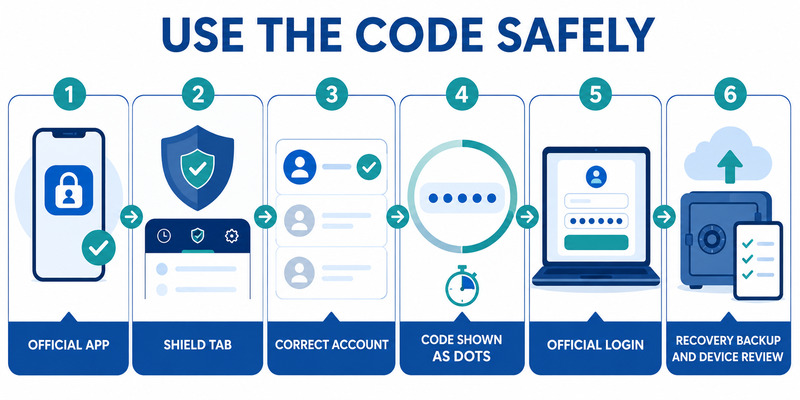
If you need to know where to find steam mobile authenticator code, open the official Steam Mobile app, select the Steam Guard shield in the bottom navigation, choose the correct Steam account, and tap Show Steam Guard code. The current value changes every 30 seconds, so use the newest one only on the official Steam client or a Valve-operated website.
The code appears only after Steam Guard Mobile Authenticator has been enrolled for that account. If the screen shows Add authenticator instead, setup is incomplete. If several accounts are registered, the correct identity must be selected before copying a value.
This guide explains the exact location, the timer, setup, multiple accounts, QR and push alternatives, invalid-code fixes, lost-phone recovery, and common phishing traps. It does not display or request any real authentication value.
1. Locate Steam Guard in the Official Mobile App
Open the supported mobile feature
The answer to where is steam mobile authenticator is inside the official Steam Mobile app for iOS or Android. Verify Valve as the publisher, open the app, and look for the shield-shaped Steam Guard control in the bottom navigation. It is a feature of Steam Mobile, not a separate app.
Steam Support currently lists iOS 13 or later and Android 5.0 or later for mobile authentication. Requirements can change, so use the live support page and current store listing. Update the phone and app before troubleshooting an interface that may be outdated.
Confirm the correct Steam Guard state
Open the shield page. An enrolled account can offer QR scanning, sign-in confirmations, and a control to show the current Steam Guard value. An account that has not completed enrollment can show Add authenticator instead.
If you ask where is steam guard mobile authenticator, do not search the Steam desktop Settings menu for the rotating phone code. The PC displays a login prompt; the protected mobile credential remains in Steam Mobile. Email Steam Guard is another method and sends codes to the contact mailbox.
| Screen state | Meaning | Next step |
|---|---|---|
| Show Steam Guard code | Mobile authenticator is enrolled | Open it and use the newest value |
| Add authenticator | Enrollment is incomplete | Follow official setup |
| Account dropdown | Several identities are registered | Select the account being signed in |
| Sign-in request | Push confirmation is pending | Review device and location |
| Scan QR code | QR login is available | Scan only the official Steam login panel |
The first checkpoint in where to find steam mobile authenticator code is therefore the Steam Guard page for the correct account, not the Profile, Store, Chat, or desktop client settings.
Bookmark Steam’s official support page so the next where to find steam mobile authenticator code check begins with the current mobile interface.
Download Authenticator App
Secure your accounts with fast, reliable two-factor authentication. Download now and protect your login in seconds.
💡 Discover Helpful Guides: Steam App Authenticator Not Working: Complete Fixes
2. Show the Current Mobile Authenticator Code
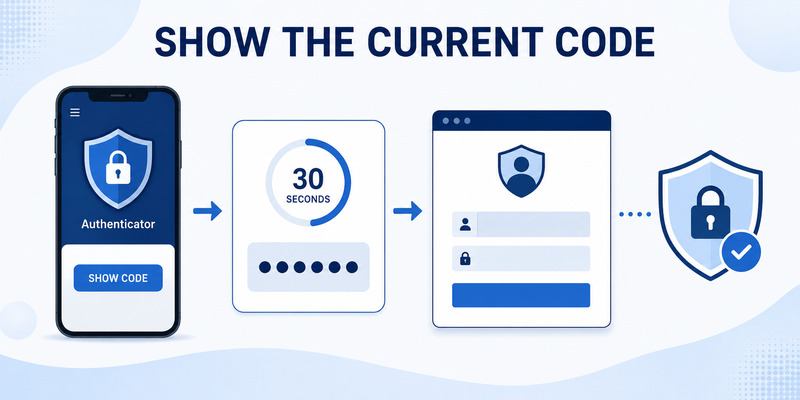
Reveal the rotating value
On the Steam Guard page, tap Show Steam Guard code. Steam displays the current short-lived value and a timer. Valve states that the code changes every 30 seconds, is usable only once, and cannot be guessed. Enter the newest value promptly.
For where to find steam authenticator code, keep the app open while typing into the official Steam client or website. If the timer is near the end, wait for a fresh value. Do not reuse an older code from clipboard history, a screenshot, or a message.
Use the code only on Valve-operated surfaces
Steam Support says never to share a mobile authenticator value and never to enter it on a site not run by Valve. A marketplace, tournament, giveaway, team page, trade verifier, or community moderator does not need it.
The phone does not require an internet connection to calculate the code after enrollment, but its clock must be accurate. Push requests, QR context, updates, and recovery still need connectivity.
Learning where to find steam mobile authenticator code does not authorize every prompt. Confirm the account and login action first. If an unexpected page asks for a code, close it, navigate to Steam through a saved official link, and review Security & Devices.
Do not photograph or record the rotating value. It expires quickly, but a live code can still help an attacker complete a sign-in during its valid window. Steam staff will not ask for it.
3. Set Up the Authenticator When No Code Appears
Install and enroll through Steam Guard
If the Steam Guard page offers Add authenticator, the account has no mobile code yet. For where to get steam mobile authenticator, install the official Steam Mobile app from Apple App Store or Google Play, verify Valve as the publisher, sign in, open Steam Guard, and choose Add authenticator.
Follow the current official setup sequence. Steam may ask for a phone number and send an SMS confirmation. Its walkthrough also describes a path for users without access to a number. Enter confirmation values only in the official app or Valve website.
Save recovery information and test
After enrollment succeeds, Steam presents a recovery code. Write it down and store it securely away from the phone. This is an emergency recovery credential, not the 30-second login value. The steam authenticator recovery code guide explains the distinction.
Return to Steam Guard and use Show Steam Guard code. Perform one signed-out login to prove that the server accepted the authenticator. Generate backup codes from Account Details and Manage Steam Guard, then store them separately.
The complete where to find steam mobile authenticator code path is:
- Install official Steam Mobile.
- Sign in to the intended account.
- Open the Steam Guard shield.
- Add the authenticator and finish confirmation.
- Save the recovery code.
- Tap Show Steam Guard code and test a login.
Steam can apply protective trade and Market holds during the first seven days after activation. Do not remove the authenticator because of an expected hold; removal weakens security and can create a 15-day restriction.
Record the successful signed-out test without secrets; it proves that where to find steam mobile authenticator code produced a server-accepted credential.
📖 Read More Guides: Steam Mobile Authenticator: Setup and Security Guide
4. Select the Correct Account on a Multi-Account Phone
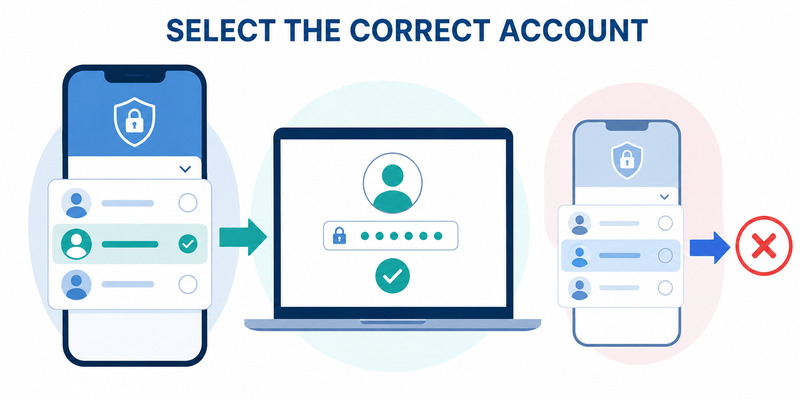
Use the Steam Guard account dropdown
Steam allows one mobile app to authenticate multiple Steam accounts. On the Steam Guard page, open the account dropdown and select the identity currently signing in. Each account has its own credential, current code, recovery information, and device relationship.
A correct value from the wrong identity will be rejected. When troubleshooting where to find steam mobile authenticator code, compare the Steam account name on the PC login with the selected account in the phone app before changing passwords or reinstalling anything.
Keep identities understandable
Use recognizable account names and maintain a secret-free record of which phone protects each account. Do not store passwords, recovery values, backup codes, or screenshots in the same list.
Steam says a phone can authenticate several accounts, but one Steam account can be on only one mobile authenticator device at a time. Use Move Authenticator when replacing the phone instead of copying app files or using an unofficial desktop tool.
| Multi-account symptom | Likely cause | Safe correction |
|---|---|---|
| Code immediately rejected | Wrong account selected | Choose the matching account |
| Push arrives for another name | Different registered identity | Review and deny if uninitiated |
| No code for one account | It was never enrolled | Add authenticator through that account |
| Old phone still owns credential | Transfer not completed | Use official Move Authenticator |
The correct answer to where is steam authenticator depends on the account dropdown. Verify the identity before revealing, entering, or approving any value.
Review Security & Devices for every high-value account and deauthorize sessions that are unfamiliar, shared, sold, or no longer needed.
5. Choose QR, Push, or Manual Code Sign-In
Use QR login on a trusted screen
Steam Mobile supports QR sign-in. On the official Steam client or Valve website, display the login QR. Open Steam Guard, choose the scan control, and point the phone at that screen. After scanning, review the device and approximate location before approving.
Never scan a QR sent in chat, email, a trade offer, or a third-party site. A malicious QR can represent an attacker’s login session. The safe QR is generated on the login panel you intentionally opened.
Choose push or manual entry when appropriate
After entering the Steam account name and password, Steam can send a phone notification. Open it, compare the account, location, device, and timing, then approve or deny. A push prompt is not safe merely because it reached the real app.
Manual entry uses the value found through where to find steam mobile authenticator code. It is useful when a notification is delayed or the phone is offline. Tap Show Steam Guard code and enter the latest value in the official login panel.
| Method | Advantage | Required check |
|---|---|---|
| QR scan | Fast and avoids typing credentials | Scan only the intentional Steam login screen |
| Push confirmation | Shows contextual details | Match account, device, location, and time |
| Manual code | Works with offline code generation | Use newest value and official domain |
All three methods depend on the phone-held credential. Learning where to find steam mobile authenticator code is useful, but QR or push may be faster when the context is trustworthy.
Choose the method before starting the login so where to find steam mobile authenticator code does not become a rushed response to an unexpected prompt.
Deny repeated uninitiated requests and change the Steam password from a clean device. Someone may already know the password even if the mobile factor blocked access.
💡 Discover Helpful Guides: Steam Mobile Authenticator: Setup and Security Guide
6. Fix an Invalid, Expired, or Missing Code
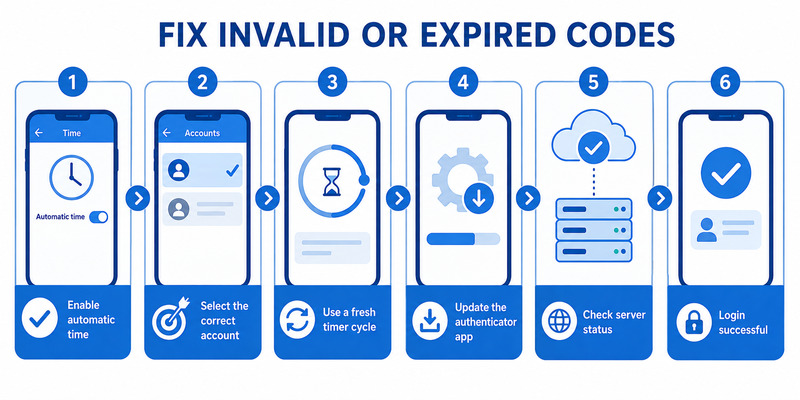
Correct time and account selection
Steam states that authenticator codes depend on the phone’s time. Enable automatic date, time, and time zone, then restart the app and wait for a fresh 30-second value. Manual time that appears close can still be far enough off to fail.
Confirm the selected account and type the current value exactly. Avoid spaces introduced by copying, and do not use a screenshot or previously written code. One clean attempt is more informative than many rapid retries.
For where to find steam mobile authenticator code, open the shield page directly rather than relying on a stale notification. If Show Steam Guard code is absent, confirm that enrollment finished and that the account was not transferred or removed.
Isolate app, network, and server issues
Update Steam Mobile and the phone OS, verify storage, restart the device, and check Steam service status. Offline code generation does not need network, but app login, account selection, push, QR, and recovery do.
Do not delete the app before confirming the recovery code, phone number, email, backup codes, and ownership evidence. Reinstallation can turn a display issue into an account-recovery problem.
If manual codes fail but QR or push succeeds, review time and account selection. If every method fails, use help.steampowered.com. Record the account name, phone model, OS, app version, time, network, exact error, and failing step without recording any real code.
The where to find steam mobile authenticator code question is solved only when the value is visible and accepted by the server. A code on screen does not prove that it belongs to the requested account or current authenticator.
📖 Read More Guides: Steam Authenticator Recovery Code: How to Find and Use It Safely
7. Recover Access When the Phone Is Unavailable
Move or restore with available recovery paths
If the old phone still works, install Steam Mobile on the new phone, sign in, and choose Move Authenticator. Follow the official confirmation, save the newly presented recovery value, test login, review devices, and wipe the old phone only after success.
If the old phone is lost but the registered number remains available, obtain a replacement SIM or eSIM, install Steam Mobile, choose that access to the old authenticator is unavailable, and follow Steam’s SMS-based transfer flow.
Contact Steam Support when recovery factors are gone
If the phone, number, and recovery code are unavailable, go to help.steampowered.com. Steam Support may request proof of account ownership such as historical account names, email addresses, receipts, or product keys through the official ticket.
Do not ask a trader, community moderator, or paid unlock service where to find steam mobile authenticator code. They cannot retrieve it safely. Never provide passwords, current codes, recovery values, SMS removal values, or trade approvals to another user.
After recovery, change compromised passwords, review Security & Devices, deauthorize old sessions, inspect trade and Market activity, generate fresh backup codes, and store the new recovery information. The steam mobile authenticator guide covers full setup and transfer planning.
Steam currently documents a two-day trade and Market restriction after authenticator transfer and a 15-day restriction after removal. These windows protect inventory; do not use unofficial software to bypass them.
A recovered where to find steam mobile authenticator code workflow ends with a signed-out test and independent fallback, not merely an account name displayed on the replacement phone.
Save the new recovery information after that test so where to find steam mobile authenticator code remains recoverable after another device loss.
8. Avoid Fake Code Requests and Desktop Tools
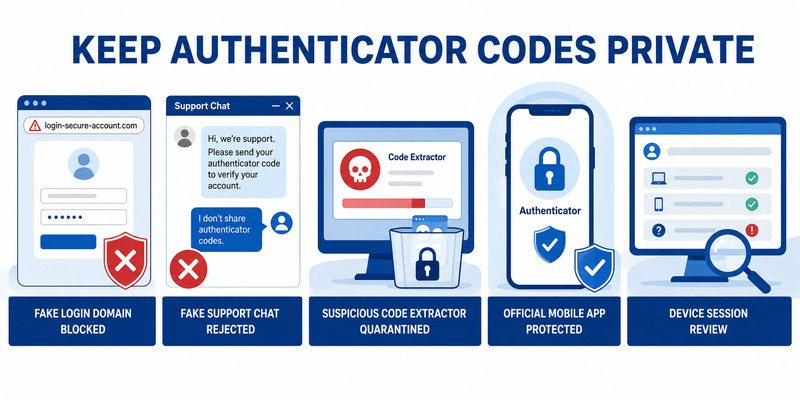
Recognize phishing requests
Scammers may claim a code is needed to verify an item, appeal a report, join a team, receive a giveaway, reverse a ban, or prove account ownership. None of these users should receive a Steam Guard value.
Check the domain before entering credentials. Typos, extra subdomains, copied Valve graphics, shortened links, and sponsored results can lead to fake login pages. Navigate through the official client or a saved Steam Support link.
Knowing where to find steam mobile authenticator code makes the secret easier to use correctly, but it also means refusing to reveal it elsewhere. Steam Support says staff will not ask for the password or mobile code.
Avoid unofficial desktop authenticators
Programs marketed as desktop Steam authenticators, code exporters, trade bots, or inventory tools can expose the second-factor secret on the same PC that stores the password and session. Steam’s supported mobile method requires a phone.
Never run a program suggested through email or chat that claims to fix, clean, optimize, verify, or recover Steam. If one was used, stop it, scan the PC with trusted tools, change Steam and email passwords from a clean device, deauthorize sessions, review API access and inventory activity, and contact Steam Support.
Do not share an SMS recovery or removal value. Those codes can add or remove authenticator devices and are especially dangerous in social-engineering attacks.
Keep screenshots of suspicious messages for evidence, but redact any code. The safest answer to where to find steam mobile authenticator code always keeps the value inside the official login flow and away from third-party tools.
9. Frequently Asked Questions
Where is the code in Steam Mobile?
Open the official app, select the Steam Guard shield, choose the correct account, and tap Show Steam Guard code. Use the newest value before the 30-second timer changes.
Why do I see Add authenticator instead?
That account has not completed mobile enrollment. Follow the official Add authenticator sequence, confirm the phone step, save the recovery code, and test a login.
Can I see the code without internet?
Yes. Steam says the phone can generate it offline, but the clock must be accurate. QR, push, update, and recovery functions require connectivity.
Why is a visible code rejected?
The phone time may be wrong, the value may have expired, or another Steam account may be selected. Enable automatic time, choose the correct identity, and wait for a fresh value.
Is the recovery code the same thing?
No. The recovery value is a persistent emergency credential shown during setup or transfer. The login value changes every 30 seconds.
Can Steam Support ask for my mobile code?
No. Steam’s guidance says Support and Valve employees will not ask for the password or mobile authenticator value. Use only the official help site.
Can one phone show codes for several accounts?
Yes. Use the Steam Guard account dropdown and enroll each identity separately. A single Steam account can be on only one mobile authenticator at a time.
Should I screenshot the code?
No. A screenshot can sync, appear in previews, or be copied by another app. Open the official app and use the current value only for the intended login.
These answers summarize where to find steam mobile authenticator code without exposing any real credential or weakening recovery.
If the app looks different, pause where to find steam mobile authenticator code and compare the current Steam Support instructions before changing account security.
💡 Discover Helpful Guides: Steam Authenticator App: Complete Steam Guard Setup, Codes & Recovery Guide
10. Final Thoughts
The direct answer to where to find steam mobile authenticator code is Steam Mobile > Steam Guard shield > correct account > Show Steam Guard code. The value changes every 30 seconds and should be entered only in the official Steam client or a Valve-operated website.
If no code appears, finish Add authenticator setup and save the separate recovery value. If several accounts are registered, select the identity that matches the login. If a current code fails, correct automatic time and wait for a new value before escalating.
QR scanning and push approval are alternatives to manual entry, but each request must match an action you initiated. Deny unexpected prompts, protect the email account, review Security & Devices, and keep backup and recovery information away from the phone and gaming PC.
Visit Authenticator App for broader two-factor setup, migration, recovery, and security guidance. A safe where to find steam mobile authenticator code process keeps the value private, verifies the account, and preserves a tested fallback.
When the phone is unavailable, use Move Authenticator, the registered number, the saved recovery value, backup codes, or Steam’s official help site. Do not install a desktop extractor or pay another person to retrieve a code.
Recheck app updates, automatic time, account selection, recovery storage, and active devices periodically. These small habits make the next where to find steam mobile authenticator code request quick, accurate, and resistant to phishing.
Download Authenticator App
Secure your accounts with fast, reliable two-factor authentication. Download now and protect your login in seconds.
