
Google Authenticator Laravel: Complete 2FA Setup Guide
Published August 12, 2026
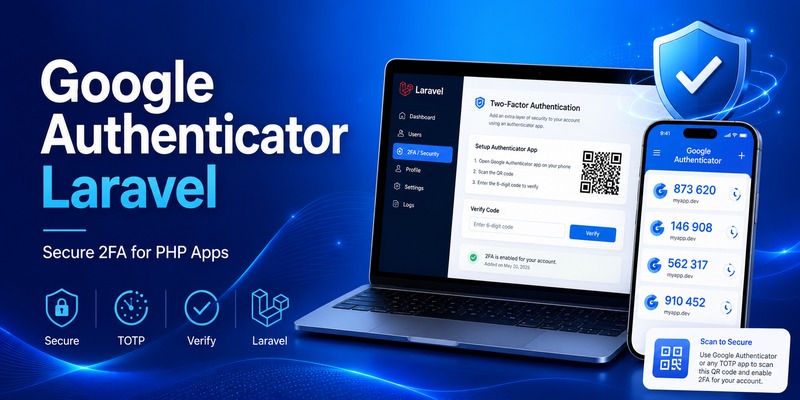
Adding two-factor authentication is one of the most effective ways to improve login security for a Laravel application. Instead of relying only on a username and password, google authenticator laravel adds a second verification step using a temporary code generated by an authenticator application.
This approach is generally based on TOTP, or Time-Based One-Time Passwords. A user scans a QR code when enabling two-factor authentication, their authenticator stores a secret, and the application generates a short-lived verification code from that secret.
The server independently calculates whether the submitted code is valid.
This means your Laravel application does not need to send every verification code through SMS, email, or an external Google API.
As of Laravel 13, Laravel’s official starter kits include built-in two-factor authentication compatible with TOTP authenticator applications. Laravel states that its starter kits support any TOTP-compatible authenticator and enable 2FA through Fortify configuration.
Developers can therefore implement google authenticator laravel either through Laravel’s first-party authentication stack or through a specialized PHP package such as PragmaRX Google2FA.
This guide explains both approaches, including QR-code enrollment, secret storage, verification, login middleware, PHP integration, WordPress comparisons, Laravel 8 considerations, and security best practices.
1. What Is Google Authenticator Laravel?
The term google authenticator laravel normally describes adding TOTP-based two-factor authentication to a Laravel application so users can verify logins with Google Authenticator or another compatible authenticator app.
Google Authenticator is only the client-side code generator.
Your Laravel server handles the important backend logic:
- Generate a unique TOTP secret for each user.
- Present that secret as a QR code.
- Allow the user to scan the QR code.
- Ask the user for a verification code.
- Validate the submitted code.
- Mark two-factor authentication as enabled.
- Require another TOTP code during future logins.
- Provide a recovery mechanism if the authenticator is lost.
A laravel 2fa google authenticator implementation therefore has two separate components.
The first is the authenticator application on the user’s phone.
The second is your Laravel backend.
They share a secret during setup, but the user’s phone does not have to contact your Laravel server each time it creates a code.
TOTP rather than Google OAuth
A common misunderstanding is to confuse google authenticator laravel with “Sign in with Google.”
They solve different problems.
Google OAuth allows users to authenticate using a Google account.
Google Authenticator provides a second authentication factor through temporary verification codes.
Laravel Socialite supports OAuth authentication providers including Google, but that is separate from TOTP-based two-factor authentication.
You could even use both.
For example:
User chooses “Sign in with Google.”
Google verifies the identity.
Your Laravel application receives the authenticated user.
Laravel then requires a TOTP code before opening sensitive account features.
That creates a more layered authentication architecture.
🧭 Explore Guides: Google Authenticator: Complete 2FA Setup & Security Guide
2. How Google Authenticator Works With Laravel
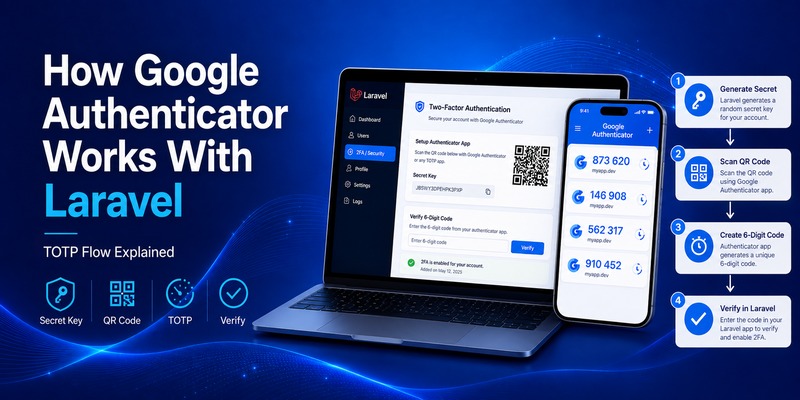
A typical google authenticator laravel setup starts when a logged-in user visits account security settings and clicks “Enable Two-Factor Authentication.”
Laravel creates a random secret such as:
JBSWY3DPEHPK3PXP
That value should never be treated as harmless configuration data.
It is effectively the seed used to generate the user’s TOTP codes.
Your application then creates an otpauth:// configuration URI containing information such as:
otpauth://totp/MyApp:[email protected]?secret=SECRET&issuer=MyApp
The URI can be converted into a QR code.
The user scans it with Google Authenticator.
From that point onward, both the Laravel backend and the phone can independently calculate the expected verification code based on the shared secret and current time.
Why the codes keep changing
TOTP codes are time based.
They usually change after a short time window.
The user sees something similar to:
517 204
After the current period expires, the authenticator generates another value.
The backend validates whether the submitted value matches the expected code for the secret.
The PragmaRX Google2FA project supports both HOTP under RFC 4226 and TOTP under RFC 6238 and provides a Laravel bridge designed to create QR-code data and verify user-submitted codes.
Does Laravel contact Google?
No Google Authenticator API request is required for ordinary TOTP verification.
That is one of the main advantages of google authenticator laravel.
Your server does not ask Google:
“Is this code valid?”
Instead, the server validates it locally.
This can make TOTP fast, inexpensive, and resilient to temporary connectivity problems with third-party services.
🗺️ Browse How-To Guides: Google MFA App: Complete Guide to Secure Multi-Factor Authentication
3. Laravel 2FA Options: Built-In vs Google2FA Packages
There are now two major ways to approach google authenticator laravel.
Option 1: Laravel’s authentication starter kits
For a new Laravel application, the first-party stack deserves serious consideration.
Laravel 13 starter kits include built-in two-factor authentication for TOTP-compatible authenticator applications. Laravel’s documentation states that 2FA is enabled through Features::twoFactorAuthentication() in config/fortify.php.
Fortify powers much of the authentication backend provided by Laravel starter kits. The framework documentation describes Fortify as a backend authentication implementation providing routes and controllers without forcing a particular frontend.
This option is particularly attractive if you are building:
- A new SaaS product
- A Laravel dashboard
- A customer portal
- A team-management platform
- A subscription service
- A standard account-based web application
You may not need to manually build every part of laravel google 2fa.
Option 2: PragmaRX Google2FA
Developers who need more direct control can use pragmarx/google2fa-laravel.
The package describes itself as a Laravel bridge for the underlying Google2FA PHP implementation. Its purpose includes generating authentication information and checking codes entered by users.
Installation is performed with Composer:
composer require pragmarx/google2fa-laravel
The package currently documents compatibility through Laravel 13, with different PHP requirements depending on Laravel version.
This route can be useful when:
- You already have custom authentication.
- You do not use Laravel starter kits.
- You want complete control over your 2FA screens.
- You have custom middleware.
- You need to integrate TOTP into an existing product.
- Your login architecture does not fit Fortify’s standard workflow.
4. How to Install Google Authenticator Laravel
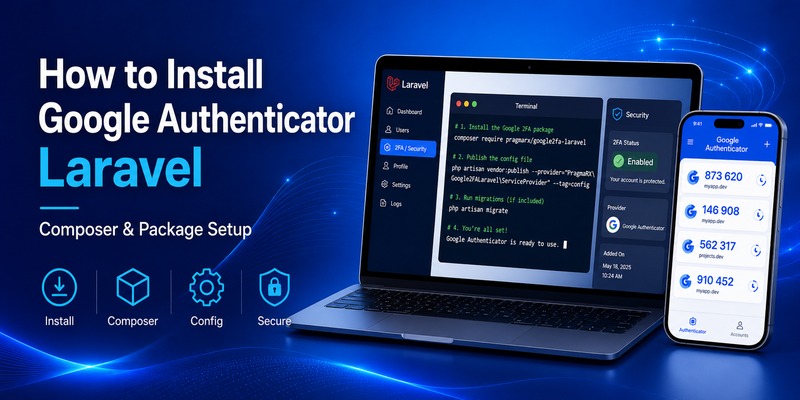
For a custom google authenticator laravel implementation, start by adding the package through Composer:
composer require pragmarx/google2fa-laravel
Current package documentation lists version 3.x as the active major line and includes compatibility for modern Laravel releases.
Modern Laravel applications can take advantage of package auto-discovery rather than manually registering every service provider.
Publish the configuration
The package documentation provides a vendor-publish command:
php artisan vendor:publish –provider=“PragmaRX\Google2FALaravel\ServiceProvider”
This gives you application-level configuration that can be adjusted when required.
Add database fields
Your application needs somewhere to store the user’s TOTP configuration.
A migration might include:
Schema::table(‘users’, function (Blueprint $table) {
$table->text(‘two_factor_secret’)->nullable();
$table->timestamp(‘two_factor_enabled_at’)->nullable();
});
Depending on your architecture, you might also add:
$table->text(‘two_factor_recovery_codes’)->nullable();
Do not store the secret carelessly.
Laravel provides encryption functionality for values that need application-level confidentiality. Laravel’s encryption system signs encrypted values with a message authentication code to protect them from modification.
A production google authenticator laravel implementation should therefore consider encrypting TOTP secrets at rest.
💡 Discover Helpful Guides: Google Authenticator for PC: Windows, Desktop and Laptop Guide
5. How to Generate and Store a TOTP Secret
After installation, your application needs to generate a unique secret for each user enabling two-factor authentication.
With Google2FA, the conceptual PHP flow is:
$google2fa = app(‘pragmarx.google2fa’);
$secret = $google2fa->generateSecretKey();
The package documentation also supports access through its Laravel integration and facade.
You then associate that secret with the authenticated user.
For example:
$user = auth()->user();
user->twofactorsecret=encrypt(secret);
$user->save();
At this stage, do not necessarily mark 2FA as enabled.
Why?
Because the user may close the setup screen before scanning the QR code.
A stronger google authenticator laravel enrollment flow is:
- Generate secret.
- Store the secret temporarily or in pending state.
- Display the QR code.
- Ask for the current code.
- Verify the code.
- Only then mark 2FA as active.
Laravel’s current starter-kit 2FA configuration includes a confirmation option specifically designed to require a successful code verification before two-factor authentication is considered fully enabled.
That is a good model even if you implement the workflow manually.
Download Authenticator App
Secure your accounts with fast, reliable two-factor authentication. Download now and protect your login in seconds.
6. How to Create a QR Code for Google Authenticator
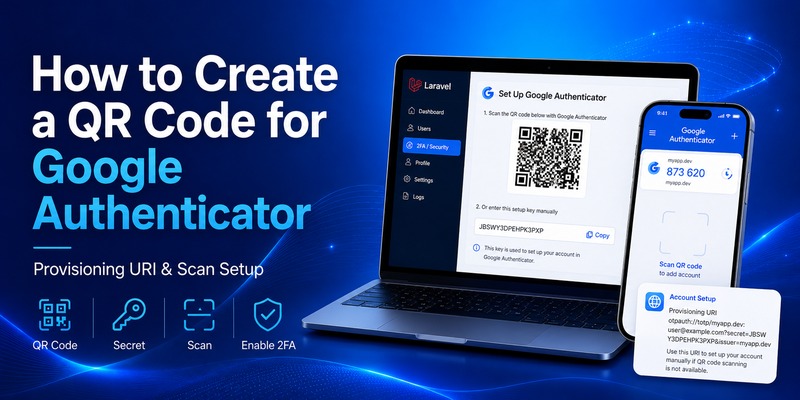
Typing a long secret manually is inconvenient.
QR enrollment is much easier.
For google authenticator laravel, your application generally needs to create a TOTP provisioning URI containing:
- Application name
- User identifier
- Secret
- Issuer
Conceptually:
$qrUrl = $google2fa->getQRCodeUrl(
config(‘app.name’),
$user->email,
$secret
);
You can then convert the provisioning URI into a QR image using a compatible QR-code library.
The phone scans this configuration and adds the account.
What the user should see
A clean setup screen might display:
Secure your account
- Open Google Authenticator.
- Tap Add Account.
- Scan the QR code below.
- Enter the six-digit code.
Under the QR code, provide the manual setup secret as a fallback.
Never expose the secret after setup unnecessarily
Once the google authenticator laravel enrollment is confirmed, avoid continuously showing the raw secret in account settings.
If an attacker obtains the secret, they may be able to clone the user’s TOTP generator.
For the same reason, avoid:
- Logging the secret
- Including it in analytics
- Sending it to client-side error reporting
- Adding it to debugging output
- Saving it in plaintext backups
- Sending it in email
📖 Explore Articles: Google Authenticator for Instagram: Setup & Fixes Guide
7. How to Verify Google Authenticator Codes in Laravel
After the user enters a six-digit code, your application verifies it against the stored secret.
A simplified google authenticator php example might look like:
secret=decrypt(user->two_factor_secret);
$isValid = $google2fa->verifyKey(
$secret,
$request->input(‘code’)
);
If verification succeeds:
if ($isValid) {
$user->two_factor_enabled_at = now();
$user->save();
}
The actual production implementation should also validate input.
For example:
$request->validate([
‘code’ => [‘required’, ‘digits:6’],
]);
This pattern is relevant not just to Laravel but to general google authenticator php applications.
Verification failures
Never simply allow unlimited attempts.
Attackers could brute-force short numerical codes if you provide unlimited retries.
Laravel includes rate-limiting tools, and its starter-kit documentation explicitly discusses rate limiting for authentication endpoints.
A good implementation should limit:
- Login attempts
- 2FA verification attempts
- Recovery attempts
- Resend or regeneration actions
This is essential for a secure google 2fa php login system.
8. How to Add 2FA to the Laravel Login Flow
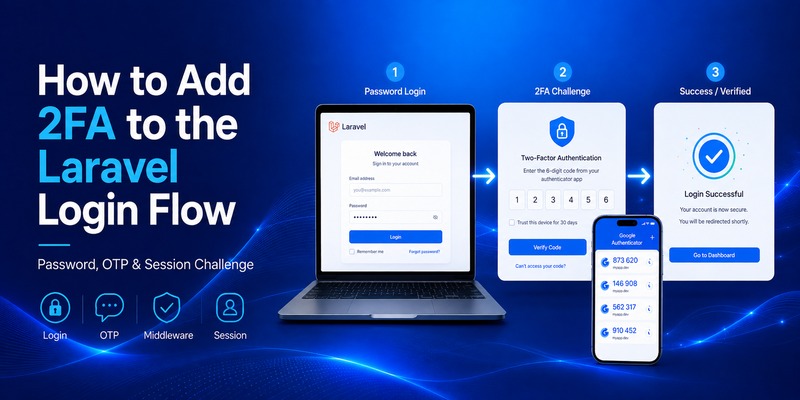
Generating a secret is only half the job.
The important part of google authenticator laravel is actually enforcing the second factor.
A standard flow looks like:
↓
Password
↓
Credentials valid?
↓
Is 2FA enabled?
↓
Ask for TOTP code
↓
Verify code
↓
Create fully authenticated session
You should avoid giving the user unrestricted authenticated access immediately after the password succeeds.
Use middleware
Laravel middleware is designed to inspect incoming requests and decide whether they should continue through the application. Laravel’s documentation describes middleware as a mechanism for filtering requests, including checking authentication state.
A custom php login google authenticator workflow might set a session flag:
session([
‘two_factor_verified’ => true,
]);
Then a middleware can verify it:
if (! session(‘two_factor_verified’)) {
return redirect()->route(‘2fa.challenge’);
}
return next(request);
Routes containing sensitive content can then require both normal authentication and 2FA completion.
PHP login with Google Authenticator
A php login with google authenticator flow should always treat password verification and TOTP verification as two separate stages.
Do not combine everything into an uncontrolled single form if doing so makes rate limiting, logging, or session state difficult.
A clearer architecture gives you better control over:
- Failed-password logging
- Failed-TOTP logging
- Suspicious activity detection
- Account lockout policies
- Recovery actions
- Trusted-device features
9. Google Authenticator Laravel 8 and Legacy Projects
Many production applications still search specifically for google authenticator laravel 8 because upgrading a mature Laravel project can require significant testing.
The good news is that the PragmaRX Google2FA Laravel package documentation currently lists compatibility with Laravel 8.
The fundamental TOTP architecture is the same.
You still need:
- Secret generation
- QR enrollment
- Code confirmation
- Middleware or login-state enforcement
- Recovery codes
- Rate limiting
However, dependency versions matter.
Do not copy installation commands from an old blog post without checking Composer compatibility.
A tutorial written for Laravel 5 or early Laravel 8 may use package versions, QR-code dependencies, or service-provider registration instructions that are no longer appropriate.
Should an old project be upgraded?
Laravel 13 was released on March 17, 2026, while Laravel 12 remains within its documented security-support window until February 24, 2027. Laravel 13 requires PHP 8.3 or newer.
Therefore, if you maintain an older google authenticator laravel project, authentication work is a good opportunity to review the framework’s support lifecycle rather than only adding another package.
Security features are most useful when the underlying framework is also receiving security fixes.
💡 Discover Helpful Guides: Setting Up Google Authenticator: Complete 2FA Setup Guide
10. Google Authenticator PHP Integration
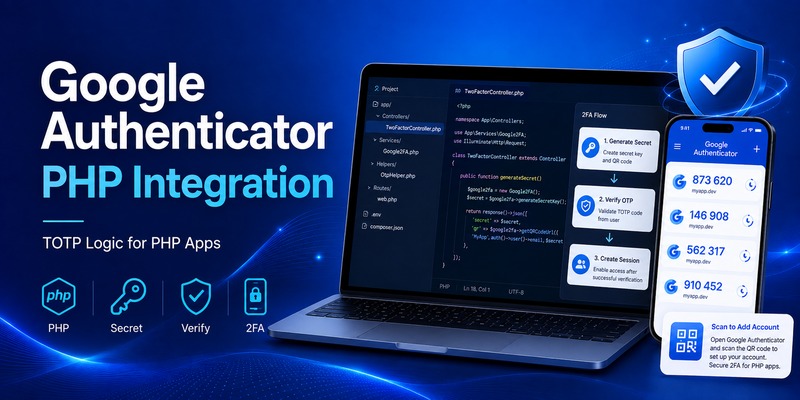
Laravel developers sometimes assume TOTP requires Laravel specifically.
It does not.
The underlying concepts also apply to plain php 2fa google authenticator systems.
A generic architecture looks like:
Register user
→ generate TOTP secret
→ create provisioning URI
→ generate QR code
→ scan with authenticator
→ verify initial OTP
→ store activation state
During login:
Verify password
→ retrieve encrypted TOTP secret
→ ask for current code
→ verify TOTP
→ establish authenticated session
This pattern can power php login google authenticator implementations in custom frameworks as well.
Google Authenticator PHP example architecture
Suppose you have:
userSecret=getUserTwoFactorSecret(userId);
The application validates:
isValid=verifyTotp(userSecret, $_POST[‘otp’]);
If valid:
$_SESSION[‘2fa_verified’] = true;
The details depend on your library, but the security model remains consistent.
The PragmaRX base Google2FA project is a PHP implementation, while google2fa-laravel provides its Laravel integration layer.
That distinction is useful when deciding whether you need framework integration or only google authenticator php functionality.
11. Google Authenticator With WordPress
Laravel is not the only PHP ecosystem using TOTP.
Searches for google authenticator wordpress and google authenticator for wordpress generally come from administrators looking to secure WordPress login screens using authenticator-generated codes.
The key difference is implementation.
With Laravel, developers frequently build 2FA into application code.
With WordPress, administrators typically use a plugin.
The official WordPress.org plugin directory contains multiple two-factor authentication plugins supporting TOTP-compatible applications.
For example, WP 2FA describes support for Google Authenticator and other TOTP-compatible applications.
WordPress 2FA Google Authenticator
A typical wordpress 2fa google authenticator setup works like this:
- Install a reputable 2FA plugin.
- Enable authenticator-based verification.
- Open the user’s security settings.
- Scan the provided QR code.
- Enter the generated code.
- Save recovery codes.
- Require 2FA on future logins.
A wordpress login google authenticator implementation therefore follows the same TOTP principles as Laravel.
The major difference is who manages the integration.
WordPress users often rely on a plugin.
Laravel developers have more direct control over controllers, middleware, models, encryption, rate limiting, and recovery flows.
🛠️ Learn with Step-by-Step Guides: Google Password Verification: Passwords, 2FA, Passkeys and Authenticator
12. Security Best Practices for Laravel Google 2FA
Installing a package does not automatically make google authenticator laravel secure.
The surrounding implementation matters just as much as code verification.
Encrypt TOTP secrets
Treat each user’s secret like a credential.
Do not store it as ordinary readable text if your architecture can avoid doing so.
Laravel offers built-in encryption functionality for protecting sensitive application data.
Require password confirmation before changing 2FA
An attacker who obtains access to an unattended authenticated session should not be able to silently replace the victim’s authenticator.
Laravel’s current two-factor configuration supports password confirmation for enabling or disabling 2FA.
Consider requiring password re-entry before:
- Enabling 2FA
- Disabling 2FA
- Regenerating secrets
- Viewing recovery codes
- Creating new recovery codes
Provide recovery codes
Users lose phones.
Phones break.
Authenticator app get deleted.
Your google authenticator laravel implementation should have a recovery path.
The PragmaRX Google2FA documentation explicitly points users toward recovery or backup-code solutions when account recovery is needed.
Recovery codes should be:
- Random
- Single-use
- Stored securely
- Regeneratable
- Invalidated after use
Rate-limit verification
Do not allow unlimited OTP attempts.
Apply rate limits by a combination of:
- User
- Session
- IP address
- Device
- Authentication flow
Log important security events
Consider logging:
- 2FA enabled
- 2FA disabled
- Recovery codes regenerated
- Repeated invalid OTP attempts
- Recovery-code usage
Do not log actual secrets or valid OTP values.
Use HTTPS
A strong laravel google 2fa implementation still needs transport security.
Never expose login credentials or TOTP codes over insecure HTTP in production.
13. Common Google Authenticator Laravel Problems
The code is always invalid
One of the most common google authenticator laravel problems is time synchronization.
TOTP depends on time.
Check:
- Server time
- Server timezone configuration
- Device time
- Code expiration
- Whether the correct secret is being used
Do not create huge verification windows simply to hide synchronization problems.
QR code scans but codes fail
Make sure the QR code was generated from the same secret stored for the user.
A common bug is:
- Generate secret A.
- Create QR code using secret A.
- Accidentally generate secret B.
- Save secret B to database.
The phone now generates codes from A while Laravel validates against B.
They will never match.
Users are authenticated before entering OTP
This is usually a session-flow problem.
If Auth::attempt() creates full access before your google authenticator laravel challenge has succeeded, protected routes may become reachable.
Use middleware or a staged login flow so sensitive routes remain inaccessible until 2FA is confirmed.
Composer package conflict
When installing laravel 2fa google authenticator, Composer may report dependency conflicts if your PHP or Laravel version does not match the package requirements.
Check the package’s current compatibility matrix rather than randomly forcing an older dependency. The current Google2FA Laravel documentation lists supported Laravel and PHP combinations through Laravel 13.
Lost phone
This is why recovery codes are critical.
Never design a 2FA system in which the only recovery method is asking an administrator to manually edit the database.
Build the recovery flow before releasing the feature.
📖 Read More Guides: Chrome Google Authenticator: Setup, Extensions & Security Tips
Final Recommendations
For new applications, google authenticator laravel is easier to implement than it was in older versions of the framework.
Laravel 13 starter kits already include TOTP-compatible two-factor authentication through the framework’s Fortify-based authentication architecture.
If your project uses Laravel’s standard authentication stack, starting with the first-party implementation will usually reduce the amount of custom security code you need to maintain.
For an established application with custom authentication, pragmarx/google2fa-laravel remains a flexible approach. Its documentation currently lists compatibility across Laravel versions through Laravel 13 and provides a Laravel bridge for the underlying PHP Google2FA implementation.
Whichever approach you choose, a production-ready google authenticator laravel implementation should contain more than a QR code and a six-digit input box.
A complete system needs:
- Secure secret generation
- Encrypted secret storage
- QR-code enrollment
- Initial code confirmation
- Login challenge enforcement
- Rate limiting
- Recovery codes
- Password confirmation for sensitive changes
- Audit logging
- HTTPS
- Tested account-recovery procedures
Developers implementing php 2fa google authenticator outside Laravel should follow the same fundamental principles.
Likewise, administrators using google authenticator wordpress should choose a reputable TOTP-compatible plugin rather than attempting to build authentication directly inside theme files. WordPress.org currently lists multiple two-factor authentication options supporting authenticator applications and TOTP.
The important concept is that Google Authenticator is not a remote authentication API your Laravel server must call. It is one compatible client for the TOTP standard.
Your Laravel application generates and stores the secret, your user’s authenticator app generates temporary codes, and your backend verifies those codes.
When that architecture is implemented correctly, google authenticator laravel can provide a practical additional security layer for SaaS platforms, internal dashboards, administration systems, customer portals, and other PHP applications where password-only authentication is no longer sufficient.
Download Authenticator App
Secure your accounts with fast, reliable two-factor authentication. Download now and protect your login in seconds.
