
Battle.net Google Authenticator: 2FA Setup Guide A-Z 2026
Published August 12, 2026
Gaming accounts are valuable targets for attackers because they can contain purchased games, rare characters, payment information, inventories, competitive progress, and years of account history. A password leak can therefore create much more trouble than simply losing access to a launcher.
That explains why users frequently search for Battle.net google authenticator when trying to add two-factor authentication to a Blizzard account.
There is, however, an important detail to understand immediately.
Battle.net does not currently direct users to configure Battle.net account authentication through the Google Authenticator app. Blizzard’s official approach is the Battle.net Authenticator feature built directly into the Battle.net mobile app. Blizzard migrated the old standalone Authenticator into its Battle.net app and instructed users of the legacy app to migrate before January 5, 2024.
Therefore, when someone searches Battle.net google authenticator, what they usually need is not a Google Authenticator QR code. They need to configure Battle.net’s own authentication feature.
This guide explains exactly how that system works, how to enable it, what to do when changing phones, how login approval works, and why Activision’s Google Authenticator support should not be confused with Battle.net authentication.
1. What Does Battle.net Google Authenticator Mean?
The phrase Battle.net google authenticator is commonly used as a generic search term for “how do I add an authenticator to my Battle.net account?”
The terminology is understandable because Google Authenticator is one of the most recognizable applications associated with two-factor authentication.
But an authenticator is a category of security technology, not necessarily a reference to Google’s application.
For Battle.net, Blizzard provides its own authentication system through the Battle.net mobile app. Blizzard’s support pages continue to list articles specifically for attaching a Battle.net Authenticator, troubleshooting the authenticator, approving login requests, restoring authentication, and using security codes.
So a typical Battle.net google authenticator search should actually be interpreted as:
Battle.net Account
↓
Battle.net Mobile App
↓
Battle.net Authenticator
↓
Login Verification
↓
Battle.net Access
You should not assume that a setup QR code found in another gaming service can be added to Battle.net.
Likewise, installing Google Authenticator on your phone does not automatically add 2FA to Battle.net.
The important step is attaching Battle.net’s Authenticator feature to the Battle.net account itself.
This distinction is particularly important for users who manage multiple gaming accounts on the same email address.
Your Battle.net account, Activision account, Steam account, Nintendo account, and Epic account are separate authentication systems even if some of those accounts can be linked together.
For the remainder of this guide, Battle.net google authenticator refers to the user’s intent of protecting Battle.net with an authenticator, while the actual Battle.net implementation uses Blizzard’s own mobile app.
🗺️ Browse How-To Guides: Google Authenticator: Complete 2FA Setup & Security Guide
2. Does Battle.net Actually Work With Google Authenticator?
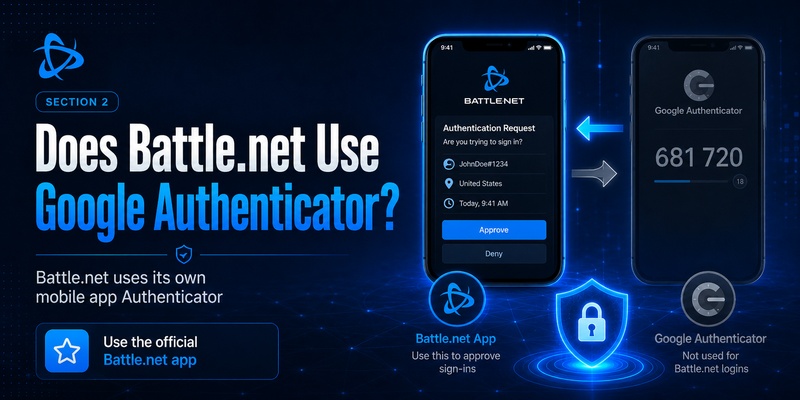
If by Battle.net google authenticator you mean “Can I scan a Battle.net QR code into the official Google Authenticator app and use its standard rotating TOTP codes?”, Blizzard’s current documentation does not direct users to that workflow.
Instead, Blizzard tells users to download the Battle.net mobile app and use the Authenticator feature built into it. Blizzard moved the authenticator into the Battle.net mobile app and retired the previous standalone authenticator application.
This matters because there are two very different authentication experiences.
A typical third-party authenticator app works like this:
Website displays QR code
→ Authenticator scans QR
→ App generates 6-digit TOTP
→ User enters code
Battle.net can provide a more integrated account-verification experience through its own application.
Blizzard’s current support index includes separate documentation for One-Touch approval as well as using an Authenticator security code instead of One-Touch.
That means Battle.net google authenticator should not be configured by experimenting with unrelated TOTP secrets or unofficial tools.
Use the official Battle.net account-management and Battle.net mobile application flow.
This also reduces confusion when troubleshooting.
If Battle.net says “Check your Authenticator,” it normally refers to the Authenticator connected to your Battle.net account, not whichever third-party TOTP application happens to be installed on the same phone. Blizzard even maintains troubleshooting information for situations where that authentication request disappears before a user can approve it.
Download Authenticator App
Secure your accounts with fast, reliable two-factor authentication. Download now and protect your login in seconds.
3. How the Battle.net Authenticator Works
The basic purpose of Battle.net google authenticator security is to prevent a password from being sufficient on its own.
Without a second factor:
Email + Password
↓
Account Access
With Battle.net authentication enabled:
Email + Password
↓
Additional verification
↓
Battle.net Authenticator
↓
Approval
↓
Account Access
The extra verification step is valuable when the password has been exposed.
For example, an attacker might obtain credentials through phishing, malware, password reuse, or a breach on another service. If the Battle.net account requires authentication approval, possession of the password alone may no longer be enough to complete the login.
The Battle.net mobile app is therefore central to the modern Battle.net google authenticator workflow.
Blizzard says the Authenticator functionality was moved into the Battle.net mobile app, which is available for supported iOS and Android devices.
Users should also understand that an authenticator does not make a weak password irrelevant.
A strong security model still includes:
- A unique Battle.net password.
- A secure email account.
- Battle.net Authenticator.
- Reliable account recovery.
- Awareness of phishing.
- Updated devices and applications.
Treat 2FA as another security layer rather than permission to reuse passwords.
🗺️ Browse How-To Guides: Google Authenticator Laravel: Complete 2FA Setup Guide
4. How to Set Up Battle.net Google Authenticator Security
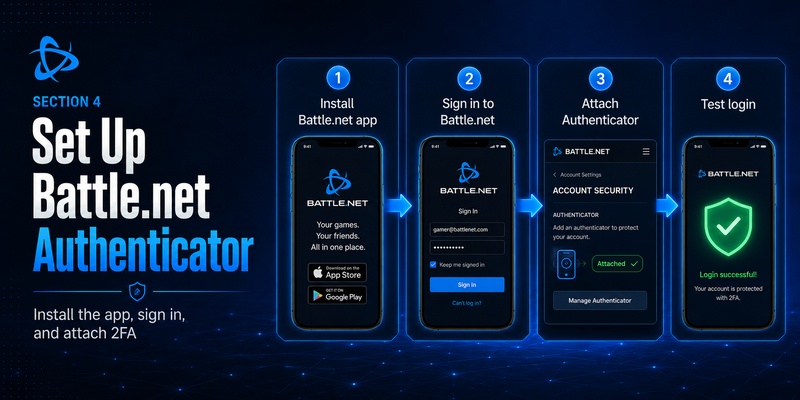
When users ask how to configure Battle.net google authenticator, the safest approach is to start with Battle.net’s official mobile application.
Blizzard currently maintains an “Attaching a Battle.net Authenticator” support path, and the company identifies the Battle.net mobile app as the current home of the Authenticator feature.
Step 1: Secure the Battle.net account first
Before changing authentication settings, make sure you know:
- Your Battle.net email.
- Your current password.
- Your account recovery information.
- The phone number associated with your account, where applicable.
Do not start a Battle.net google authenticator migration while you are uncertain whether you can access your primary email account.
Your email is often essential during account recovery.
Step 2: Install the Battle.net mobile app
Use the official Battle.net application available through your device’s supported app store.
Remember: you are looking for the Battle.net application, not merely downloading Google Authenticator because the search keyword contains “Google Authenticator.”
Blizzard specifically moved its authentication feature to the Battle.net mobile app.
Step 3: Sign in to your Battle.net account
Open the application and authenticate with the Battle.net account you want to protect.
Double-check the account before attaching the authenticator.
This is especially important if you manage several Battle.net profiles or family accounts.
Step 4: Attach the Authenticator
Follow the account-security prompts for enabling the Battle.net Authenticator.
Once connected, your mobile device becomes an important component of the Battle.net google authenticator security workflow.
Step 5: Test the login
Do not assume the configuration works simply because setup completed.
Log into Battle.net on a trusted browser or computer and verify that the account requests the expected authentication step.
A successful test confirms that you understand the approval process before you actually need it during an urgent login.
5. How to Approve Battle.net Login Requests
One reason Battle.net google authenticator differs from a generic TOTP implementation is Battle.net’s integrated approval process.
Blizzard’s support resources reference One-Touch Authenticator approval and maintain troubleshooting pages for users whose Authenticator request disappears too quickly or returns a request error.
A login may conceptually work like this:
- Enter Battle.net credentials
- Battle.net requests verification
- Open Battle.net mobile app
- Review authentication request
- Approve legitimate login
- Continue to Battle.net
Before approving a request, ask yourself whether you actually initiated the login.
If the answer is no, do not approve it.
Unexpected authenticator prompts can indicate that someone else is attempting to access the account.
This is an important habit regardless of whether you searched Battle.net google authenticator, Microsoft Authenticator, passkeys, or another MFA solution.
Never approve requests automatically.
Authentication fatigue attacks depend on users becoming so accustomed to security prompts that they approve one without checking.
When an unexpected Battle.net request appears, securing the password and reviewing account security is safer than simply dismissing the notification and forgetting about it.
🗺️ Browse How-To Guides: Google MFA App: Complete Guide to Secure Multi-Factor Authentication
6. Battle.net Authenticator Codes vs One-Touch Approval
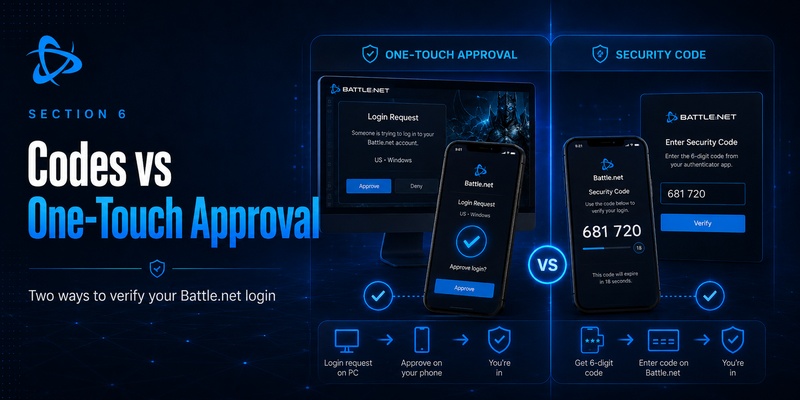
Some Battle.net google authenticator users specifically expect to see a six-digit code because that is how Google Authenticator and many TOTP applications traditionally work.
Battle.net can use an integrated approval experience, but Blizzard also maintains support documentation titled “How Do I Use the Authenticator Security Code Instead of One-Touch?”
This is useful when the normal approval workflow is unavailable.
Conceptually, there are two verification styles:
One-Touch-style approval
Login request
→ Mobile app notification/request
→ Approve
→ Login
Security-code verification
Login request
→ Open Authenticator
→ Obtain security code
→ Enter code
→ Login
This explains some of the confusion behind Battle.net google authenticator.
A user may see a numerical security code and assume Battle.net is simply using Google Authenticator.
But seeing a temporary authentication code does not mean that Google’s Authenticator application controls the account.
The important question is which security system generated and registered the authenticator.
For Battle.net, use the Battle.net Authenticator linked through Battle.net.
7. Moving the Battle.net Authenticator to a New Phone
Changing phones is one of the situations where Battle.net google authenticator searches increase because users worry about losing account access.
Blizzard previously required users of the legacy Authenticator application to migrate to the Battle.net mobile app. The old standalone app was scheduled for removal from app stores beginning January 1, 2024, and users were told to migrate by January 5, 2024.
That migration is historical now, but it illustrates an important principle:
Do not erase your old phone until you know the new authentication configuration works.
Blizzard’s support system still includes information for restoring an Authenticator on a new device and troubleshooting serial-number, restoration-code, or SMS-verification problems.
When replacing your phone:
- Confirm access to your Battle.net email.
- Confirm the account’s phone information is current.
- Install the Battle.net app on the new phone.
- Follow the supported transfer or authentication flow.
- Test a Battle.net login.
- Only then wipe the old device.
Battle.net Phone Notifications can also play a role in recovery. Blizzard has stated that phone notifications can help with actions such as removing a lost Authenticator, resetting a password, unlocking an account, and recovering an account name.
Recovery planning should be part of Battle.net google authenticator setup, not something considered only after the phone has already been lost.
8. Battle.net Google Authenticator vs Activision Google Authenticator
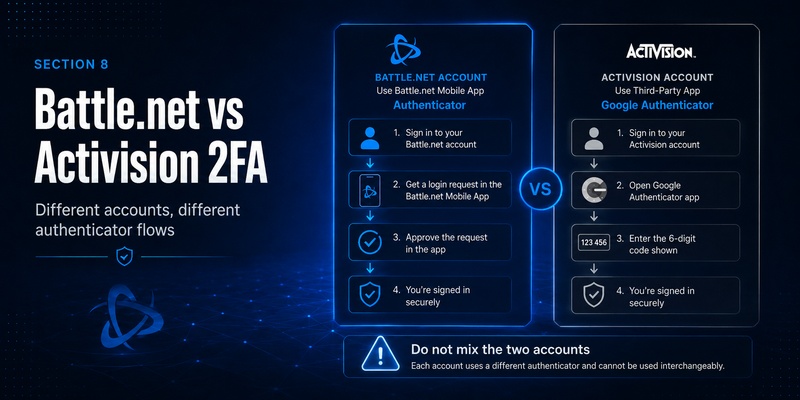
This distinction is particularly important for Call of Duty players.
Battle.net and Activision accounts can both be relevant to the same player, but their account security systems are not identical.
The search term google authenticator activision is valid because Activision officially supports third-party authenticator applications including Google Authenticator, Authy, Duo Mobile, and Microsoft Authenticator for Activision-account 2FA.
That differs from Battle.net google authenticator.
For an Activision account, the official flow can involve:
Activision Account
→ Privacy & Security
→ Two-Factor Authentication
→ Authenticator App
→ Google Authenticator
→ Verification Code
Activision’s updated 2026 documentation states that users can enable Authenticator App authentication and can choose Google Authenticator as one supported option.
Battle.net’s current flow instead uses the Battle.net mobile app’s Authenticator.
So you may legitimately have both:
Battle.net
→ Battle.net Authenticator
Activision
→ Google Authenticator
on the same phone.
The two should not be treated as interchangeable.
If a Call of Duty login problem is asking for an Activision 2FA code, opening the Battle.net Authenticator may not solve it.
Similarly, a Battle.net verification request should not automatically be searched for under an Activision entry in Google Authenticator.
Understanding which account is requesting authentication will save significant troubleshooting time.
💡 Discover Helpful Guides: Google Authenticator for PC: Windows, Desktop and Laptop Guide
9. Common Battle.net Authenticator Problems and Fixes
Even a correctly configured Battle.net google authenticator setup can encounter problems.
“Check your Authenticator” disappears too quickly
Blizzard maintains a support case specifically for authentication requests that disappear before the user can complete them.
Retry the login and keep the Battle.net mobile app ready before submitting your credentials.
One-Touch approval does not work
Blizzard also documents Authenticator request errors and an option for using a security code instead of One-Touch.
If the approval flow fails, use the supported alternative rather than repeatedly reinstalling random authentication apps.
New phone cannot restore authentication
Verify account ownership and recovery information.
Blizzard’s support resources include troubleshooting for restoring Authenticator access with previous authenticator information or SMS verification.
Battle.net Authenticator cannot be found in the app store
If you are searching for a standalone “Battle.net Authenticator,” this may be the problem.
The authenticator was moved into the Battle.net mobile app. Blizzard maintains a support result specifically for people unable to find the old Authenticator app in mobile storefronts.
You receive a login request you did not initiate
Do not approve it.
Treat unexpected Battle.net google authenticator prompts as a warning that your credentials may be known to someone else.
Change the password from a trusted device and review the account’s security information.
10. Best Security Practices for Your Battle.net Account
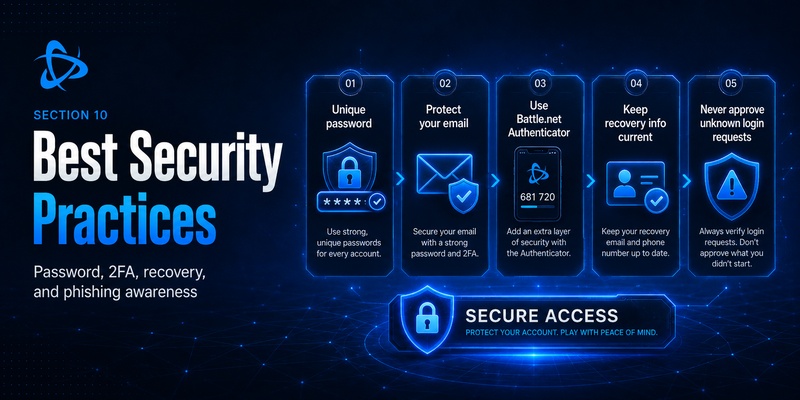
Adding Battle.net google authenticator protection is useful, but MFA works best as part of a larger account-security strategy.
Use a unique password
Do not use the same password for Battle.net and your email account.
If one site is breached, credential reuse can turn that leak into access to multiple accounts.
Protect the email account
Your Battle.net authentication may be strong, but an attacker controlling your email can interfere with account recovery.
Enable strong MFA on your email provider as well.
Keep your recovery information current
A phone number that you stopped using years ago can make account recovery significantly harder.
Blizzard currently provides self-service options for updating Battle.net phone information and notes that phone notifications can assist with authenticator-related recovery.
Never approve unexpected requests
A secure Battle.net google authenticator setup still depends on user decisions.
Read every verification prompt before approving it.
Use only official software
Avoid unofficial “Battle.net Google Authenticator generators,” browser extensions, APK files, or websites that claim to create Battle.net authentication codes.
They may attempt to capture credentials.
Test recovery before you need it
Know which email address, phone number, and device are connected to the account.
The worst moment to discover outdated recovery information is after losing your phone.
📖 Explore Articles: Google Authenticator for Instagram: Setup & Fixes Guide
11. Should You Use Battle.net Google Authenticator?
Yes—you should use two-factor protection for a valuable Battle.net account.
But the correct implementation matters.
If your goal is Battle.net google authenticator, don’t start by searching for a way to force Battle.net into Google Authenticator.
Use Battle.net’s supported Authenticator system.
The current recommended architecture is effectively:
Battle.net password
+
Battle.net Authenticator
=
Stronger Battle.net security
Google Authenticator can still be useful elsewhere.
For example, google authenticator activision is directly relevant because Activision officially supports Google Authenticator as one of its third-party authentication applications.
But that does not turn Google Authenticator into the authentication system for Battle.net.
Think of each service independently:
| Account | Authentication approach |
| Battle.net | Battle.net Authenticator in Battle.net mobile app |
| Activision | Supported third-party authenticator app, including Google Authenticator |
This separation is the key lesson behind Battle.net google authenticator.
12. Conclusion
The most important thing to know about Battle.net google authenticator is that the search phrase does not describe Battle.net’s current official setup literally.
Battle.net uses its own Authenticator feature inside the Battle.net mobile app. Blizzard moved authentication away from the legacy standalone Battle.net Authenticator application, with the migration occurring around the beginning of January 2024.
For current users, the recommended process is straightforward:
Install the Battle.net mobile app, attach the Battle.net Authenticator to the correct account, test authentication, keep recovery information current, and carefully review login requests before approving them.
If One-Touch approval causes problems, Blizzard also maintains support for using Authenticator security codes and provides troubleshooting for login requests, lost authenticators, new devices, and authentication errors.
Do not confuse this with Activision authentication.
Activision currently allows third-party applications including Google Authenticator for account 2FA, which is why google authenticator activision is a legitimate but separate setup.
Therefore, the safest interpretation of Battle.net google authenticator is:
You want stronger 2FA security for Battle.net—but you should use Battle.net’s own supported Authenticator rather than trying to substitute Google Authenticator.
That approach keeps the setup aligned with Blizzard’s current account-security system, makes recovery easier to understand, and avoids mixing authentication codes belonging to completely different gaming accounts.
Download Authenticator App
Secure your accounts with fast, reliable two-factor authentication. Download now and protect your login in seconds.
