
Google OTP App: Complete Guide to OTP, TOTP, and 2FA
Published August 8, 2026 · Updated August 14, 2026
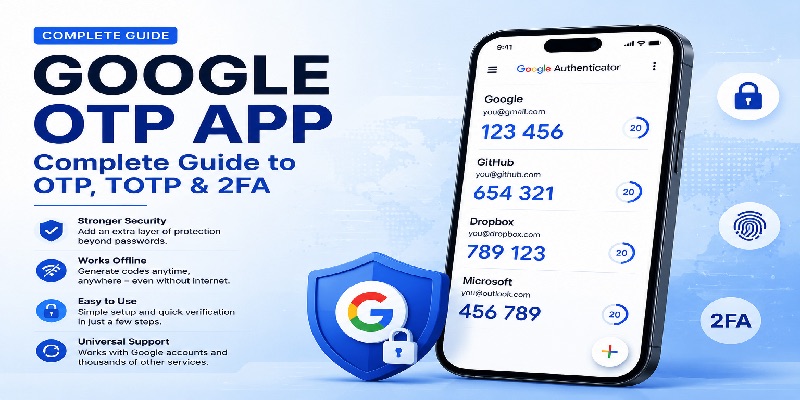
Passwords are still the first line of defense for many online accounts, but a password alone can be stolen, reused, guessed, or exposed in a data breach. A google otp app adds another verification step by generating a temporary one-time code on a trusted device. That extra step is commonly used as part of two-factor authentication, or 2FA.
This pillar guide explains the entire google otp app ecosystem: what OTP and TOTP mean, how setup works, why codes can be generated without internet access, what an otpauth:// URI contains, how Python libraries fit into the flow, and how compatible tools such as Bitwarden, KeePass, and LinOTP relate to Google Authenticator.
1. What Is a Google OTP App and Why Is It Used?
A google otp app is an authenticator application used to generate one-time passwords for accounts that support app-based two-step verification. Google Authenticator is one implementation, but the underlying idea is not limited to Google services. Many websites and apps can provide a QR code or setup key that an authenticator can store and use to generate verification codes.
The phrase google otp is often used broadly by people looking for a Google Authenticator code. Technically, OTP means “one-time password,” while the code shown in an authenticator is usually a time-based one-time password, or TOTP. Google describes Google Authenticator as an application that generates one-time verification codes for compatible sites and apps. It can also generate enrolled codes without an internet connection or mobile service.
Why OTP Is Stronger Than a Password Alone
A password is something you know. A code from a google otp app is based on a secret that has been provisioned to your authenticator. When a service requires both, a stolen password by itself is less useful.
This is the practical purpose behind searches such as google 2fa otp: users want a second authentication factor that is separate from the password they already use.
Where a Google Authenticator Code Is Used
After you enable app-based 2FA, the sign-in flow normally asks for your username and password first, then a current google otp code. Depending on the website, this may be called a verification code, authenticator code, security code, OTP, or two-step verification code.
A google otp app is therefore not a replacement for your main password. Instead, it participates in a broader authentication process that requires an additional credential during sign-in.
📖 Explore Articles: Google Authenticator: Complete 2FA Setup & Security Guide
2. Google OTP, TOTP, and HOTP: What Is the Difference?
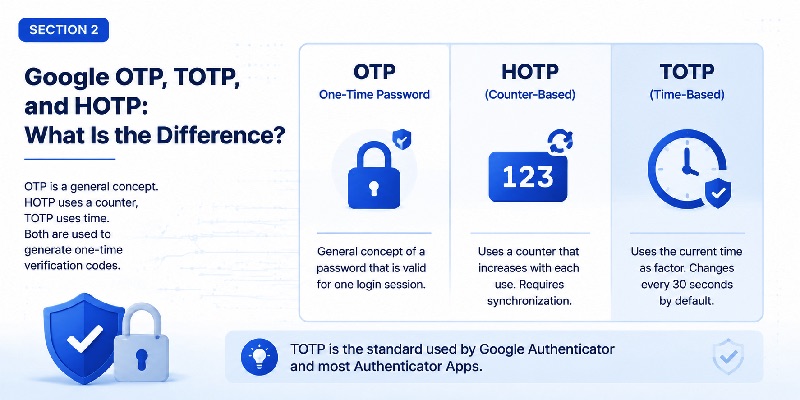
| Term | Moving factor | Typical behavior | Common use |
| OTP | General concept | Temporary or single-use code | Account verification |
| HOTP | Counter | Changes when a counter advances | Hardware/software tokens |
| TOTP | Time | Changes after a defined time interval | Authenticator apps |
TOTP Is Time-Based
RFC 6238 defines TOTP as a time-based extension of HOTP. The authenticator and verification system share a secret and derive a value using the current time. RFC 6238 recommends a 30-second default time step as a balance between usability and security.
That is why totp google authenticator codes appear to refresh automatically. The application is not contacting the website every 30 seconds. Both sides can independently calculate a matching value when they possess the correct secret and use compatible TOTP parameters.
Searches for google totp or google 2fa totp usually describe this same mechanism. A google otp app stores the enrolled credential and performs the local TOTP calculation for the user.
HOTP Is Counter-Based
HOTP uses an advancing counter rather than the current time as its moving factor. The basic concept is still a one-time password, but its synchronization model differs from TOTP.
The important takeaway is simple: when you scan a QR code into a google otp app and see a number changing periodically, you are most likely using TOTP rather than a proprietary “Google OTP” algorithm.
A search for google totp app therefore generally refers to an authenticator capable of receiving a TOTP secret and generating matching time-based verification codes.
📖 Read More Guides: Google Authenticator 2FA: Complete Guide to Two-Step Verification
3. How to Set Up Google OTP Verification Step by Step
Setting up a google otp app begins on the account you want to protect. The website or application must first support an authenticator application as a two-factor authentication method.
Step 1: Enable Two-Step Verification
Open the account’s security settings and look for Two-Factor Authentication, 2FA, 2-Step Verification, or Authenticator App.
For Google Accounts, Google places Google Authenticator within its 2-Step Verification options. Once configured, the application can generate a verification code when Google requests one during sign-in.
Step 2: Scan the QR Code or Enter the Setup Key
The service normally displays a QR code. Open your google otp app, choose the option to add an account, and scan it.
When QR scanning is unavailable, many services provide a text setup key that can be entered manually.
The QR code and setup key should be treated as sensitive credentials. Someone who gains access to the underlying secret may be able to reproduce future TOTP codes with another compatible authenticator.
Step 3: Confirm the First Code
The service will usually ask for the current number shown in the google otp app. Enter it before the current time window expires.
This confirmation proves that the authenticator and the verification server were provisioned with compatible information.
This process is commonly described as google otp verification. For a third-party service, it does not mean Google receives every code. The service that enrolled the TOTP credential normally performs its own verification.
Step 4: Save Recovery Options
After enrollment, save any recovery codes or alternative authentication methods provided by the service.
A google otp app improves security, but a recovery method remains important if your phone is lost, replaced, reset, or temporarily unavailable.
Download Authenticator App
Secure your accounts with fast, reliable two-factor authentication. Download now and protect your login in seconds.
4. How a Google OTP App Generates Codes Without Internet
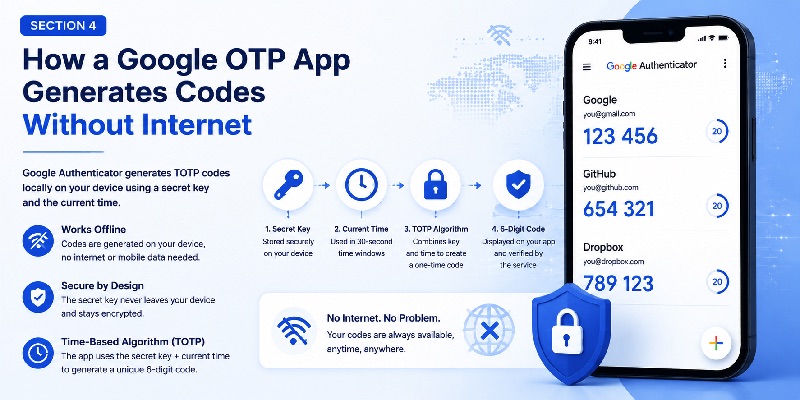
One of the most useful properties of a google otp app is offline code generation. Google confirms that Google Authenticator can generate verification codes without an internet connection or mobile service.
The App and Server Calculate Separately
During enrollment, the authenticator receives a secret. For TOTP, the google otp app combines that secret with a time-derived value to calculate a temporary numeric code.
The server performs a corresponding calculation. If the values match within the server’s permitted time window, authentication can continue.
This architecture explains why a code does not need to be downloaded from Google each time you sign in.
In a standard authenticator-based TOTP implementation, the phone does not query a remote google otp api simply to receive the next six-digit value. TOTP itself is calculated from the provisioned secret and time.
Why the Phone Clock Matters
Because TOTP uses time as a moving factor, your google otp app works best when the device’s date, time, and time zone are accurate.
Automatic date and time settings can help prevent significant clock differences between the device and verification system.
Sync Is Separate From Code Generation
Google Authenticator can currently synchronize verification codes across devices when users sign in to their Google Account. Google also states that synchronized Authenticator data is encrypted in transit and at rest.
Synchronization requires connectivity, but it is separate from the basic TOTP calculation. An enrolled google otp app can still calculate codes locally when the network is unavailable.
5. Understanding otpauth://, QR Codes, and Secret Keys
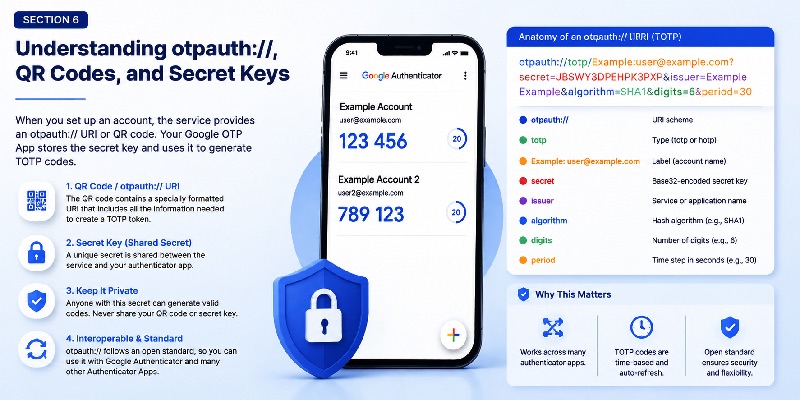
The QR code displayed during authenticator enrollment commonly represents an otpauth:// provisioning URI.
Google’s documented Key URI Format uses the general structure:
otpauth://TYPE/LABEL?PARAMETERS
The documented token types include totp and hotp.
This is the technical background behind searches for otpauth google authenticator. A QR image provides a convenient method for transferring structured provisioning information into a google otp app.
What an otpauth URI Can Contain
A typical TOTP provisioning URI may contain:
- a token type such as totp;
- an account label;
- a Base32-encoded secret;
- an issuer identifying the service;
- algorithm information;
- the number of displayed digits;
- a time period.
Google’s Key URI documentation recommends identifying the issuer so that authenticator entries belonging to different services can be distinguished more clearly.
Why the Secret Must Stay Private
Anyone who obtains an active shared secret may potentially reproduce the same TOTP sequence using another compatible implementation.
A setup QR code should therefore be handled as a credential rather than an image that can be shared publicly.
Once enrollment is complete, the google otp app needs access to the secret to calculate codes, while the verification system retains or securely derives the information needed to calculate the expected value.
This shared-secret design is one reason secure backup, migration, and storage practices matter so much for authenticator applications.
6. Google TOTP for Developers: Python, PyOTP, and API Use
Authenticator applications are also relevant to developers who want to provide app-based 2FA inside their own services.
PyOTP and Google Authenticator Compatibility
PyOTP is a Python library supporting HOTP and TOTP. Its documentation specifically describes compatibility with Google Authenticator and includes methods for creating provisioning URIs suitable for authenticator enrollment.
That makes queries such as pyotp google authenticator and python otp google authenticator common when developers build TOTP authentication flows.
A typical architecture is:
- Generate a unique secret for the user.
- Create a compatible TOTP provisioning URI.
- Convert the URI into a QR code.
- Let the user enroll it in a google otp app.
- Request a current verification code.
- Verify the submitted code on the server.
- Protect the stored TOTP secret.
The google otp app acts as the code-generating side of this flow, while the application backend acts as the verifier.
Is There a Google OTP API?
The keyword google otp api can be confusing because “OTP” describes several different technologies.
Google provides Android APIs that help applications work with SMS verification codes. For example, its SMS Retriever-related APIs support SMS-based verification flows. Those APIs are different from Google Authenticator TOTP generation.
For authenticator-based TOTP, developers normally implement the standard on their own backend or use a trusted library.
They provision a secret compatible with the authenticator and validate the submitted code against the expected TOTP value.
The google otp app therefore does not need to expose every generated code through a remote Google endpoint.
Avoid Hard-Coding Secrets
Each user or authenticator enrollment should have its own appropriately generated credential. RFC 6238 specifies a unique secret for each prover and recommends protecting keys against unauthorized access.
Developers should also protect verification endpoints with controls such as rate limiting and secure transport rather than relying on the short lifetime of a TOTP alone.
📖 Read More Guides: How to Use Google Authenticator: Complete Setup and 2FA Guide
7. Google OTP App Compatibility With Bitwarden, KeePass, and LinOTP
A google otp app belongs to a much broader OTP ecosystem.
Because multiple applications implement compatible TOTP standards and provisioning formats, users are not necessarily restricted to a single authenticator product.
Compatibility does not mean every application provides identical storage, synchronization, migration, backup, or recovery behavior.
Bitwarden and TOTP
Bitwarden supports TOTP-based authenticator workflows. Its documentation also shows otpauth://totp/ provisioning data in authenticator import and export examples.
The phrase bitwarden totp google authenticator usually refers to compatible TOTP credentials being used or migrated between these ecosystems.
Authenticator exports should be handled carefully because they can contain information capable of generating future OTP values.
KeePass and OTP
KeePass documentation includes built-in functions for generating HMAC-based OTPs and time-based OTPs. It also supports configurable OTP parameters.
A query such as keepass otp google authenticator therefore usually relates to configuring KeePass with values compatible with an existing TOTP-enabled account.
A google otp app and KeePass can calculate matching TOTP values when they are configured with equivalent secret and algorithm parameters.
LinOTP and Google Authenticator
LinOTP supports HOTP and TOTP token enrollment. Its documentation provides a “Google Authenticator compliant” configuration that applies defaults designed for compatibility with Google Authenticator.
That is the connection behind searches for linotp google authenticator.
For organizations, these interoperable systems can be particularly useful because authentication can be managed server-side while users continue using familiar authenticator applications.
8. Invalid Google OTP Codes: Common Causes and Fixes
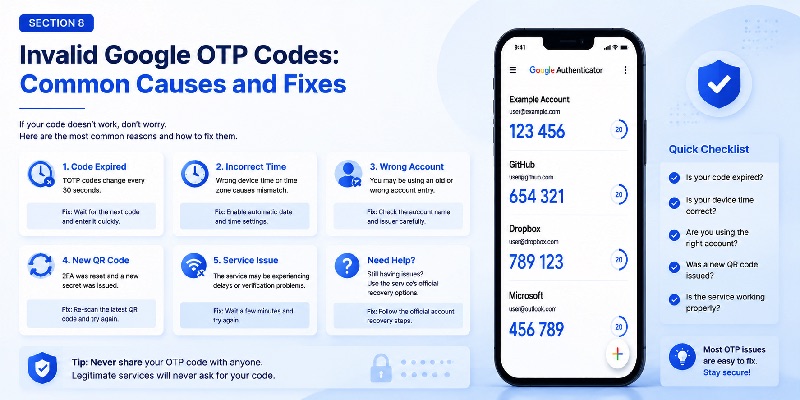
A google otp app may occasionally display a code that a website rejects.
This does not automatically mean the authenticator application has stopped working. The time window, enrolled secret, account selection, or server-side configuration may be responsible.
1. The Code Expired During Entry
TOTP values only remain current for a limited time window.
If only a few seconds remain, wait for the next number and enter it promptly. This is one common situation behind an invalid google code totp search.
2. The Phone Time Is Incorrect
Because TOTP derives its moving factor from time, significant clock differences can place the google otp app and verification server in different windows. RFC 6238 specifically discusses synchronization and allowable time-step windows.
Check the phone’s automatic date, time, and time-zone settings before assuming the token itself is corrupted.
3. The Wrong Account Entry Was Selected
Users with multiple authenticator entries for the same service can accidentally select an old token.
If the website’s 2FA configuration was reset, the older credential stored in the google otp app may no longer match the new server-side secret.
Check the account name and issuer before entering the code.
4. A Setup QR Code Was Replaced
Re-enabling authenticator-based 2FA may generate a new secret.
When a server expects the new credential but the authenticator still contains the previous secret, every displayed code can be rejected even though the numbers continue changing normally.
In that situation, enroll the current QR code or follow the service’s official account-recovery process.
5. The User Is Asking “What Is My OTP?”
A search such as google what is my otp does not have one permanent numeric answer.
Your OTP is the temporary value displayed for the relevant enrolled account at that moment.
Do not use random websites or ask another person to generate the code for you. Open your own authenticator or use the affected service’s official recovery method.
If the google otp app continues failing after the correct account and time settings have been verified, use the service’s supported recovery options rather than repeatedly guessing codes.
📖 Read More Guides: Google Password Verification: Passwords, 2FA, Passkeys and Authenticator
9. Security Best Practices for Google 2FA OTP and TOTP
A google otp app can strengthen account security, but the token itself and its recovery paths still require protection.
Protect the Enrollment Secret
Never publicly post a TOTP setup QR code, secret key, migration payload, or unprotected authenticator export.
If you believe a TOTP enrollment secret has been exposed, reset authenticator-based 2FA through the affected service and provision a new credential.
Use a Strong Device Lock
Protect the phone with an appropriate screen lock and keep the operating system updated.
If your google otp app uses account-based synchronization or backup, secure the account controlling that synchronization as well.
Keep Recovery Codes Separate
Recovery codes are useful when the authenticator device is unavailable.
Store them in a protected location that is not dependent on the same phone used to generate your normal OTP values. Google also provides alternative 2-Step Verification and recovery methods for situations where the primary verification option cannot be used.
Treat OTP as a Second Factor
A google otp app makes a stolen password less useful because an additional credential is required. Google describes 2-Step Verification as a way to help prevent unauthorized access even if a password is stolen.
However, users should still verify that they are signing in through the legitimate website or application.
Never Share a Current OTP on Request
Do not provide the current number from your google otp app to someone who contacts you unexpectedly and asks for a verification code.
Authenticator values should be entered only when you intentionally initiate a legitimate authentication flow.
📖 Explore Articles:
Google MFA App: Complete Guide to Secure Multi-Factor Authentication
10. How to Choose the Right Authenticator App
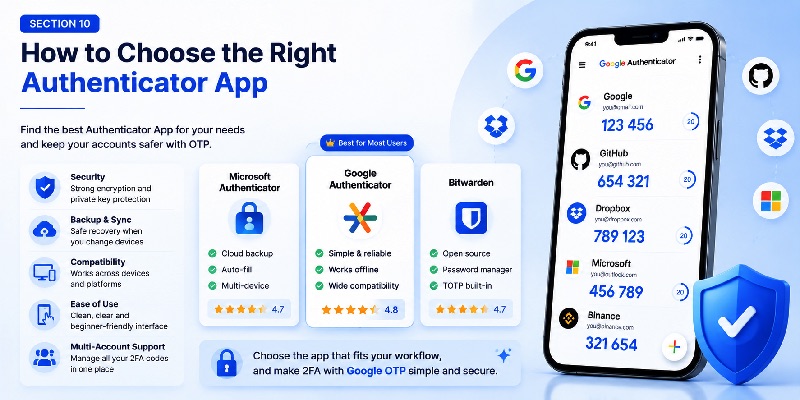
A google otp app such as Google Authenticator is a straightforward option for standard TOTP accounts.
Other products may combine authentication with password management, provide different synchronization approaches, or include administrative features designed for organizations.
When comparing an Authenticator App, consider five areas:
- Compatibility: Does it support the TOTP services you use?
- Migration: Can credentials be transferred safely when you replace your device?
- Backup or sync: Can authentication data be recovered, and how is access protected?
- Account labeling: Is it easy to distinguish several accounts for the same service?
- Recovery: What happens if the application or device becomes unavailable?
For most users, the core experience remains simple: enroll an account once, open the google otp app when the service asks for a verification code, and enter the current value.
The more important security considerations happen around that workflow: protecting the setup secret, maintaining secure recovery options, and selecting the correct account when several tokens are stored.
A properly configured google otp app provides a practical method for adding app-based two-factor authentication without depending on SMS delivery.
TOTP is designed for interoperability, allowing a verifier and authenticator to independently derive matching short-lived codes when both possess compatible secret and time information.
Whether you use Google Authenticator or another compatible tool, the core principles remain the same: protect the provisioning secret, maintain accurate device time, save appropriate recovery methods, and never expose active verification codes to untrusted parties.
For users evaluating otp google authenticator solutions, the safest starting point is to enable an authenticator through the official security settings of the account being protected.
For developers, google totp compatibility should be approached as a standards-based TOTP implementation rather than as a shortcut to a third-party code-generation service.
That distinction makes the entire authentication architecture clearer: the service owns its verification process, the authenticator protects the provisioned credential, and the temporary OTP provides an additional layer beyond the account password.
Download Authenticator App
Secure your accounts with fast, reliable two-factor authentication. Download now and protect your login in seconds.
