Google OAuth: Complete Developer Guide to Tokens and APIs
Modern applications often need access to Google services without asking users to share their Google passwords. A calendar application may need permission to read events, a productivity platform may need access to selected Drive data, and a website may simply want users to sign in with their existing Google Accounts.
This is where google oauth becomes important.
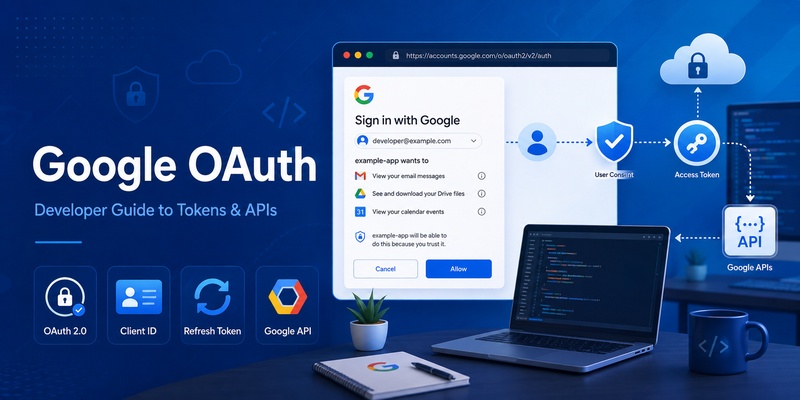
OAuth 2.0 lets an application request specific permissions from a user while Google remains responsible for authenticating that user. Instead of receiving the user’s password, the application receives tokens representing the access the user approved. Google describes the general process as obtaining OAuth credentials, requesting an access token, and sending that token when calling an authorized Google API.
However, OAuth is frequently confused with Google Sign-In, OpenID Connect, Google Authenticator, TOTP, and other authentication technologies. These systems can work together, but they solve different problems.
This guide explains how google oauth works, how developers create credentials, how access and refresh tokens behave, how user identity should be handled, and why Google Authenticator codes are fundamentally different from OAuth tokens.
1. What Is Google OAuth?
OAuth is primarily about authorization
Google oauth is Google’s implementation of the OAuth 2.0 authorization framework for applications that need controlled access to Google services.
The main idea is delegated authorization.
Suppose a photo-management application needs permission to access a user’s Google data. The application should not ask the user to type their Google password into the application’s own interface. Instead, the user is sent to Google’s authorization experience.
The user signs in directly with Google and reviews the requested permissions. If permission is granted, Google returns authorization information to the application. The application can then obtain an access token for approved Google APIs. Google’s OAuth documentation describes this basic process as obtaining OAuth 2.0 credentials, requesting authorization, receiving an access token, and using that token for API requests.
OAuth is not exactly the same as authentication
Developers sometimes describe any Google login flow as google oauth, but authorization and authentication should be distinguished.
OAuth answers a question such as:
“What is this application allowed to access?”
Authentication answers:
“Who is this user?”
Google supports authentication through OpenID Connect, which is built on OAuth 2.0. Google’s documentation describes its OpenID Connect implementation as OpenID Certified and explains how applications can obtain identity information about a user.
This distinction becomes particularly important when designing a system that both signs users in and requests permission to access Google APIs.
🗺️ Browse How-To Guides: Google OTP App: Complete Guide to OTP, TOTP, and 2FA
2. How Google OAuth Works

Step 1: The application starts authorization
A typical server-side google oauth flow begins when the application redirects the user’s browser to Google’s authorization server.
The request normally includes information such as:
- Client ID
- Redirect URI
- Requested scopes
- Response type
- Optional authorization parameters
The client ID identifies the application, while scopes describe the permissions being requested.
Google handles account authentication, account selection, and the user’s consent decision. For a web-server authorization-code flow, an approved request results in Google redirecting the user back to the application’s configured callback URL with an authorization code.
Step 2: Exchange the authorization code
The application’s backend exchanges the authorization code for token credentials.
The response can contain an access token that allows the application to call authorized Google APIs.
If the application needs continued access when the user is no longer actively using the website, it may request offline access. Google’s current web-server documentation specifies access_type=offline for applications that need to refresh access without the user being present in the browser.
This authorization-code architecture helps keep sensitive parts of the token exchange on the server.
Step 3: Call Google APIs
Once an access token has been issued, it can be included with requests to Google APIs covered by the approved scopes.
A good google oauth implementation should not assume that one authorization automatically gives permission to every Google service. Each API defines its own scopes, and Google recommends choosing the scopes appropriate to the access actually required.
Download Authenticator App
Secure your accounts with fast, reliable two-factor authentication. Download now and protect your login in seconds.
🗺️ Browse How-To Guides: Google Authenticator Web: How to Use 2FA Securely in Your Browser
3. How to Create a Google OAuth Client ID
Create an OAuth client for the correct platform
Before an application can begin authorization, developers normally configure a project and OAuth credentials.
Google explains that OAuth 2.0 credentials can include a client ID and, depending on the type of application, a client secret. For example, Google’s documentation notes that JavaScript applications and web-server applications have different credential requirements.
The google oauth client id tells Google’s authorization system which application is making the request.
It is important to understand what the client ID is not.
It is not:
- A user’s Google ID
- An access token
- A refresh token
- An API key
- A password
For Sign in with Google on websites, Google’s current setup documentation states that obtaining an OAuth 2.0 client ID is an initial requirement for configuring Google Identity Services.
Configure redirect URIs carefully
Web applications generally need to register authorized redirect URIs.
After the authorization process, Google sends the user’s browser back to one of these approved locations.
For example, a production callback could conceptually look like:
https://example.com/oauth/google/callback
The URI sent in the authorization request must correspond to the URI configured for that OAuth client.
Redirect URI mistakes are among the most common OAuth configuration problems.
Developers should also avoid exposing a confidential client secret in public JavaScript, mobile application packages, Git repositories, analytics systems, or client-side logs.
The google oauth client id itself is an identifier, but a client secret for a confidential application should be protected as a credential.
💡 Discover Helpful Guides: Google Authenticator: Complete 2FA Setup & Security Guide
4. Understanding Google OAuth Tokens

Access token
An access token represents authorization to access particular resources.
After successful authorization, an application sends the access token with requests to Google APIs.
The token’s effective permissions correspond to the scopes granted by the user.
An access token is not supposed to become the application’s permanent identifier for the user, nor should it be treated as an application password.
ID token
When OpenID Connect is used for authentication, an application can receive an ID token containing identity-related claims.
This is often where developers confuse a generic google auth token with an OAuth access token.
The two tokens have different purposes:
An access token is used to authorize API requests.
An ID token is used to provide verified information about an authenticated identity.
Google provides specific guidance for validating ID tokens and recommends using the sub claim as the unique identifier for a Google Account.
Refresh token
A refresh token lets an application request a new access token without requiring the user to complete the entire interactive authorization flow again.
This makes refresh tokens useful for applications that perform authorized operations when the user is offline.
The token types should therefore never be mixed together.
A secure google oauth architecture understands which token is intended for API access, identity, and renewal.
5. Google API Refresh Token Explained
Why a refresh token is needed
Access tokens are temporary.
If an application needs continued API access after an access token expires, a google api refresh token can be used to request another access token.
Google’s documentation says that applications requesting offline access can use a refresh token to maintain access to authorized Google APIs while the user is not present.
Common examples include:
- Synchronizing calendar information
- Processing authorized data periodically
- Running scheduled backend jobs
- Maintaining a server-side integration
- Performing operations after the user’s browser session ends
For a server application, the refresh token should normally remain on the backend rather than being exposed to browser code.
Refresh tokens can become invalid
Developers should never design google oauth under the assumption that a refresh token will remain valid forever.
Google’s OAuth policies explicitly state that refresh tokens can be invalidated or expire. A user can revoke the application’s access, and automated security processes can also invalidate credentials.
Google also currently documents a limit of 100 refresh tokens per Google Account per OAuth 2.0 client ID. When that limit is reached, creating another token can invalidate the oldest token.
This limit can appear unexpectedly during development if the same test account is repeatedly authorized.
A production application should detect refresh failures and request authorization again when necessary rather than retrying an invalid credential indefinitely.
6. OAuth Sign In With Google and User Identity

Signing users into your application
The phrase oauth sign in with google commonly refers to allowing a user to register or log in to a website with an existing Google Account.
Google Identity Services provides Sign in with Google functionality, while OpenID Connect supplies standardized identity claims. Google describes Sign in with Google as a way for users to sign up or sign in using their Google Accounts.
Once the identity response has been validated, the application can associate the Google identity with its own account record.
A common model is:
Google identity → Local user record → Application session.
This lets the application manage its own roles, preferences, subscriptions, and permissions separately from Google’s authorization system.
Finding the correct Google user identifier
Developers searching for google oauth user id should pay particular attention to the OpenID Connect sub claim.
Google states that sub is a unique identifier for the user, is unique among Google Accounts, and is not reused.
Google also specifically advises developers not to use the email field as the permanent unique identifier for an account.
This matters because email-related information can change over time.
Your database might therefore conceptually store:
internal_user_id
google_sub
The stable identity relationship should be based on the verified sub value.
A successful oauth sign in with google login also does not automatically give the application permission to access every Google API. Authentication and API authorization should remain distinct.
7. Google Auth API Integration for Web and Apps
Choose the correct architecture
The search phrase google auth api can describe several different Google authentication and authorization technologies.
Before implementation, identify the actual requirement.
Does the application need to:
- Sign users in?
- Access a Google API?
- Access a Google API while the user is offline?
- Authenticate a server workload?
- Add two-factor authentication to the application’s own accounts?
These requirements can lead to different technologies.
For browser authorization, Google Identity Services supports obtaining access tokens for Google APIs. Google describes its web library as supporting both authentication for user sign-in and authorization for API access while separating the two concepts.
Server-to-server access
Not every application requires user-delegated google oauth.
For server-to-server scenarios, Google documents service accounts separately. In Google Workspace environments, administrators can also grant service accounts domain-wide authority under certain conditions.
Developers should therefore avoid forcing an interactive user OAuth flow into a workload that should instead use workload or service identity.
Do not confuse Authenticator with Google APIs
Queries such as api google authenticator can be misleading.
Google Authenticator is not the normal interface for calling Google Drive, Calendar, YouTube, or other Google APIs.
Google’s Authenticator open-source documentation explicitly says its one-time-password technology is based on OATH standards and that OATH is unrelated to OAuth.
That difference becomes essential when designing a 2FA system.
8. Google OAuth Integration in Java and Python

Java applications
Java developers implementing google oauth should use the appropriate Google authentication or API client libraries for the service they are integrating.
The OAuth architecture remains the same:
Obtain authorization → receive credentials → maintain tokens securely → call the Google API.
However, the keyword google authenticator api java often represents a different developer intent.
If you want Java code to access Google APIs, you are dealing with OAuth or Google authentication libraries.
If you want Java code to generate or validate six-digit codes compatible with Google Authenticator, you are dealing with TOTP.
Those are separate systems.
TOTP is standardized in RFC 6238. The specification defines a time-based variant of the HOTP algorithm in which the moving factor is derived from time.
You therefore do not need an OAuth request simply to calculate a standards-compatible TOTP value.
Python applications
The same distinction applies to google authenticator api python.
Google’s Python authentication tooling supports OAuth 2.0 credentials, including credentials based on access and refresh tokens, while separate helpers exist for verifying Google-issued ID tokens.
For API authorization, a Python backend typically maintains authorized credentials and uses the appropriate Google API client.
For application-specific two-factor authentication, a Python backend instead uses a TOTP implementation and securely manages each user’s TOTP secret.
Do not design the application’s 2FA system around an OAuth access token. Their threat models, lifetimes, and purposes are different.
9. Google OAuth vs Google Authenticator and 2FA
OAuth and OATH are not the same
One of the most important technical distinctions in this topic is the difference between OAuth and OATH.
Google oauth is used for delegated authorization and can support authentication when combined with OpenID Connect.
Google Authenticator generates one-time verification codes for websites and applications that support authenticator-based 2-Step Verification. Google’s support documentation describes Authenticator as generating one-time verification codes for compatible services.
Google’s own Authenticator repository specifically notes that the OATH standards used for one-time passwords are unrelated to OAuth.
Is there a Google Authenticator developer API?
A query such as google authenticator developer api can give the impression that developers should send a request to a Google server to generate or verify each Authenticator code.
That is not how standard TOTP integration works.
TOTP is based on a shared secret and time-based calculation defined by RFC 6238.
The application implementing 2FA typically provisions a secret to the user’s authenticator app, stores the corresponding server-side information securely, and independently verifies submitted TOTP codes.
Similarly, google 2fa api should not be treated as another name for Google’s OAuth endpoints.
OAuth token vs Authenticator token
A google authenticator token usually means the temporary verification value displayed by an authenticator.
A google auth token, in OAuth development discussions, may instead refer to an OAuth access token or identity-related token.
They are not interchangeable.
OAuth token:
Used for API authorization or identity flows.
TOTP code:
Used as a time-based authentication factor.
Understanding this difference prevents a developer from building 2FA around the wrong infrastructure.
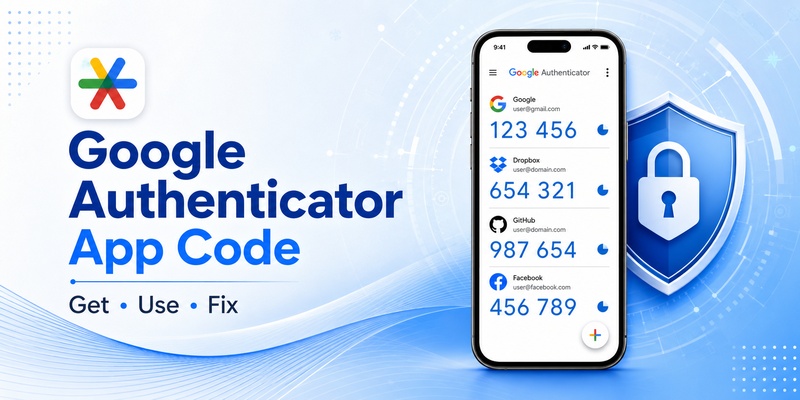
📖 Read More Guides: Google Authenticator App Code: How to Get, Use, and Fix Verification Codes
10. Google OAuth Security and Troubleshooting

Protect sensitive credentials
Any production google oauth system should treat token storage as a security-critical component.
Refresh tokens deserve particularly strong protection because they can be used to obtain additional access tokens after an original access token expires.
Client secrets belonging to confidential applications should also remain server-side.
Avoid placing credentials in:
- Public Git repositories
- Frontend source code
- Analytics events
- Error-reporting payloads
- Application screenshots
- URLs
- Ordinary debug logs
Where sensitive information must be persisted, restrict access and use an appropriate secure storage mechanism.
Handle revoked authorization
A user always needs to remain in control of access previously granted to an application.
Google explicitly requires applications to handle refresh-token revocation and expiration.
A robust application should detect invalid credentials, stop jobs that can no longer complete, and present a clear reconnect flow when the user next tries to use the affected functionality.
Common OAuth errors
Several categories occur frequently during development.
redirect_uri_mismatch generally points toward a mismatch between the callback used in the authorization request and the configuration of the OAuth client.
Client authentication problems can occur when the wrong client ID or client secret is used.
An expired access token requires renewal when appropriate.
A revoked or invalid refresh token generally requires user authorization again.
Insufficient scopes mean the application requested or received less access than the API operation requires.
When troubleshooting, log enough metadata to diagnose the flow without logging the actual tokens.
11. Google OAuth Best Practices for Production
Request minimum scopes
A production google oauth implementation should apply least privilege.
If an application needs one limited permission, do not request numerous broad scopes merely because they might be useful someday.
Google’s OAuth scope documentation recommends selecting scopes according to the actual API functionality being used and notes that sensitive scopes may require additional review.
Incremental authorization can also improve the user experience.
For example, an application may initially request only Google-based sign-in. Later, when the user activates a Calendar feature, the application can request the relevant Calendar authorization.
This keeps the permission request connected to something the user understands.
Separate identity from authorization
A local account database should distinguish between:
- The application’s user ID
- Google’s stable external user identifier
- API authorization credentials
- Application-specific permissions
For Google identity, use the verified sub claim rather than email as the permanent external identifier.
Design for token failure
Token failure is a normal lifecycle event, not necessarily an exceptional security incident.
Users revoke access.
Credentials expire.
Scopes change.
Applications get reconfigured.
Development environments generate extra refresh tokens.
A mature google oauth implementation should therefore contain recovery paths instead of assuming authorization will remain valid forever.
Separate 2FA architecture
If your application also provides TOTP-based authentication, keep it separate from Google API authorization.
The google 2fa api concept should not be mixed with OAuth access control.
Your application can use Google Sign-In for identity, Google API authorization for delegated access, and TOTP as an additional account-security factor. These layers can coexist while remaining technically independent.
Conclusion
Google oauth provides the authorization foundation behind many applications that interact with Google services. Instead of collecting a user’s Google password, an application requests specific permissions and receives controlled credentials that can be used with approved APIs.
The implementation begins with an OAuth client configuration. The google oauth client id identifies the application, while scopes describe the requested permissions.
An access token is used for Google API requests.
A google api refresh token can maintain authorized access when offline access has been granted.
An OpenID Connect ID token can provide authenticated identity information.
For developers looking for a google oauth user id, Google’s recommended stable identifier is the verified sub claim rather than the user’s email address.
Just as important is knowing what OAuth is not.
Searches for api google authenticator, google authenticator developer api, google authenticator api java, and google authenticator api python often combine two separate concepts.
Google Authenticator uses standards-based one-time passwords. RFC 6238 defines TOTP, and Google’s Authenticator documentation explicitly distinguishes the OATH one-time-password standards from OAuth.
Therefore, use google oauth when an application needs delegated Google API access or Google-based identity. Use TOTP when the application needs time-based two-factor authentication.
When both are required, treat them as complementary layers: OAuth controls delegated access, OpenID Connect establishes identity, and an authenticator app can provide an additional authentication factor.
Keeping those responsibilities separate results in cleaner code, clearer consent, easier troubleshooting, and a more secure production architecture.
Download Authenticator App
Secure your accounts with fast, reliable two-factor authentication. Download now and protect your login in seconds.