
Google Authenticator Google Play: Download, Setup & 2FA App Guide
Published August 8, 2026 · Updated August 14, 2026
Passwords alone are no longer the strongest way to protect an online account. Email accounts, cloud services, social platforms, business tools, gaming profiles, and financial services increasingly support two-factor authentication, commonly called 2FA. One of the simplest ways to add this extra security layer on Android is through google authenticator google play.
Google Authenticator generates temporary verification codes that can be required after entering a password. According to Google’s current Google Play listing, these codes can be generated even when a phone does not have a network or cellular connection.
However, Google Authenticator is not the only option available. Android users searching for an authenticator app google play store can also encounter Microsoft Authenticator, Duo Mobile, Salesforce Authenticator, Steam Guard, and many third-party 2FA applications.
That creates an important question: which authenticator should you use?
This guide explains how google authenticator google play works, how to install and configure it, what to check before downloading an authentication application, and how Google’s solution compares with several popular alternatives currently available for Android.
1. What Is Google Authenticator Google Play?
When people search for google authenticator google play, they are usually looking for Google’s official Android application for generating verification codes.
Google Authenticator is designed to add another verification step to compatible accounts. Instead of relying entirely on a password, a service can ask for a temporary code generated on your phone.
What Google Authenticator does
The basic authentication flow is simple:
- Enter your username or email.
- Enter your password.
- The website requests a verification code.
- Open Google Authenticator.
- Find the corresponding account.
- Enter the temporary code displayed by the app.
The official google play authenticator listing explains that Google Authenticator can generate verification codes without an active cellular or internet connection. This is useful because code generation does not depend on receiving an SMS every time you sign in.
Google also supports transferring Authenticator accounts between devices using QR codes. Google’s support documentation describes an import process in which the new device scans a QR code generated by the previous device.
Google Authenticator is not your Google password
A common misconception is that installing google authenticator google play changes or replaces your Google Account password.
It does not.
Google Authenticator is a verification tool. The account or service itself determines whether 2FA is required and provides the QR code or setup key used to connect that account to the app.
This also means Google Authenticator can be used with compatible services beyond Google accounts.
When evaluating any Authenticator App, remember that the authenticator and the account being protected are two different components of the security process.
📖 Read More Guides: Google Authenticator 2FA: Complete Guide to Two-Step Verification
2. Why Download Google Authenticator From Google Play?
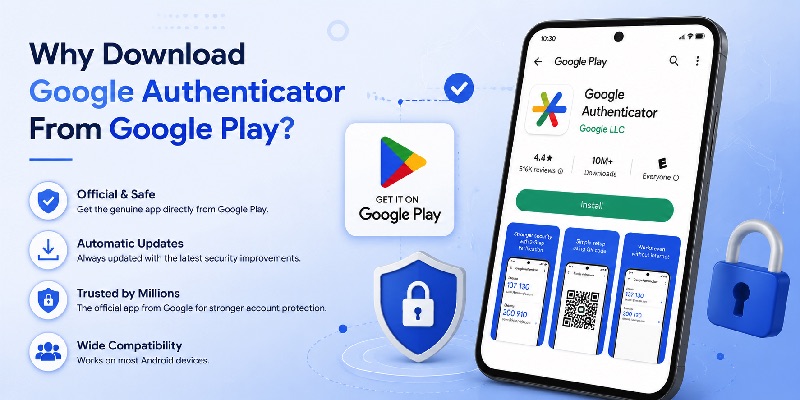
Searching for an authentication application can return many apps with similar names, icons, and descriptions. For this reason, the source of your download matters.
For Android users with access to Google Play, the safest starting point for google authenticator google play is Google’s official store listing.
Verify the developer before installing
Before tapping Install, check the application name and developer.
For Google Authenticator, the official Google Play listing identifies the application as Google’s Authenticator product.
Do not assume that every application containing words such as “Google,” “OTP,” “2FA,” or “Authenticator” is the official Google app.
Searching google authenticator play store may display alternative authenticator applications as well. Some can be legitimate products, but they are not necessarily created or supported by Google.
This is particularly important because an authenticator handles information connected to your account security.
Why the Play Store is convenient
Using google authenticator google play gives Android users a familiar installation process:
- Find the application.
- Review its developer information.
- Check device compatibility.
- Install it.
- Receive future app updates through Google Play.
The same principle applies when downloading an authenticator app google play from another provider.
For example, Microsoft Authenticator, Duo Mobile, and Salesforce Authenticator all currently maintain Google Play listings.
Downloading an authenticator should therefore begin by confirming that you have located the intended app and its legitimate publisher rather than selecting the first similarly named search result.
📖 Read More Guides:
Google Account Two Step Verification: Complete Setup Guide
3. How to Download Google Authenticator on Android
Installing google authenticator google play is similar to installing other Android applications, but taking an extra moment to verify the listing can prevent mistakes.
Step-by-step installation
On an Android device:
- Open Google Play Store.
- Search for Google Authenticator.
- Locate the official Google application.
- Review the developer and app information.
- Tap Install.
- Wait for installation to finish.
- Open Google Authenticator.
You may also encounter the phrase google play authenticator when searching online. Make sure the search result ultimately points to the official Google Authenticator listing rather than an unrelated application.
Google’s current Play Store description states that the app supports multiple accounts and verification-code generation.
What to do before adding accounts
Installing google authenticator google play is only the first step. Before connecting important accounts, make sure you understand the recovery options provided by each service.
Depending on the website, these may include:
- Backup codes
- Additional authentication methods
- Security keys
- Recovery email
- Recovery phone
- Another registered device
Do not treat an authenticator as your only recovery plan.
If you replace or lose your phone without having another way to verify your identity, account recovery can become significantly more difficult.
When migrating between phones, Google’s official support documentation provides a QR-based transfer option for Authenticator accounts.
Preparing recovery methods before relying heavily on google authenticator google play can save substantial trouble later.
📖 Read More Guides: Google Authenticator 2FA: Complete Guide to Two-Step Verification
4. How to Set Up Google Authenticator After Installation
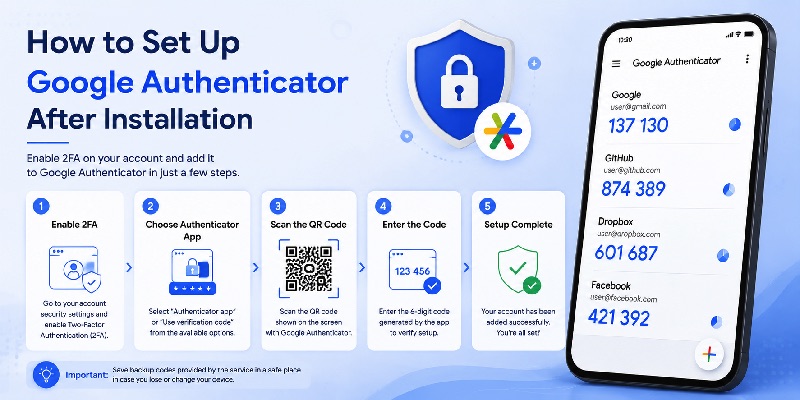
After installing google authenticator google play, you need to connect each account that you want the app to protect.
The exact website menus vary, but the overall process is similar across many services.
Enable two-factor authentication
First, sign in to the account you want to secure.
Look for settings such as:
- Security
- Two-Step Verification
- Two-Factor Authentication
- Multi-Factor Authentication
- MFA
- Authentication App
Select the option for an authenticator or verification-code application.
The service normally displays either a QR code or a setup key.
Open google authenticator google play, choose the option to add an account, and follow the on-screen setup process.
Scan the QR code
QR scanning is usually the fastest method.
The website displays a QR code containing the information required to configure the authenticator. Google Authenticator reads it and begins generating codes for the account.
Many services then ask you to enter one current code to confirm that setup succeeded.
Once confirmed, the account should appear inside the app.
Save recovery information
Do not finish the setup process without checking whether the service offers backup codes or another recovery method.
Store recovery information somewhere secure and separate from the phone running google authenticator google play.
For example, keeping the only copy of your recovery code as a screenshot on the same phone offers little protection if that phone becomes unavailable.
Google’s own transfer guidance also makes it possible to move Authenticator accounts from an old device to a new device by using the app’s account-transfer feature.
Download Authenticator App
Secure your accounts with fast, reliable two-factor authentication. Download now and protect your login in seconds.
5. Google Authenticator vs Other Popular Authenticator Apps
There is no single authenticator that is ideal for every account and every organization.
Someone protecting a few personal accounts may have very different needs from an employee using enterprise identity systems.
The table below provides a practical comparison of several popular options found when researching alternatives to google authenticator google play.
| App | Main Use | Verification Codes | Push Approval | Best For |
| Google Authenticator | General 2FA | Yes | Service-dependent/not its primary model | Simple personal 2FA |
| Microsoft Authenticator | Microsoft + general MFA | Yes | Yes | Microsoft personal/work/school accounts |
| Duo Mobile | Duo Security + third-party 2FA | Yes | Yes | Business and enterprise authentication |
| Salesforce Authenticator | Salesforce MFA | Yes | Yes | Salesforce users and organizations |
| Steam Mobile / Steam Guard | Steam account security | Steam-specific | Yes | Steam gamers |
Google confirms that its authenticator can generate verification codes offline. Microsoft describes its Authenticator as supporting multi-factor and passwordless sign-in, while Duo states that Duo Mobile can generate passcodes and receive push notifications.
Salesforce Authenticator also supports push-based approval and denial of authentication requests.
Simplicity versus ecosystem integration
The main strength of google authenticator google play is simplicity.
If you primarily need temporary codes for compatible services, the app provides a focused workflow.
Microsoft Authenticator and Duo Mobile can make more sense when your employer or school already uses their respective identity systems.
Salesforce Authenticator is particularly relevant to Salesforce environments.
Steam Guard is different again because it is built specifically around Steam account security.
Therefore, choosing an Authenticator App should start with the systems you actually use rather than selecting an app based only on popularity.
6. Google Authenticator vs Microsoft Authenticator
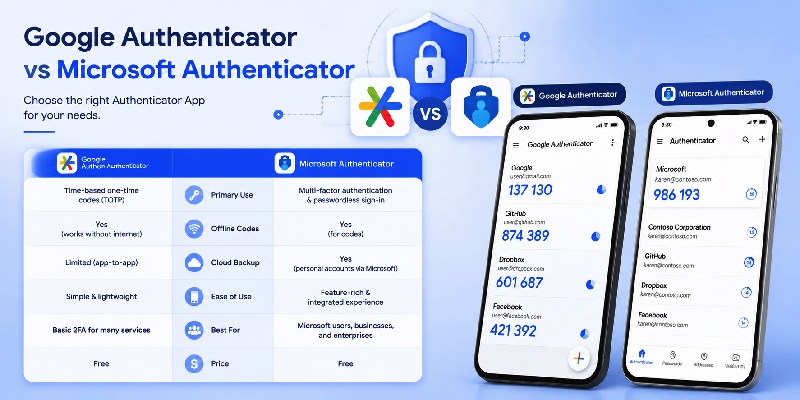
Microsoft Authenticator is one of the most common alternatives people encounter while researching google authenticator google play.
Searches such as microsoft authenticator app google play, microsoft authenticator google play, and microsoft authenticator google play store all refer to Microsoft’s Android authenticator application.
Microsoft currently provides its Authenticator through Google Play for Android devices.
Where Google Authenticator is strong
Google Authenticator works well when the goal is straightforward code-based two-factor authentication.
Benefits include:
- Simple interface
- Multiple-account support
- Offline code generation
- QR-based account setup
- QR-based account transfer
The ability to generate codes without network connectivity is explicitly documented on Google’s current Play listing.
For people who simply want an app that displays verification codes, google authenticator google play remains an easy option to understand.
Where Microsoft Authenticator differs
Microsoft Authenticator goes further into Microsoft’s identity ecosystem.
Microsoft says the app supports multi-factor authentication and passwordless sign-ins and includes additional management capabilities for Microsoft personal, work, and school accounts.
This makes the google play store microsoft authenticator app particularly relevant for Microsoft 365 or Microsoft Entra environments.
The choice is therefore not necessarily about which application is universally “better.”
Choose google authenticator google play if simple verification-code management matches your needs.
Choose Microsoft Authenticator when Microsoft’s authentication workflows, push approvals, or organizational requirements are important.
7. Duo Mobile and Salesforce Authenticator on Google Play
Enterprise users may encounter Duo or Salesforce rather than Google Authenticator.
Both currently have official Android listings on Google Play.
Duo Mobile
People searching google play duo mobile or google play store duo mobile are usually looking for Cisco Duo’s authentication application.
According to its current Google Play listing, Duo Mobile works with Duo Security’s two-factor authentication service, generates login passcodes, and can receive push notifications for one-tap authentication. It can also manage code-based 2FA for other compatible applications and web services.
This makes Duo especially useful when an employer, university, or organization already uses Duo authentication.
For general personal accounts, google authenticator google play may feel simpler, while Duo Mobile becomes more valuable when Duo Push is part of an organization’s login flow.
Salesforce Authenticator
A search for google play salesforce authenticator leads to another specialized authentication option.
Salesforce says its app provides multi-factor authentication and can send a push notification that lets users approve or deny account activity.
Salesforce’s support documentation also directs Android users to install Salesforce Authenticator from Google Play as part of its setup process.
For a company centered on Salesforce, this integration can be more important than choosing a general-purpose authenticator.
In other words, google authenticator google play is not automatically the best choice for every workplace. Your organization’s authentication requirements should determine which application you install.
📖 Read More Guides: Google Account Two Step Verification: Complete Setup Guide
8. Steam Guard and Authentication for Gaming Accounts
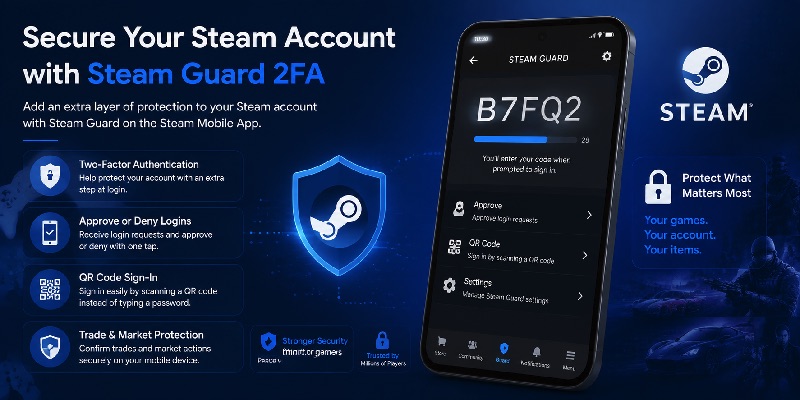
Gaming accounts can also benefit from stronger login protection, but Steam handles authentication differently from a typical generic TOTP application.
Users searching for steam authenticator google play should look at Steam Guard inside Valve’s official Steam mobile application.
How Steam Guard works
The current Steam Android listing says Steam Guard provides two-factor authentication for Steam accounts.
It includes options such as:
- Two-factor authentication
- QR-code sign-in
- Approve or deny sign-in requests
- Trade and Market confirmations
Because these functions are closely integrated with Steam, users should generally follow Steam’s own authentication flow instead of assuming that google authenticator google play is a direct replacement.
Generic authenticator vs platform authenticator
This illustrates an important distinction.
A general authenticator is designed to work with many websites that support common authentication-code standards.
A platform-specific authenticator can provide additional features connected to that platform.
Steam Guard, for example, is tied to Steam login, authorized devices, and account actions.
Salesforce Authenticator is closely tied to Salesforce.
Microsoft Authenticator integrates deeply with Microsoft identity.
By comparison, google authenticator google play is attractive when you want a relatively simple application for managing verification codes across compatible services.
Before adding an account, always use the authentication method officially recommended by that service.
9. Using Authenticator Apps Without Google Play Services
Android is used on many types of devices, and not every Android device includes the same Google components.
This becomes especially important when researching microsoft authenticator without google play services.
Microsoft Authenticator requirements
Microsoft’s current troubleshooting documentation states that, on Android, using Authenticator for a work or school account requires push notifications to be enabled and requires Google Play Services and Google Play Store to be installed and enabled.
Therefore, users should not assume that every feature will work identically on a device without Google’s services.
This is an important distinction between generating a local authentication code and receiving a cloud-delivered push approval.
If your organization requires Microsoft push authentication, check device compatibility before depending on the app.
What about Google Authenticator?
Google’s Play listing states that Authenticator can generate verification codes even without a network or cellular connection.
However, “offline” and “without Google Play Services” are not necessarily the same thing.
Offline means the installed application can generate its codes without an active network connection.
A device that does not support Google Play at all presents a different installation and compatibility situation.
For this reason, google authenticator google play should be downloaded and used according to Google’s supported distribution and device requirements.
Avoid downloading unknown APK files simply because they claim to provide the same functionality.
10. Common Google Authenticator Problems and Solutions
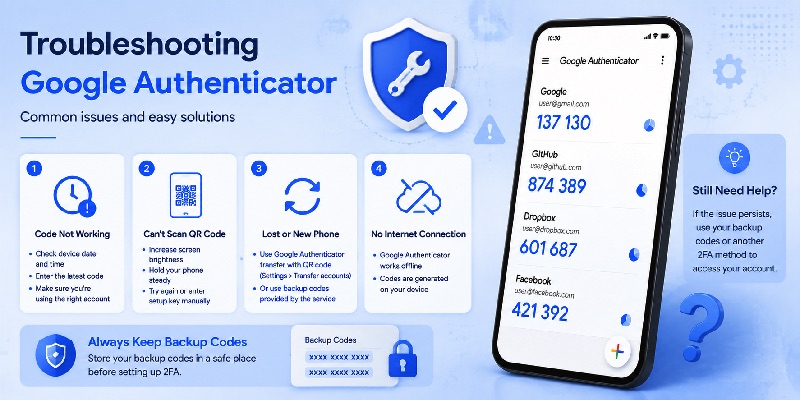
Even a relatively simple application can cause confusion during device changes or account setup.
Here are several issues users may encounter with google authenticator google play.
The verification code does not work
If a service rejects a code, first confirm that you selected the correct account inside the authenticator.
Users managing many accounts sometimes accidentally enter a valid code belonging to another login.
Also verify that:
- You are using the newest displayed code.
- Your phone’s date and time are correct.
- The account was configured with the correct QR code.
- The service’s 2FA setup has been completed.
Do not repeatedly disable security controls simply because one code fails.
Instead, use the recovery or alternative authentication methods offered by the account provider.
You bought a new phone
Moving to another device requires more planning.
Google provides a transfer process in which Authenticator accounts can be exported from an old device and imported to another by scanning a QR code.
Complete the transfer while you still have access to the old device whenever possible.
After installing google authenticator google play on the new phone, verify important accounts individually before removing access from the old phone.
You cannot find the right app
Searching for authenticator app google play store produces multiple choices.
Check:
- Exact application name
- Publisher/developer
- Description
- Official website information
- Whether your service specifically recommends that authenticator
For Google’s application, use the official google authenticator play store listing instead of choosing an unrelated app with similar branding.
11. Security Tips When Using an Authenticator App
Installing google authenticator google play improves your authentication setup only when the rest of your security practices are also sensible.
The authenticator should be one part of a broader account-protection strategy.
Protect the device itself
Because your phone may contain access to email, authentication codes, recovery information, and signed-in accounts, secure it with a screen lock.
Depending on your device, this may include:
- PIN
- Password
- Fingerprint
- Face authentication
Keep Android and important applications updated.
Avoid installing applications from suspicious sources or granting unnecessary permissions to unknown software.
Never share authentication codes
A verification code is meant to prove possession of your authentication device.
Do not send a current code to someone merely because they claim to represent technical support.
When using google authenticator google play, enter codes only into the legitimate website or application whose login you initiated.
Keep recovery options available
Before enabling 2FA on an important account:
- Review recovery methods.
- Save backup codes when offered.
- Add a backup authentication method if appropriate.
- Understand what happens if your phone is lost.
- Test your setup before signing out everywhere.
For accounts that support stronger phishing-resistant methods such as passkeys or hardware security keys, you may also want to evaluate those options alongside an Authenticator App.
The objective is not simply to install the greatest number of security applications. It is to create a login setup that is both secure and recoverable.
12. Is Google Authenticator Google Play the Right Choice?
For many Android users, google authenticator google play remains one of the simplest ways to begin using app-based two-factor authentication.
It is especially suitable when you want a focused application for generating verification codes across multiple compatible accounts.
Google’s official listing confirms important capabilities such as multiple-account management and verification-code generation without requiring an active network connection. Google also provides a QR-code-based process for transferring accounts to another device.
However, alternatives have advantages in particular ecosystems.
The microsoft authenticator app google play option is useful for people working heavily with Microsoft personal, business, or school identities. Microsoft supports MFA, push-based authentication, and passwordless sign-in scenarios.
Duo Mobile is particularly relevant when an organization uses Duo Security, while Salesforce Authenticator fits naturally into Salesforce authentication workflows.
Steam users should generally use Steam Guard through the official Steam mobile application for Steam-specific 2FA features.
The important point is that no authenticator should be selected only because its name appears first in search results.
When downloading google authenticator google play or another authentication application, confirm the official developer, understand how your accounts will be recovered, and follow the authentication method recommended by the service you are protecting.
If you mainly need straightforward time-based verification codes, google authenticator google play offers a clean and practical solution.
If your company relies on Microsoft, Duo, or Salesforce, their ecosystem-specific authenticators may provide a smoother workflow.
Whichever option you choose, combining a strong password with properly configured multi-factor authentication makes an account considerably harder to access using a stolen password alone.
For Android users beginning their 2FA setup, google authenticator google play is therefore a logical starting point—but the best authentication solution is ultimately the one that matches your accounts, devices, recovery plan, and security requirements.
Download Authenticator App
Secure your accounts with fast, reliable two-factor authentication. Download now and protect your login in seconds.
