
FIDO Google: Complete Guide to Secure Login and FIDO2
Published August 8, 2026 · Updated August 14, 2026
Passwords have protected online accounts for decades, but passwords alone have become increasingly difficult to rely on. They can be reused, stolen through phishing websites, exposed in data breaches, or accidentally shared. This is one reason technologies based on the FIDO standards have become an important part of modern account security.
The term FIDO Google is commonly used by people searching for information about Google’s implementation of FIDO, FIDO2, passkeys, and hardware security keys. It is important to understand that FIDO Google is not the official name of a separate Google application. Instead, the phrase generally refers to Google’s support for authentication technology based on standards developed by the FIDO Alliance.
Google Accounts can use passkeys and compatible hardware security keys as authentication methods. FIDO2 combines WebAuthn with the Client to Authenticator Protocol, commonly called CTAP. These technologies use public-key cryptography instead of asking users to repeatedly enter shared secrets such as passwords or one-time verification codes.
This guide explains how FIDO Google works, how it relates to passkeys and FIDO2, how it differs from Google Authenticator, and when each security method makes sense.
1. What Is FIDO Google?
Understanding the FIDO standard
FIDO stands for Fast Identity Online. The FIDO Alliance develops authentication standards designed to reduce dependence on passwords while improving security and usability.
Modern FIDO Google authentication is closely associated with FIDO2 and passkeys. FIDO2 combines two important components:
- WebAuthn, the web authentication standard used by browsers and websites.
- CTAP, which allows authenticators such as security keys or nearby devices to communicate with a platform.
Together, these technologies allow users to prove their identity using cryptographic credentials rather than transmitting a password or reusable authentication secret.
What FIDO means for Google users
For a Google Account, FIDO Google can appear in several forms. A user may authenticate with a passkey stored on a trusted device, use the device’s fingerprint or screen lock to authorize a passkey, or use a compatible FIDO2 hardware security key.
Google officially supports passkeys for Google Accounts. When a passkey is used, the user proves both possession of the device and the ability to unlock it. Depending on account settings, this can replace entering a password or serve as a strong verification method.
Therefore, users searching for FIDO Google are usually looking for one of three things: passwordless Google login, FIDO2 security-key authentication, or information about Google’s passkey system.
📖 Read More Guides: Google Authenticator 2FA: Complete Guide to Two-Step Verification
2. How FIDO Google Authentication Works
Public and private keys
The biggest difference between FIDO Google authentication and traditional passwords is the way credentials are handled.
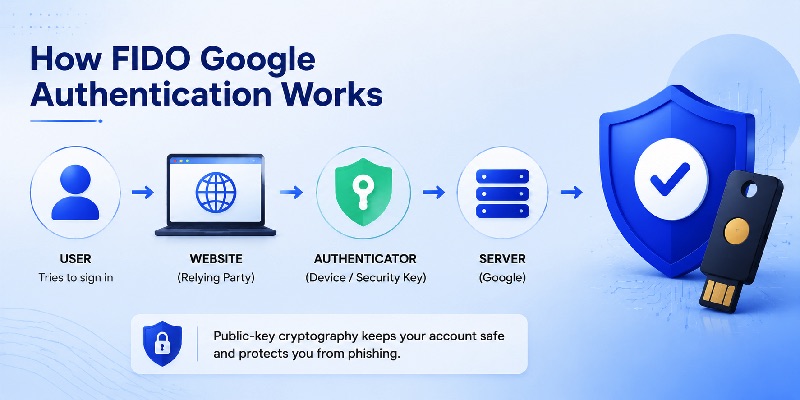
FIDO authentication relies on public-key cryptography. During registration, an authenticator creates a cryptographic credential associated with the website or service. The service receives information needed to verify future authentication, while sensitive private-key material remains protected by the user’s authenticator.
When the user signs in, the service sends an authentication challenge. The authenticator uses the protected credential to respond. The server then verifies that response.
The user may authorize this process using a fingerprint, face recognition, device PIN, pattern, or another local device-unlock mechanism. The biometric information itself does not need to be sent to Google simply to perform normal passkey authentication.
Passkeys are built on FIDO standards and are designed to provide a familiar device-unlock experience while replacing or supplementing passwords.
Why phishing becomes more difficult
A major benefit of FIDO Google is resistance to traditional credential phishing.
With a password, users can accidentally type their credentials into a fake website. Authentication codes can also potentially be entered into fraudulent login pages.
FIDO credentials work differently because credentials are associated with the legitimate website or relying party. A fraudulent domain cannot simply request the same credential as the legitimate service.
That characteristic makes FIDO-based authentication especially valuable for high-value Google Accounts, business accounts, creators, administrators, and anyone who regularly receives suspicious login messages.
Google itself describes passkeys and security keys as strong options for protecting accounts against phishing.
3. Why FIDO Google Is More Secure Than Password-Only Login
Passwords create reusable secrets
Traditional passwords are reusable secrets. If someone obtains the password, they may attempt to use it from another device or location.
Users also tend to reuse passwords across multiple websites, which increases the potential impact of a breach.
FIDO Google reduces this problem by introducing cryptographic authentication that does not require the same reusable secret to be transmitted during each login.
A passkey can also make authentication more convenient. Instead of remembering a complicated password, a user may approve login through the same mechanism used to unlock a trusted device.
Google currently allows eligible accounts to create passkeys and use them during sign-in.
Stronger protection against account takeover
The security advantage becomes particularly important when phishing is involved.
Imagine receiving an email containing a link to a convincing imitation of a Google login page. A traditional password can be typed into that page. A one-time code may also be copied into it if the victim believes the request is legitimate.
With FIDO Google, authentication is cryptographically connected to the legitimate service. This provides significantly stronger protection against common phishing techniques.
This does not mean that every other security method is useless. Google Authenticator, prompts, recovery information, and backup codes can all play important roles.
However, users seeking strong phishing resistance should understand why FIDO Google passkeys and security keys represent a different class of authentication from manually entered verification codes.
📖 Read More Guides:
Google Account Two Step Verification: Complete Setup Guide
4. How to Set Up FIDO Google on Your Google Account
Create a passkey
For many users, the simplest introduction to FIDO Google is a passkey.
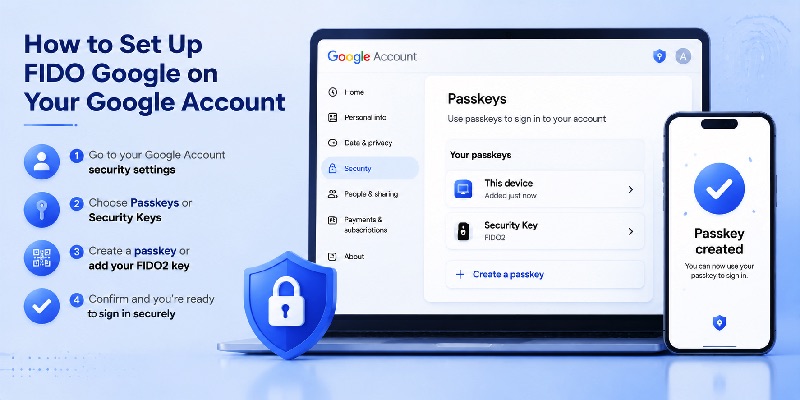
Google allows users to manage passkeys through their Google Account security settings. The exact interface can change over time, but the general process is straightforward:
- Sign in to your Google Account.
- Open the account security settings.
- Find the passkey or sign-in options.
- Choose the option to create a passkey.
- Confirm your identity.
- Follow the device instructions to save the credential.
A compatible phone, computer, operating system, browser, or credential manager can store or manage the passkey. Google notes that passkeys may use familiar device-unlock methods such as fingerprints, face recognition, or screen locks.
Once configured, FIDO Google authentication may appear when you sign in on supported devices.
Add a FIDO2 security key
Some users prefer a dedicated physical security key.
Google supports security keys as part of account protection and 2-Step Verification. A compatible FIDO2 hardware security key can also be used for passkey functionality in supported configurations.
Hardware keys can be particularly useful for users managing important accounts because the authentication credential is tied to a physical device.
When setting up FIDO Google with a hardware key, consider registering more than one secure authentication option. A backup method can be useful if the primary key is lost or unavailable.
Google’s Advanced Protection guidance also recommends maintaining appropriate recovery options and, where suitable, an additional passkey or security key.
5. Google FIDO Login vs Google FIDO2 Login
What does Google FIDO login mean?
The phrase google fido login usually describes signing in to a Google Account using authentication based on FIDO standards.
In practical terms, that may mean:
- Using a passkey on a phone.
- Using a passkey stored through a credential manager.
- Using a computer’s built-in authenticator.
- Using a compatible hardware security key.
Therefore, google fido login is better understood as a general search term rather than the name of one specific Google login page.
In the context of FIDO Google, the important concept is that authentication can rely on cryptographic credentials instead of depending entirely on a typed password.
What does Google FIDO2 login mean?
The phrase google fido2 login is more specific because FIDO2 refers to the modern set of standards built around WebAuthn and CTAP.
FIDO Alliance documentation describes WebAuthn and CTAP together as FIDO2.
A google fido2 login may therefore involve a FIDO2 security key or another authenticator capable of participating in WebAuthn authentication.
For everyday users, the terminology is less important than the experience. Both searches often lead to the same practical goal: signing in securely without relying solely on a password.
Modern FIDO Google passkey functionality brings that experience to regular users without requiring them to understand every protocol behind it.
Download Authenticator App
Secure your accounts with fast, reliable two-factor authentication. Download now and protect your login in seconds.
6. FIDO Google vs Google Authenticator
They are not the same technology
One of the most common misunderstandings surrounding FIDO Google is the assumption that Google Authenticator is part of FIDO authentication.
The two technologies solve similar account-security problems but operate differently.
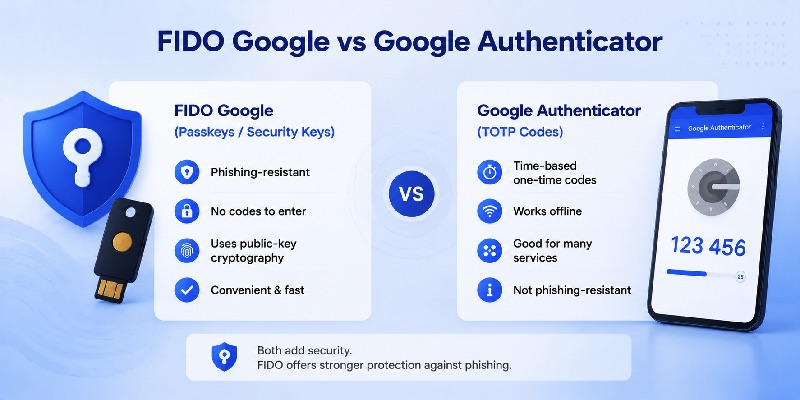
Google Authenticator generates one-time verification codes for websites and applications that support authenticator-based 2-Step Verification. Google states that these codes can be generated even without an internet or cellular connection.
FIDO Google, by contrast, uses cryptographic authentication through mechanisms such as passkeys and security keys.
In simplified terms:
- Password + Authenticator code = knowledge plus a temporary code.
- FIDO/passkey authentication = possession of a cryptographic credential plus device authorization.
Which option should you use?
There is no requirement to treat the technologies as mutually exclusive.
For websites that support only TOTP verification, an Authenticator App remains useful. Google Authenticator can generate codes for many compatible accounts, not just Google Accounts.
For services supporting passkeys or hardware security keys, FIDO Google provides stronger resistance to phishing because authentication is connected cryptographically to the correct service.
Users who manage especially sensitive accounts should also consider recovery planning. Google provides backup-code options for situations where normal 2-Step Verification methods are unavailable.
The strongest configuration depends on the services you use, the devices you own, and the recovery methods available to you.
7. Using Google Authenticator With Outlook, Roblox, and iPad
Google Authenticator with Microsoft and Outlook accounts
People searching google authenticator outlook are usually trying to add an Outlook or Microsoft account to a third-party authenticator.
Microsoft supports two-step verification and authentication applications. Its documentation explains that verification codes can be used as part of account authentication, while Microsoft Authenticator also supports broader sign-in features for Microsoft accounts.
If a Microsoft security setup screen provides a standard authenticator-app QR code or setup secret that is compatible with your chosen authenticator, follow Microsoft’s current instructions when enrolling it.
The important distinction is that google authenticator outlook relates to one-time-code authentication, not directly to FIDO Google.
Google Authenticator for Roblox and iPad
Roblox officially supports authenticator-based 2-Step Verification. Its support documentation lists Google Authenticator among apps that can be used for this purpose.
When users search google authenticator for roblox or google authenticator roblox, they are generally trying to scan the Roblox 2-Step Verification QR code and then enter the temporary code generated by the authenticator.
Roblox has also introduced stronger phishing-resistant options for certain enhanced-security configurations, including passkeys or hardware security keys.
For google authenticator ipad, Google’s own support documentation includes instructions for iPhone and iPad users and confirms that Google Authenticator can generate verification codes for supported services.
When downloading the app, verify that you are looking at the genuine application rather than relying only on a familiar-looking google authenticator icon
📖 Read More Guides: Google Authenticator 2FA: Complete Guide to Two-Step Verification
8. Is Online Google Authenticator Available?
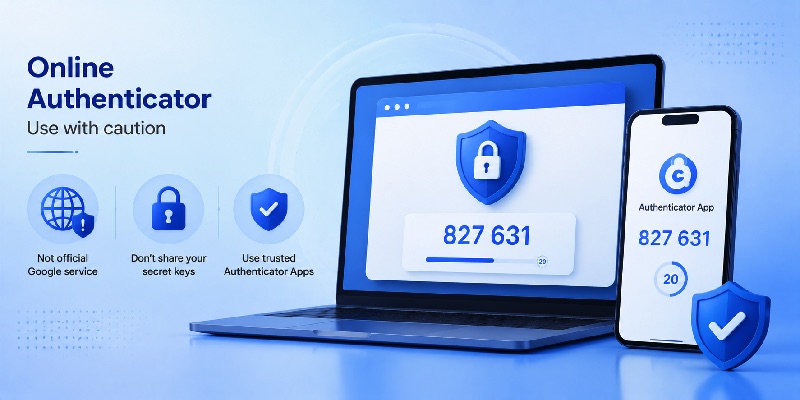
Be careful with web-based OTP generators
Searches for online google authenticator have become common because users often want to access authentication codes from a desktop browser.
However, this requires caution.
As of August 2026, Google’s official Authenticator documentation describes the Google Authenticator application for supported mobile environments, including Android and iPhone/iPad. Google does not document a standalone official browser-based Google Authenticator service comparable to the mobile app.
Therefore, a website presenting itself as a google authenticator app online should not automatically be assumed to be operated by Google.
Entering a TOTP secret key into an unknown website can undermine the security benefit of two-factor authentication because that secret is what generates future verification codes.
Better desktop alternatives
If your real goal is convenient computer authentication, FIDO Google may offer a better solution than searching for a browser-based OTP generator.
Supported desktop browsers and operating systems can participate in passkey authentication. Hardware security keys can also work with compatible computers.
This allows FIDO Google authentication without copying temporary six-digit codes between devices.
If a service requires TOTP specifically, use a trusted authenticator solution supported by that service rather than uploading authentication secrets to random websites.
The lack of an official online google authenticator should therefore not be viewed as a limitation of Google’s passkey ecosystem. The two approaches are designed for different authentication workflows.
9. FIDO Google and Google Authenticator on Linux
Using FIDO authentication on Linux
Linux users sometimes search for google authenticator linux when they actually need one of two different things: a desktop TOTP manager or FIDO authentication.
For FIDO Google, Linux can participate through compatible browsers, operating-system capabilities, passkey providers, and hardware authenticators.
FIDO2 supports external authenticators through CTAP, while WebAuthn provides the browser-facing authentication interface. FIDO documentation describes transports including USB, NFC, and Bluetooth depending on the authenticator and implementation.
That makes a physical security key particularly useful for users who regularly move between Linux, Windows, macOS, or other environments.
Is there an official Google Authenticator Linux app?
Users searching google authenticator on linux or google authenticator for linux should distinguish official Google software from third-party implementations.
Google’s consumer Authenticator documentation focuses on its mobile application rather than providing a standard official Google Authenticator desktop application for Linux.
Third-party software may support the same TOTP standard, but users should evaluate such software carefully before importing authentication secrets.
For Google Account authentication specifically, FIDO Google may be a cleaner desktop option because a FIDO2 security key or compatible passkey workflow avoids storing TOTP secrets inside an additional desktop application.
In other words, google authenticator linux and FIDO2 solve different problems. Determine whether the website requires a one-time code or supports a passkey/security key before choosing a solution.
📖 Read More Guides: Google Account Two Step Verification: Complete Setup Guide
10. FIDO Google for Gemini, YouTube, and Google Services
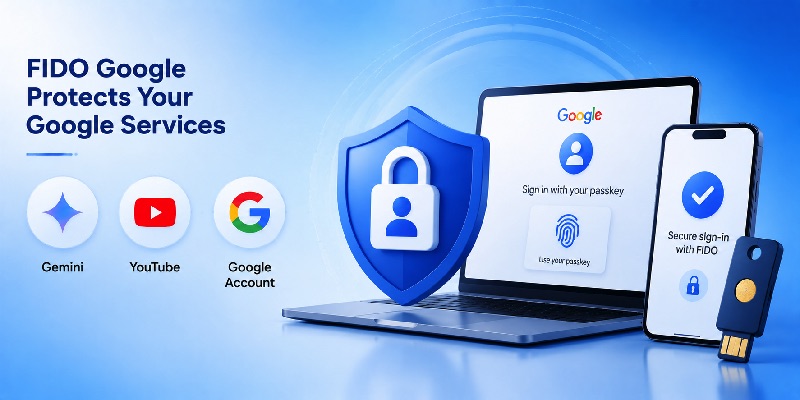
Gemini security comes from the Google Account
A search such as gemini google authenticator can give the impression that Gemini has a separate Google Authenticator system.
For most Gemini functionality requiring authentication, the important security layer is the Google Account used to access the service. Google’s Gemini documentation states that users need a Google Account for additional Gemini features and saved activity.
Therefore, protecting that Google Account with FIDO Google, a passkey, 2-Step Verification, and appropriate recovery options also helps protect access to Gemini associated with the account.
You normally do not need a separate “Gemini Authenticator” account simply because you use Gemini.
This is another reason FIDO Google should be understood at the Google Account level rather than as an individual security tool installed separately for every Google service.
Protecting YouTube with stronger authentication
The same concept applies to google authenticator youtube searches.
A YouTube channel is connected to a Google Account, so strengthening the Google Account strengthens the authentication protecting channel access.
YouTube’s current security guidance recommends 2-Step Verification and identifies passkeys as providing strong protection against phishing. It also lists security keys, Google prompts, Google Authenticator, phone verification codes, and backup codes as available types of verification with different security characteristics.
For creators, channel managers, or accounts with valuable content, FIDO Google passkeys or security keys can therefore be particularly important.
A traditional authenticator code remains useful, but passkeys provide stronger resistance against login pages designed to steal passwords and OTP codes.
11. Best Practices for Using FIDO Google Securely
Combine strong authentication with recovery planning
Setting up FIDO Google is only one part of account protection.
A strong account should also have a recovery strategy. Losing a phone, security key, or computer should not permanently lock the legitimate owner out of the account.
Google allows users to configure recovery information and provides backup-code functionality for certain 2-Step Verification situations.
Consider the following practices:
- Create passkeys only on devices you control.
- Protect every device with a secure screen lock.
- Remove passkeys from devices you no longer own.
- Consider keeping a backup hardware security key for important accounts.
- Maintain current recovery information.
- Store backup codes securely.
- Review Google Account security settings periodically.
The goal is not simply to enable FIDO Google, but to build an authentication system that remains both secure and recoverable.
Do not approve unexpected authentication attempts
Passkeys reduce phishing risk, but users should still pay attention to unexpected login activity.
Do not authorize a sign-in simply because a prompt appears on your device. Confirm that you actually initiated the login.
Likewise, never send authenticator codes, backup codes, passwords, or security-key information to someone who contacts you unexpectedly.
If you use an Authenticator App, remember that a verification code should be entered only into the legitimate service for which the code was generated.
For high-value accounts, FIDO Google provides its greatest benefit when combined with good device security, careful recovery planning, and awareness of suspicious login attempts.
12. Troubleshooting FIDO Google Login Problems
Passkey or security key is not appearing
If FIDO Google does not appear as an authentication option, first verify that the passkey or security key has actually been registered with the correct Google Account.
Also check whether:
- You are signing in to the correct Google Account.
- Your device has a screen lock configured.
- Your browser and operating system support the required authentication capability.
- The hardware security key supports the required FIDO2 features.
- The credential is stored in the credential manager you are currently using.
Google notes that creating a passkey on a hardware security key requires a key supporting the FIDO2 protocol.
For older security keys registered before Google’s expanded passkey support, Google’s documentation also notes that some users may need to remove and re-add the key before creating a passkey on it.
What happens if you lose your device?
Losing the device containing your FIDO Google passkey does not automatically mean that the Google Account is lost.
The available recovery process depends on your existing account configuration. You may have another passkey, another registered security key, a recovery method, or another verification step.
This is why recovery options should be configured before an emergency occurs.
For Google Authenticator users, backup codes can also help when normal verification methods are unavailable. Google specifically describes backup codes as an alternative when users cannot obtain their usual 2-Step Verification codes.
For critical accounts, avoid relying on a single device. The most resilient FIDO Google setup includes strong authentication plus at least one carefully protected recovery path.
Final Thoughts
FIDO Google represents an important change in how users protect their Google Accounts. Instead of depending entirely on passwords or manually entered verification codes, FIDO-based authentication uses cryptographic credentials designed to make phishing and credential theft substantially harder.
Passkeys have made this technology much easier for ordinary users. A fingerprint, face unlock, device PIN, or hardware security key can authorize authentication without forcing the user to remember another complex password.
At the same time, FIDO Google should not be confused with Google Authenticator.
Google Authenticator remains useful for services that rely on time-based verification codes. FIDO2, passkeys, and security keys use a different architecture and provide stronger protection against many phishing attacks.
Users interested in google fido login or google fido2 login should begin by checking the security settings of their Google Account and reviewing the available passkey and security-key options.
For services such as Outlook or Roblox, authenticator codes may still be relevant. For Google services such as Gemini and YouTube, protecting the underlying Google Account with FIDO Google can provide a stronger authentication foundation.
Ultimately, the best security configuration is not about choosing one tool for every situation. Use FIDO Google where passkeys or FIDO2 security keys are supported, use trusted authenticator-based verification where TOTP is required, maintain secure recovery options, and keep control of the devices that hold your credentials.
As passwordless authentication becomes more widely supported, FIDO Google provides a practical path toward faster sign-in, stronger phishing resistance, and a more secure Google Account.
Download Authenticator App
Secure your accounts with fast, reliable two-factor authentication. Download now and protect your login in seconds.
