
Microsoft Authenticator Work Offline: Complete Offline MFA Guide
If you are traveling, flying, working in an area with poor mobile reception, or simply have no Wi-Fi, knowing whether microsoft authenticator work offline can determine whether you can still access an important account.
The short answer is yes—but only for certain authentication methods.
Microsoft states that verification codes generated inside Authenticator do not require an internet or cellular-data connection. By contrast, sign-in notifications and approval responses do require connectivity.
That difference is critical.
When microsoft authenticator work offline through a rotating one-time code, your phone calculates the code locally. When you are asked to approve a notification or complete number matching, your phone needs internet access so the authentication request can reach the device and your response can return to Microsoft.
For users who travel frequently or work in restricted network environments, understanding when microsoft authenticator work offline makes MFA far more predictable.
This guide explains offline verification codes, push authentication, setup, account recovery, privacy, alternative devices, Google’s authenticator option, and what to do if Microsoft authentication services appear unavailable.
1. Can Microsoft Authenticator Work Offline? The Short Answer
Can Microsoft Authenticator work offline? Yes, if you are using a locally generated verification code.
Microsoft’s official Authenticator FAQ says verification codes do not require an internet connection, mobile data, or phone service. You can open the app and retrieve the current code even when your phone is completely offline.
This is the most important reason microsoft authenticator work offline is useful.
For example, imagine you are traveling abroad and have disabled mobile roaming. Your laptop is connected to airport Wi-Fi, but your phone has no data service.
If the website asks you to enter a six-digit authenticator code, you can open Authenticator on your offline phone, read the code, and enter it on the laptop.
In that situation, microsoft authenticator work offline successfully because the phone does not need to contact Microsoft to calculate the code.
Push approvals are different.
If the sign-in page tells you to approve a request in Authenticator or asks you to match a number displayed on the sign-in screen, the phone needs internet connectivity. Microsoft specifically states that sign-in notifications and responses require an internet connection.
The practical rule is simple:
- Verification code: offline-capable.
- Push approval: internet required.
- Number matching: internet required.
- New account registration: internet normally required.
- Cloud backup and recovery: internet required.
Therefore, microsoft authenticator work offline does not mean every feature continues working offline.
Download Authenticator App
Secure your accounts with fast, reliable two-factor authentication. Download now and protect your login in seconds.
2. How Does Microsoft Authenticator Work Offline?
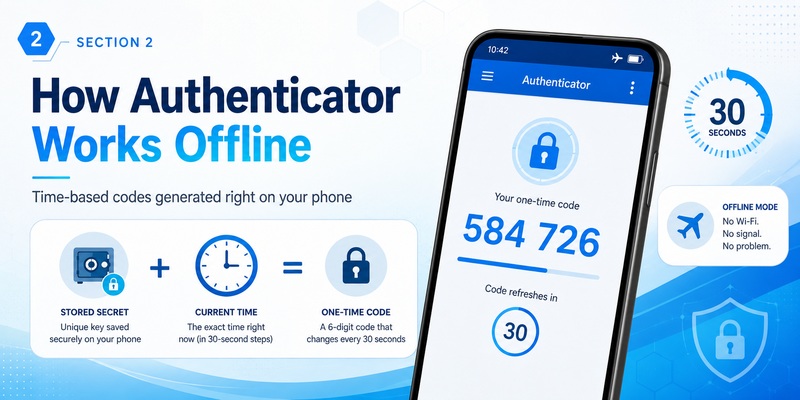
How does Authenticator work offline? It relies on time-based one-time password technology for supported accounts.
During account enrollment, the website and authenticator establish a shared secret. Once that secret is stored securely on the device, the authenticator does not need to ask the website for a new password every 30 seconds.
Instead, it combines the stored secret with the current time and performs a cryptographic calculation.
RFC 6238 defines TOTP as a time-based version of the HMAC-based One-Time Password algorithm. The current time acts as the changing factor used to calculate the short-lived password.
That explains technically why microsoft authenticator work offline.
Your phone already has two things it needs:
- The previously registered secret.
- The current device time.
The authentication server independently performs the corresponding calculation. When you enter the code, the server compares your value with the expected value for that time window.
Microsoft notes that supported verification codes change approximately every 30 seconds.
Consider a simple example.
You set up an account while connected to the internet. Later, you enable airplane mode. Authenticator continues displaying rotating codes.
Your computer remains online and asks for MFA. You type the current code displayed on the offline phone.
The server accepts it because both systems can independently calculate the expected value.
Therefore, microsoft authenticator work offline because code generation happens locally rather than being downloaded from Microsoft.
One important requirement is accurate time.
Because TOTP uses time as part of the calculation, a device clock that is significantly incorrect can cause otherwise legitimate codes to fail. RFC 6238 requires the authenticator and verification system to operate with compatible time steps.
💡 Discover Helpful Guides: Microsoft Authenticator Passwordless Sign-In: Complete Guide
3. Which Authenticator Features Work Without Internet?
Does the Authenticator app work without internet? Yes for code generation, but not for every feature.
The clearest distinction is between locally generated authentication and cloud communication.
When microsoft authenticator work offline, you can typically still view a rotating TOTP code for an already configured compatible account. Microsoft confirms that these verification codes do not need data connectivity.
However, several features require the network.
Push notifications must reach the phone from Microsoft’s authentication infrastructure. Number matching also involves an active sign-in request that the device receives and approves. Consequently, these workflows cannot be completed entirely offline.
Backup and restore also depend on cloud services.
Microsoft currently supports account backup and recovery, with different processes for iOS and Android. Microsoft notes that backup and restoration stay within the same device platform: an iOS backup is restored to iOS, while an Android backup is restored to Android.
So microsoft authenticator work offline for:
- Existing one-time verification codes
- Viewing already configured TOTP accounts
- Generating the next rotating TOTP value
Internet is needed for activities such as registration, push requests, cloud backup, cloud restoration, and account re-registration.
Unlike a remote TV app that usually has to communicate directly with another device over a network, an offline TOTP generator can calculate its answer locally.
If you know you will be disconnected, check that your account offers “Use a verification code” or another code-based option before leaving your network.
🧭 Explore Guides: Microsoft Authenticator Extension: Safe Browser Guide
4. How to Set Up Microsoft Authenticator for Offline Codes
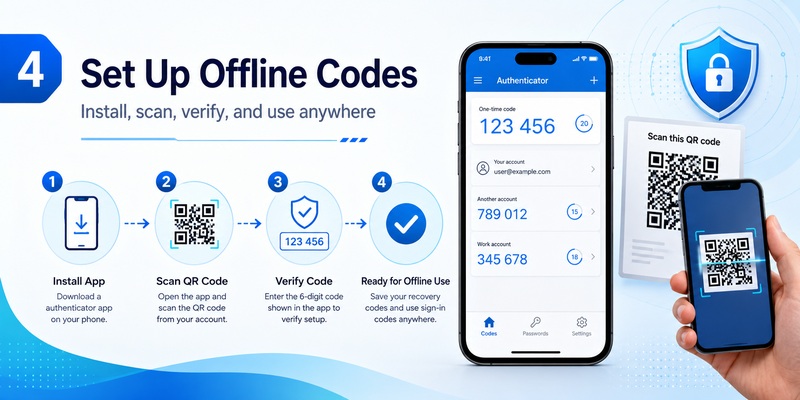
How to set up Microsoft Authenticator correctly matters if you want reliable offline authentication later.
For work or school accounts, Microsoft currently directs users to their Security info settings, where they can add Microsoft Authenticator as a sign-in method. The setup process displays a QR code that is scanned with the mobile device. Third-party accounts that support standard TOTP can generally be added through the “Other account” option.
Complete setup while you are online.
The recommended sequence is:
- Install the official Microsoft Authenticator app.
- Open the security settings for the account.
- Enable two-step verification or MFA.
- Choose an authenticator application.
- Display the QR code.
- Open Authenticator and add the appropriate account type.
- Scan the QR code.
- Complete the test requested by the service.
- Confirm that a rotating verification code appears if the account supports TOTP.
- Add a second recovery method or save backup codes when available.
Once the TOTP account has been registered, microsoft authenticator work offline for subsequent code generation.
The initial registration itself is different. Your account provider needs to register and verify the authentication method, so you should not expect the complete setup process to work with no connectivity.
You should also protect the enrollment secret.
Do not casually save screenshots of QR codes or upload them to public cloud folders. The QR code can contain the secret used to create future verification codes.
Before traveling, deliberately test whether microsoft authenticator work offline for the account. Enable airplane mode, open the account in Authenticator, and verify that its code continues to change.
💡 Discover Helpful Guides: Microsoft Authenticator Passwordless Sign-In: Complete Guide
5. How to Sign In When Your Phone Has No Internet
A Microsoft Authenticator login can still succeed when your phone is offline if the service allows code-based verification.
Start the login normally on an internet-connected computer.
Enter your username and password. When the verification screen appears, choose the option to use an authenticator code instead of a push notification.
Open Authenticator on the offline phone, select the account, and type the displayed code into the sign-in page.
Microsoft documents authenticator-code sign-in as a method where users manually enter the randomly generated code from their authentication application.
This is one of the clearest examples of how microsoft authenticator work offline.
The computer connects to the website, while the phone only generates the second factor.
For example, suppose your phone is in airplane mode during an international flight, but your laptop has aircraft Wi-Fi.
If your account supports a code, microsoft authenticator work offline and no mobile roaming is needed.
If you see only a push request, the situation is different. Connect the phone to Wi-Fi or choose another authentication method that you previously configured.
Microsoft allows users to choose alternative verification methods in supported account configurations, although availability can depend on organization policy.
For travelers, the best preparation is to test this before leaving home.
Switch your phone to airplane mode and attempt a code-based login from another connected device. If microsoft authenticator work offline during your test, you know that particular account has an offline-capable verification route.
💡 Discover Helpful Guides: Microsoft Authenticator: Complete Setup, Login, Backup & Troubleshooting Guide
6. Can You Use Microsoft Authenticator Without a Phone?
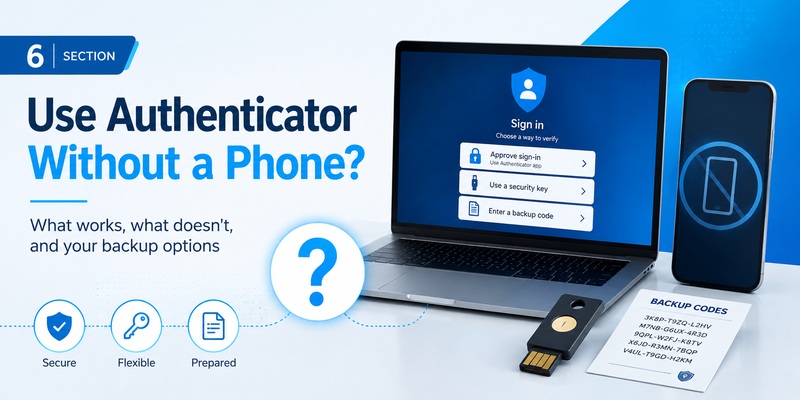
Is IT possible to use Microsoft Authenticator without a phone? It depends on what “without a phone” means.
If you mean installing Microsoft Authenticator directly on a Windows PC or Mac, Microsoft says the official Authenticator product is not available as a desktop application. Microsoft explains that separating the second authentication factor from the device on which you enter your password provides an additional security benefit.
If your goal is simply to make microsoft authenticator work offline without cellular service, you do not need an active SIM connection.
Microsoft states that verification codes do not require phone service. An already configured supported mobile device can continue generating codes locally.
If you want to eliminate mobile Authenticator entirely, investigate alternative methods supported by your account.
Microsoft account security options can include passkeys and other verification methods. Work and school accounts may also permit security keys or other authentication methods, depending on administrator policy.
For users who frequently operate in high-security or offline environments, a hardware security key can be a useful additional option.
Do not remove Authenticator before testing the replacement.
A safer migration is:
Register the alternative method, verify that it works, add a recovery option, and only then consider removing the old method.
The goal is not merely to make microsoft authenticator work offline, but to avoid creating a single point of failure for account recovery.
💡 Discover Helpful Guides: Microsoft Authenticator Passkeys: Setup, Login, Phone Transfer, and Troubleshooting Guide
7. Is Microsoft Authenticator Safe and Private?
Is Microsoft Authenticator safe for everyday MFA? It is an official Microsoft security product designed to provide multifactor authentication, one-time codes, and supported passwordless authentication.
Using an additional authentication factor provides stronger account protection than relying solely on a reusable password. However, no authenticator eliminates every threat.
One-time codes can still be captured by sophisticated real-time phishing sites, while users can accidentally approve fraudulent push requests. Microsoft’s use of number matching for push authentication is intended to make unexpected approval requests harder to accept blindly.
The fact that microsoft authenticator work offline does not make a TOTP code impossible to steal. It simply means the code is generated locally.
Protect the device itself with a strong PIN, fingerprint, Face ID, or another secure lock.
Does Microsoft Authenticator track browsing history? Microsoft’s Authenticator FAQ describes collection of minimal usage information necessary for reliability and security, optional additional usage data, and diagnostic logs that remain in the application until the user chooses to submit feedback. Diagnostic information can include details needed to investigate technical problems.
Microsoft documents browsing-history information separately in its Microsoft account and Edge privacy materials. Based on Microsoft’s published documentation, ordinary browser-history tracking is not described as part of Authenticator’s TOTP-generation function.
For privacy-conscious users, microsoft authenticator work offline also means the application does not have to contact Microsoft simply to calculate every rotating TOTP code.
8. Microsoft Authenticator vs Google Authenticator Offline
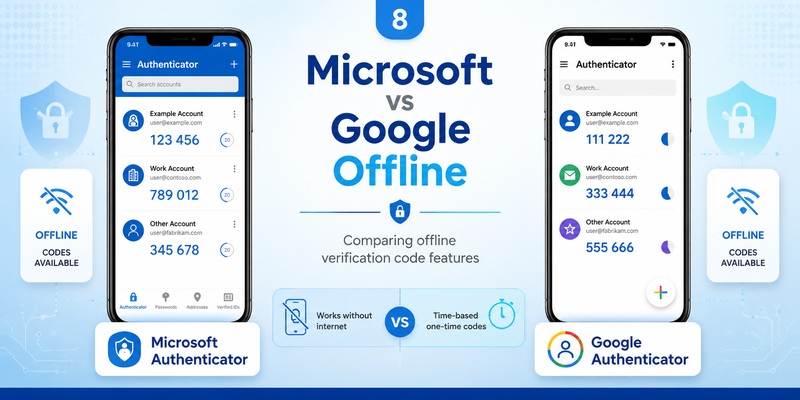
Both Microsoft and Google provide authenticator solutions capable of generating standard verification codes without network connectivity.
Google’s official documentation states that Google Authenticator can generate verification codes without an internet or mobile connection. Google also supports optional synchronization of codes through a Google Account.
For standard TOTP accounts, the reason microsoft authenticator work offline is fundamentally similar: the authenticator possesses the account secret and uses the current time to calculate a temporary password locally.
The applications differ more noticeably in their surrounding ecosystems.
Microsoft integrates Authenticator with Microsoft account and Microsoft Entra workflows, including push notifications and number matching. These connected workflows need internet access.
Google’s solution also supports optional cloud synchronization across devices, while basic local code generation can continue without a connection.
Is Google Authenticator free? The official Google Play listing provides an Install option from Google LLC and presents the app as the company’s authenticator for two-step verification without a separate subscription requirement for standard code generation.
Which option is better depends on the account.
If your company relies heavily on Microsoft Entra push approval, Microsoft’s solution normally provides the more integrated experience.
For ordinary TOTP accounts, both can support offline code generation.
The important point is that microsoft authenticator work offline does not require you to replace it simply because you expect to lose connectivity.
💡 Discover Helpful Guides: SMS vs Authenticator App: Which Is More Secure for Two-Factor Authentication?
9. What to Do If Microsoft Authenticator Is Down or Not Working
Is Microsoft Authenticator down when your notification does not arrive? Not necessarily.
First determine whether the problem affects local code generation or a network-dependent feature.
If the application still displays rotating codes, microsoft authenticator work offline is functioning locally even if push authentication is unavailable.
If a generated code is rejected, verify the phone’s date, time, and time zone. TOTP calculations depend on time, and a sufficiently inaccurate clock can create a code outside the server’s accepted window.
If push notifications are missing, check internet access first. Microsoft explicitly states that push sign-in notifications and responses require connectivity.
For work or school environments, administrators can view Health > Service health in the Microsoft 365 admin center to identify known service incidents and advisories. Microsoft’s public Azure status page covers widespread incidents, while Service Health can provide information more relevant to a particular organization.
Troubleshoot in this order:
- Confirm automatic date and time.
- Try the next rotating code.
- Verify Wi-Fi or mobile data for push authentication.
- Check notification permissions.
- Try another previously configured authentication method.
- Ask your administrator whether an MFA policy changed.
- Review Microsoft service health.
- Avoid deleting the Authenticator account unless you know how to register it again.
Understanding that microsoft authenticator work offline helps separate an application problem from an internet or Microsoft cloud-service problem.
🛠️ Learn with Step-by-Step Guides: Microsoft Authenticator App Not Showing Code: How to Fix It
10. Frequently Asked Questions and Offline Security Checklist
Does Microsoft Authenticator need Wi-Fi for verification codes?
No. Microsoft says verification codes can be generated without internet access or mobile data. That is the core situation in which microsoft authenticator work offline.
Does Microsoft Authenticator need internet for number matching?
Yes. Number matching is part of a push sign-in workflow, so the request and response require connectivity.
Can Microsoft Authenticator work in airplane mode?
For an already configured standard TOTP account, yes. You can still view the rotating code while the phone has no network connection.
Why does an offline code sometimes fail?
Check the phone clock. Because TOTP is time-based, incorrect device time can lead to a mismatch between your generated value and the server’s expected value.
Does backup work offline?
No. Backup and restoration depend on cloud services. Microsoft documents separate iOS and Android backup and recovery processes.
Do I need cellular service?
No for standard offline verification codes. Microsoft specifically states that phone service is not required for code generation.
Can I install Authenticator on Windows or macOS?
Microsoft says Authenticator is not available as an official desktop application for PC or Mac.
What should I prepare before traveling?
Before leaving reliable connectivity, verify that microsoft authenticator work offline for every important account you expect to use. Confirm that a rotating code is visible, leave automatic date and time enabled, store recovery codes securely, and configure an additional verification method where possible.
You should also test a complete offline scenario. Enable airplane mode on the authentication device, sign in from another connected device, and use the rotating code.
If that succeeds, you know microsoft authenticator work offline for that particular account configuration.
The final distinction is straightforward: microsoft authenticator work offline for locally generated TOTP verification codes, but push notifications, number matching, account registration, backup, and cloud restoration require connectivity.
Once you know which authentication method your account actually uses, microsoft authenticator work offline becomes a dependable option for travel, limited cellular coverage, network outages, and other situations where your authentication phone cannot reach the internet.
Download Authenticator App
Secure your accounts with fast, reliable two-factor authentication. Download now and protect your login in seconds.
